Last Updated on 4. October 2026 by SuffocationLink status: OK
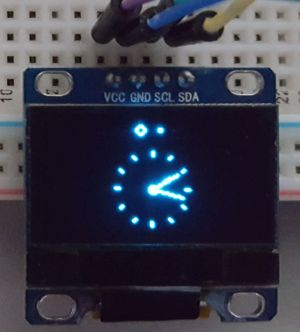
Ich möchte für ein kleines Projekt ein kleines 128×64 Pixel großes Oled Display anschließen. Hierfür habe ich mir einen kleinen Prototyp erarbeitet, den ich hier gerne vorstellen möchte.
Ich betreibe das Display an einem Arduino Uno über den Wire Bus.
Data sheet
Source: https://cdn-shop.adafruit.com/datasheets/SSD1306.pdfLink status: OK
Components
Hardware
- Arduino Uno or similar
- Oled Display SSD1306
- Prototyp Shield oder ein Steckbrett
- A few connecting cables
Software
- Arduino IDE (InstallationLink status: OK)
- Adafruit Adafruit_SSD1306 Unified Bibliothek
- Test programme from the library
Experimental setup
I'm using the prototype add-on board (See hereLink status: OK).
The display is powered by the Arduino. Additionally, data communication takes place via the Wire bus, which is located on ports A4 and A5 of the Arduino Uno.
Schematic

Library
Es gibt auch andere Bibliotheken für das SSD1306, aber die Adafruit war mit geringen Anpassungen die für mich am leichtesten zu verwendende. Bei anderen hatte ich zusätzlich das Problem, dass der Speicher des Arduino zu klein ist.
Entweder über GITHUB die neuste Version holen oder über den Bibliotheksmanager installieren.
https://github.com/adafruit/Adafruit_SSD1306Link status: OK
Wie es geht, steht hereLink status: OK.
Programming
Library preparation
Eine sehr lästige Eigenschaft der Adafruit Bibliothek ist, dass hier das define der Displaygröße für den Präprozessor in der Bibliothek geändert werden muss. Dieses steht standardmäßig auf 128×32 Pixel.
Also Bibliothek auf der Festplatte suchen, die Datei heißt:
Adafruit_SSD1306.h
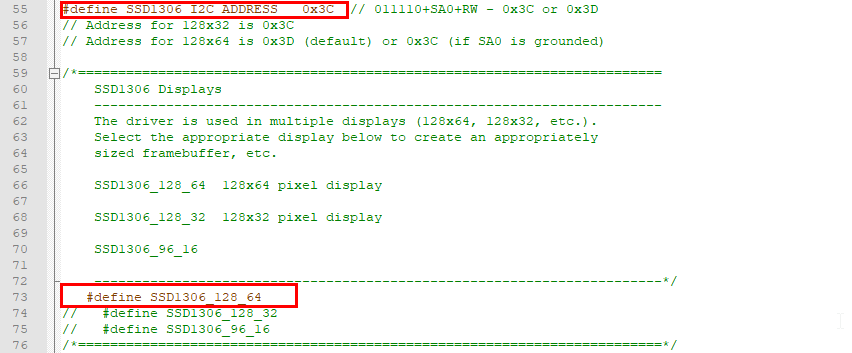
In der aktuellen Version wird die Zeile 74 auskommentiert und die Zeile 73 reingenommen.
Beispielprogramm
I am using an example program belonging to the library:
Pfad: Adafruit SDD 1306 -> sdd1306_128x64_i2c
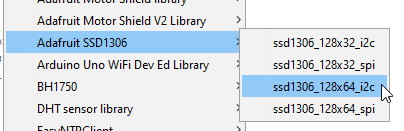
Wie ihr ein Testprogramm auswählt, findet ihr hereLink status: OK.
Upload the program to the Arduino, and it should all work then.
Verwandte Themen
Sources
https://github.com/adafruit/Adafruit_SSD1306Link status: OK
Logbook
| Date | Change | Author |
|---|---|---|
| 04.10.2026 | Rechtschreibung korrigiert: Tippfehler, Kommas, Groß-/Kleinschreibung | Suffocation |
| 03.10.2026 | Logbuch-Tabelle auf Log-Liste umgestellt | Suffocation |
| 18.07.2026 | Verzeichnisstruktur angepasst und Datenblatt hinzugefügt. | Suffocation |
| 02.11.2018 | Post created | Suffocation |