Last Updated on 10. October 2026 by SuffocationLink status: OK
Soll eine IDE Festplatte an einen alten XT Computer angeschlossen werden, oder wird eine größere Festplatte für den 386er benötigt, kann man „einfach“ ein Bios neu schreiben oder den Computer durch einen neueren ersetzen. Da beides meist keine Option ist, gibt es zum Glück das XT-IDE Projekt.
Schon kann der XT Computer mit neuen Festplatten zu versort werden oder und AT-Computer größere Festplattenkapazitäten erkennen. Die XT-IDE Software wird, wie der Name schon sagt, in ein ROM geschrieben, diese kann auf eine Netzwerkkarte, auf einer eigens dafür vorgesehenen Karte oder sogar einem neu gebauten IDE Controller aufgedrückt werden.
This post describes the use of the XT-IDE BIOS and refers to some card solutions in other posts.
Links to the project
Nur zur Klarstellung: Das Projekt ist nicht mein geistiges Eigentum, sondern wurde vom Entwickler mit hohem zeitlichen Aufwand realisiert und der Allgemeinheit zur Verfügung gestellt. Sollte das Projekt gefallen, zollt dem Entwickler doch mal euren Respekt mit einem Like oder vielleicht sogar mit einer (Kaffee-)Spende.
XT-IDE Universal BIOSLink status: OK
Views
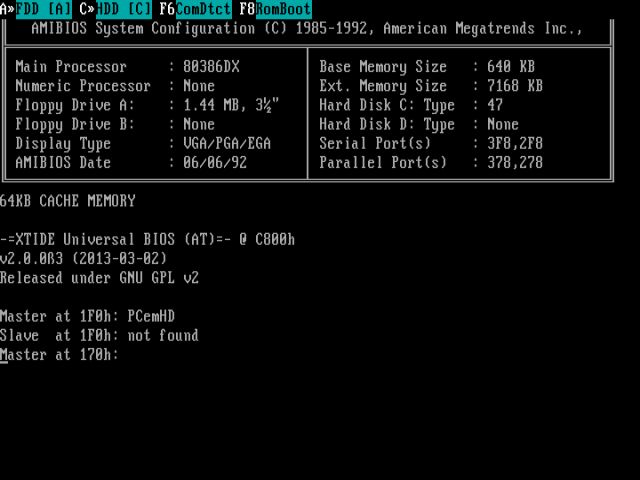
Facts
- Ersetzt nicht das eigentliche Bios, sondern ersetzt nur die IDE Controller Funktionalität.
- Can overwrite the actual BIOS code (disable HDD in BIOS).
- Es gibt vorgefertigte Bios-Versionen, die auf ein Rom gebrannt werden können oder per Makefileanpassung kann eine eigene Version erstellt werden
- Programmiert werden kann das Bios aufs EE-/UE-Proms wie 27C64, 27C256, 28C64, 28C512 …
- Das Bios benötigt eine Hardware wie eine Steckkarte, IDE Controller oder eine Netzwerkkarte mit ROM Sockel.
- Je nach ROM Type und Steckkartenkombination kann das EEROM auf der Karte programmiert werden oder muss extern programmiert und gelöscht werden.
Hardware Projects
Glitchwork rev 4
https://www.minuszerodegrees.net/xtide/variations/XT-IDE%20and%20XT-CF%20variations.htm#xt_cf_lite_v4.1Link status: OK
Monotech XT-CF-Mini
https://github.com/monotech/monotech_xt-cf-miniLink status: OK
XT- CF-Lite
https://github.com/skiselev/xt-cf-lite-v4Link status: OK
ISA ROMs
Zwei Versionen, eine programmierbar mit Umschalter für 8kB und 32kB EEPRoms, die andere nur für 27C256 UEPROMs geeignet.
https://www.vogons.org/viewtopic.php?t=82499Link status: OK
Reconstructed
Ich habe einige der Projekte nachgebaut, siehe unten bei den verwandten Projekten.
ROM on the network card
Es ist auch möglich, das XT-IDE Bios auf ein Rom zu flashen und auf den freien ROM-Steckplatz einer Netzwerkkarte zu stecken. Hierbei muss beachtet werden, dass das ROM per Jumper oder Konfigurationstool aktiviert, die richtige Größe angegeben wird und die Startspeicheradresse definiert wird. Auch arbeiten die Netzwerkkarten meist nur mit UV-löschbaren ROMs wie dem 27C64 zusammen. Diese können dann nur mit externem EPROM Programmer programmiert werden. Evtl. gibt es hierfür aber einen funktionierenden EEPROM-Ersatz von WINBOND, dann kann man sich das Beleuchten für das Löschen sparen.
Programming
Build XT-IDE BIOS
Die Quellen der XT-IDE sind schnell selbst gebaut, man benötigt nur ein paar Programme und schon wird der eigene Rechner zum Bios-Assemblierer. Beschrieben ist das Ganze unter folgendem Link:
https://xtideuniversalbios.org/wiki/BuildInstructionsLink status: OK
Im Grunde müssen die folgenden Tools installiert werden. Danach überprüfen, ob sie auch in den Umgebungsvariablen stehen und einmal neustarten.
- TortoiseSVNLink status: OK (or any SVN client)
- MinGWLink status: Unknown (only mingw32-make.exe is needed)
- NASMLink status: Unknown
- UPXLink status: Unknown (optional)
- Strawberry PerlLink status: Unknown (optional)
Per SVN die Sourcen holen. Dazu Rechtsklick mit der Mouse in ein gewähltes Zielverzeichnis und SVN Checkout wählen.
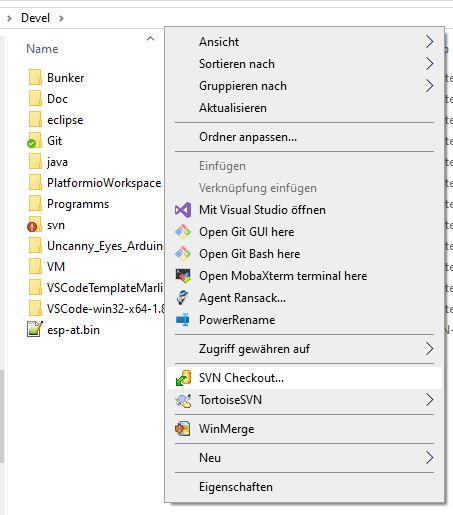
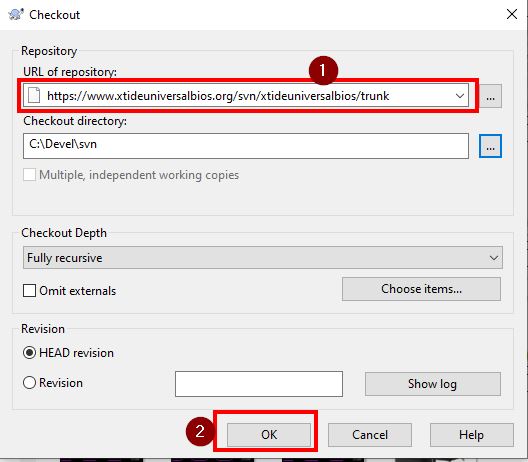
Enter the following URL and check out:
https://www.xtideuniversalbios.org/svn/xtideuniversalbios/trunkLink status: Unknown
Open the command line and navigate to the directory. Then, run the mingw32-make command and everything should build.
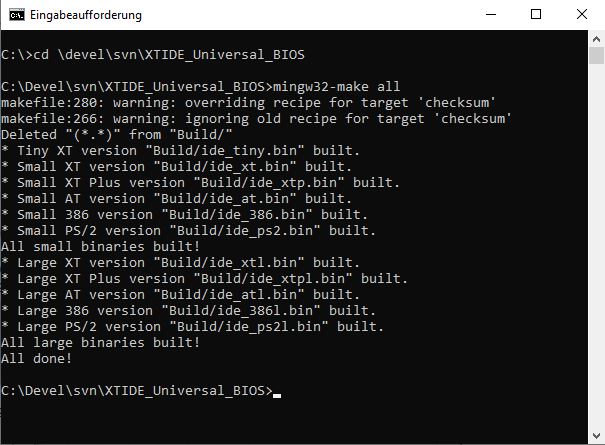
Die Binärdateien für das Biosrom sind dann im Verzeichnis build zu finden.
Build custom XT-IDE BIOS
Hierfür müssen die beiden folgenden Variablen in der Make Datei (makefile im XTIDE BIOS Ordner) gesetzt werden.
DEFINES_CUSTOM =
BIOS_SIZE_CUSTOM = ?
Zusätzlich habe ich noch die Konstante DEFINES_COMMON_CUSTOM eingefügt, da ich das Powermanagement entfernt habe. Meine Variante der Konfiguration sieht wie folgt aus:
DEFINES_COMMON_CUSTOM= MODULE_STRINGS_COMPRESSED MODULE_HOTKEYS MODULE_8BIT_IDE MODULE_EBIOS MODULE_SERIAL MODULE_SERIAL_FLOPPY NO_ATAID_VALIDATION CLD_NEEDED EXTRA_LOOP_UNROLLING_SMALL MODULE_BOOT_MENU MODULE_8BIT_IDE_ADVANCED MODULE_COMPATIBLE_TABLES EXTRA_LOOP_UNROLLING_LARGE

DEFINES_CUSTOM = $(DEFINES_COMMON_CUSTOM) USE_386 MODULE_ADVANCED_ATA MODULE_W


#27C256
BIOS_SIZE_CUSTOM = 32768
The BIOS can then be built with the following command:
mingw32-make customDie Binärdateien für das Biosrom sind dann im Verzeichnis build zu finden.
Configuration tool build
Das Konfigurationstool xtidecfg.com wurde bereits mit dem letzten SVN Checkout geholt. Es befindet sich im Verzeichnis XTIDE_Universal_BIOS_Configurator_v2. In das Verzeichnis wechseln und make ausführen.
mingw32-make xtThe file xtidecfg.com can be found in the build directory. There are further options for building the tool:
| Everything | clear, release | Bolt release |
| at | – | AT Version |
| xtplus | – | Extended instruction set for 80188/80186/V20/V30 |
| next | – | XT version instruction set on 8088/8087/V30 |
| Clean | – | Tidy everything up for a new build |
| Release | next | UPX Compression |
| xt_unused | next | Optimiert nicht benutzten Code weg |
Installation
Bevor das Bootrom gebrannt wird, sollte das Rom über das Tool konfiguriert werden. Hierfür benötigt man einen Rechner, am besten den, der das Rom später verwenden soll. Dort wird dann das Programm xtidecfg.com aufgerufen.
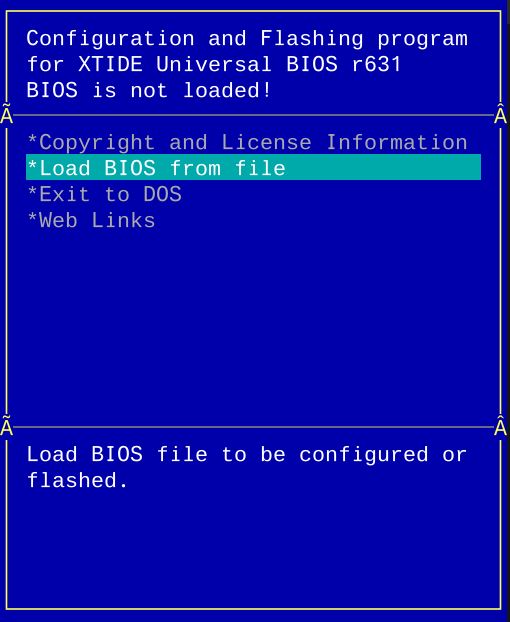
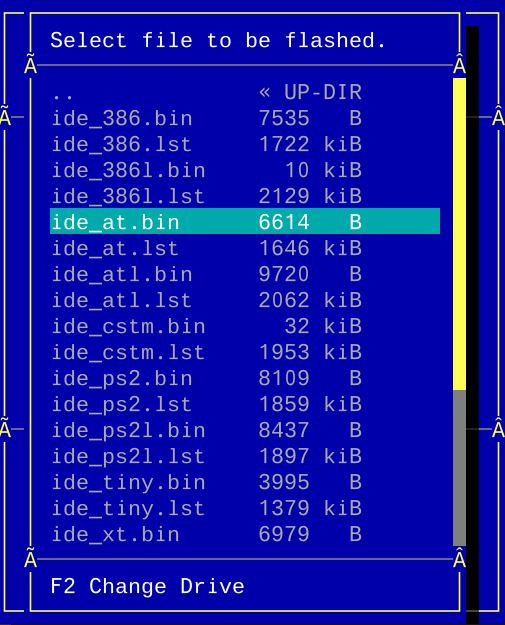
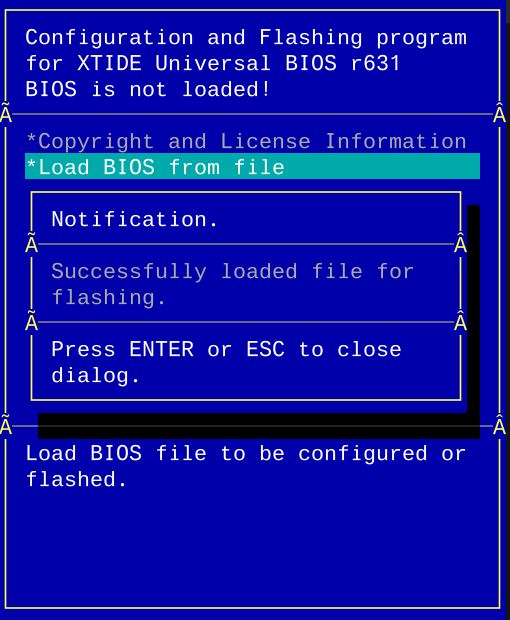
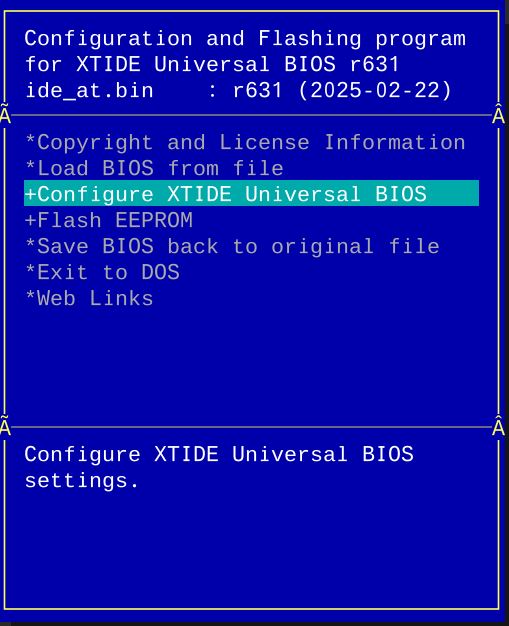
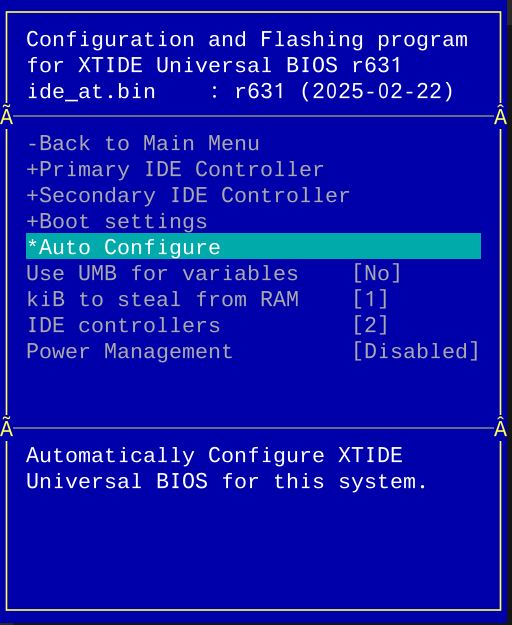
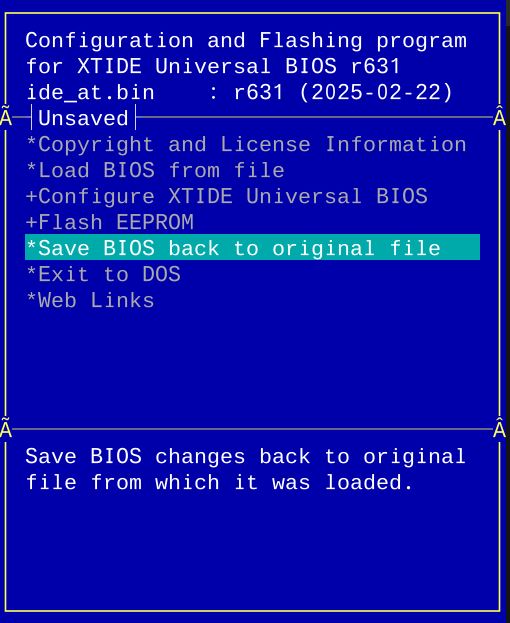
(*) Autoconfig funktioniert nur auf dem Originalrechner, auf dem man das XTIDE Rom verwenden möchte, ansonsten müssen die Einstellungen, wie zum Beispiel die Adresse des IDE Controllers, manuell vorgenommen werden.
Danach die Datei nehmen und auf das ROM brennen. Sollte ein EEPROM verwendet worden sein und es wird von der Software unterstützt, kann es auch direkt über die eingesteckte Karte programmiert werden.
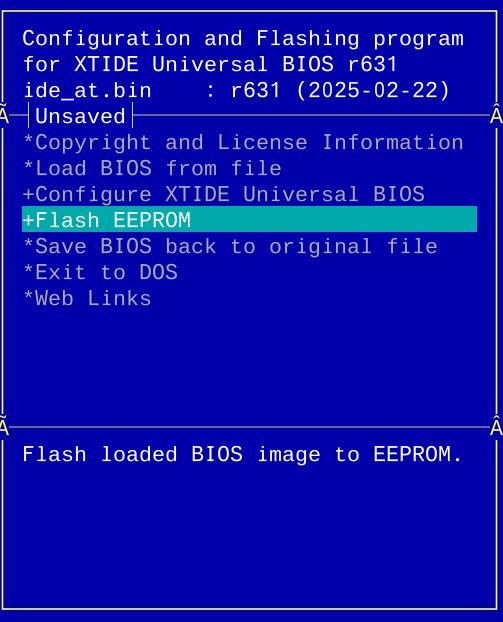
Beim nächsten Booten mit eingestecktem ROM sollte XTIDE nach der boardeigenen Biosinitialisierung angezeigt werden.
Problems
XTIDE is not found on boot
- Meist ist dies auf einen Adress-Konflikt entweder mit dem ROM oder es wurde nicht die richtige HDD Controller-Adresse angegeben. Auch wenn der Controller nicht gefunden wird, wird XTIDE einfach nicht angezeigt. Alle Adressen nochmal überprüfen, auch die Jumper auf den ROM- und dem Controllerboard prüfen. Als guter Wert für die ROM Adresse hat sich C800 und D800 bewährt.
- Falsches ROM verwendet, manche EROMs und EEPROMS sind nicht kompatibel. Auch können Karten immer nur die angegebenen EPROM Typen unterstützen. Ich hatte beispielsweise ein 27C256 mit einem 28C256 ersetzt, was aber nicht funktioniert, weil das Pinout an zwei Stellen abweicht. Hier muss ein 27C257 verwendet werden ;).
- When it comes to the ROM on the network card, ensure that it is active, that the size and address are set correctly.
Controller not found
Sollte wider Erwarten die XTIDE angezeigt werden, aber es gibt den Fehler Controller nicht gefunden, so stimmt die Adresse/Typ des IDE Controllers nicht, diese nochmal im Tool überprüfen und das ROM neu flashen.
Checksum Error
XTIDECONF wurde nicht ausgeführt, dieses berechnet die Checksumme und setzt sie. Tool ausführen und ROM neu flashen.
Rom lässt sich nicht über XTIDECFG flashen
Falsche Rom Version, zum Beispiel lässt sich das AT28C64-B flashen, aber das AT28C64 nicht. Versucht man das AT28C64 zu flashen, funktioniert die Version auf diesem danach nicht mehr und der EPROM Programmierer muss angeworfen werden.
Miscellaneous
—
Conclusion
Ein tolles Projekt. Ich hatte anfänglich ein paar Probleme, dass die XT-IDE nicht gefunden wurde oder das BIOS nicht richtig konfiguriert war. Wenn man aber weiß, wie es geht und die Fallstricke gefunden und gelöst hat, geht es ganz einfach. Leider habe ich diese Kleinigkeiten nur in wenigen Youtube Videos gefunden, bzw. erst nachträglich die Details gesehen, die nötig gewesen wären. Aber was soll das Jammern, es ist geglückt und wenn man die richtigen (E/EE/UE) PROMS nimmt, klappt das alles auch. Achtet bei den Projekten darauf, welcher ROM-Typ benötigt wird. Dies ist wichtig, damit alles funktioniert.
Licence
Stand 10.10.2026, laut Projektseite bzw. Repository.
- Hardware: je Karte: Glitch Works XT-IDE GPLv3, Monotech XT-CF-Mini GPLv3, XT-CF-Lite v4 Lizenz nicht angegeben
- Software/Firmware: XTIDE Universal BIOS: GPLv2
- Marken: Genannte Marken- und Produktnamen gehören ihren jeweiligen Inhabern.
Related Posts
- Retro Projekt – ISA-Boot EEPROM KarteLink status: Unknown
- Retro Projekt – XT-CF-Lite Version 4.1Link status: Unknown
Sources
https://github.com/glitchwrks/xt_ideLink status: OK
https://users.glitchwrks.com/~glitch/2017/11/23/xt-ide-rev4Link status: Unknown
https://www.minuszerodegrees.net/xtide/XT-IDE%20-%20Basics.htmLink status: Unknown
https://www.minuszerodegrees.net/xtide/rev_4/XT-IDE%20Rev%204%20-%20general.htmLink status: Unknown
https://www.retrospace.net/infoseiten/readm.php?id=66Link status: Unknown
https://users.glitchwrks.com/~glitch/2017/11/23/xt-ide-rev4Link status: Unknown
https://www.lo-tech.co.uk/wiki/XTIDE_Universal_BIOSLink status: Unknown
PCemLink status: Unknown
Log
| Date | Change | Author |
|---|---|---|
| 10.10.2026 | Abschnitt Lizenz ergänzt (Hardware/Software) Block Klarstellung unter Link zum Projekt eingefügt | Suffocation |
| 08.10.2026 | Überschriften-Hierarchie korrigiert (H1→H2, Unterebenen eine Stufe tiefer) | Suffocation |
| 04.10.2026 | Rechtschreibung korrigiert: Tippfehler, Kommas, Groß-/Kleinschreibung | Suffocation |
| 03.10.2026 | Logbuch-Tabelle auf Log-Liste umgestellt | Suffocation |
| 30.03.2025 | The XT is being simulated in PCem and screenshots have been made. Possibly include screenshots of actual hardware as well. | Suffocation |
| 23.02.2025 | Introduction written | Suffocation |
| 22.02.2025 | Information added about the BIOS build | Suffocation |
| 23.07.2024 | Components soldered | Suffocation |
| 15.07.2024 | Plates ordered with XT ROM from DocWilde Retronics Post created | Suffocation |