Last Updated on 10. October 2026 by SuffocationLink status: OK
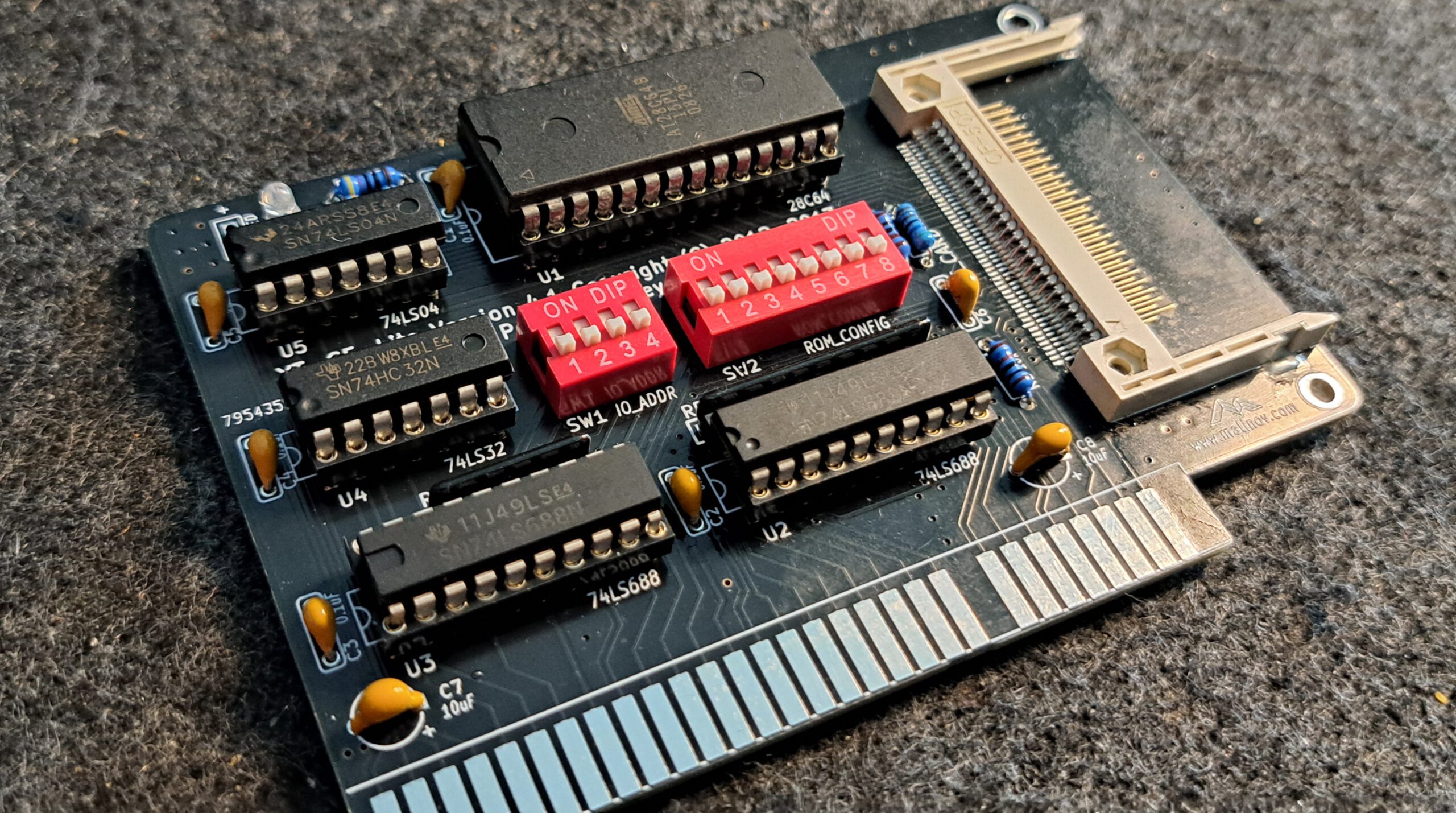
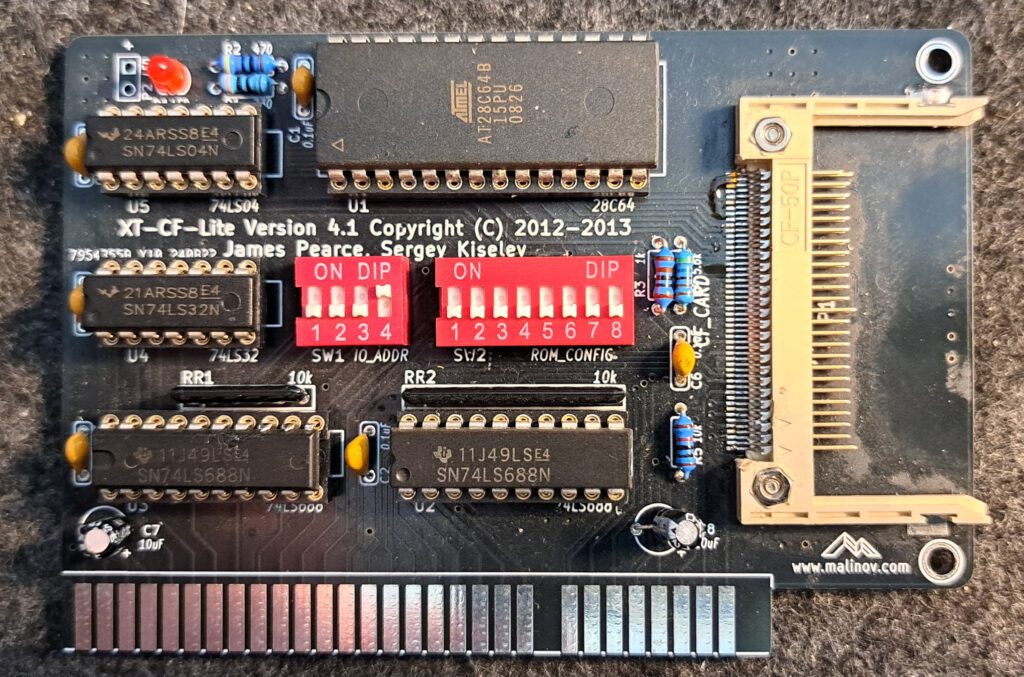
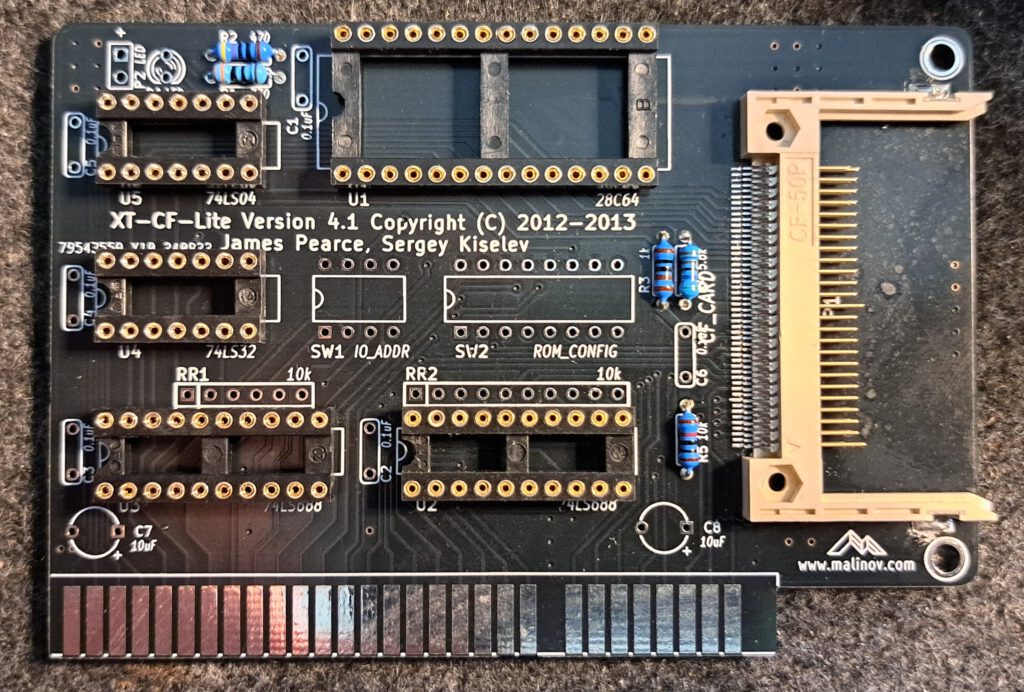
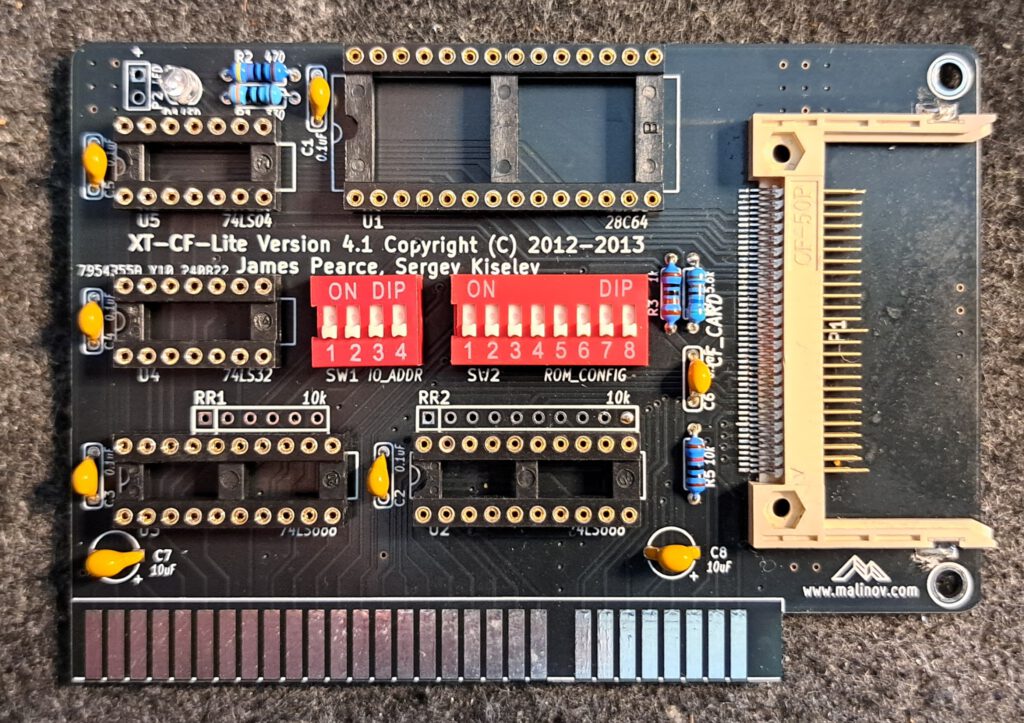
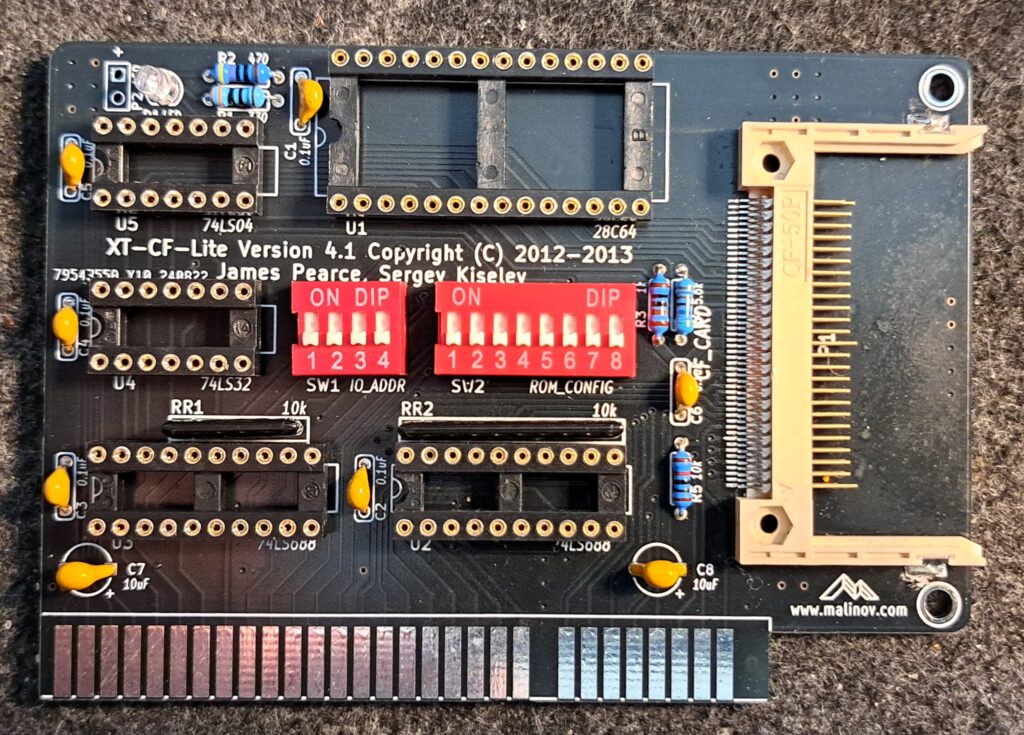
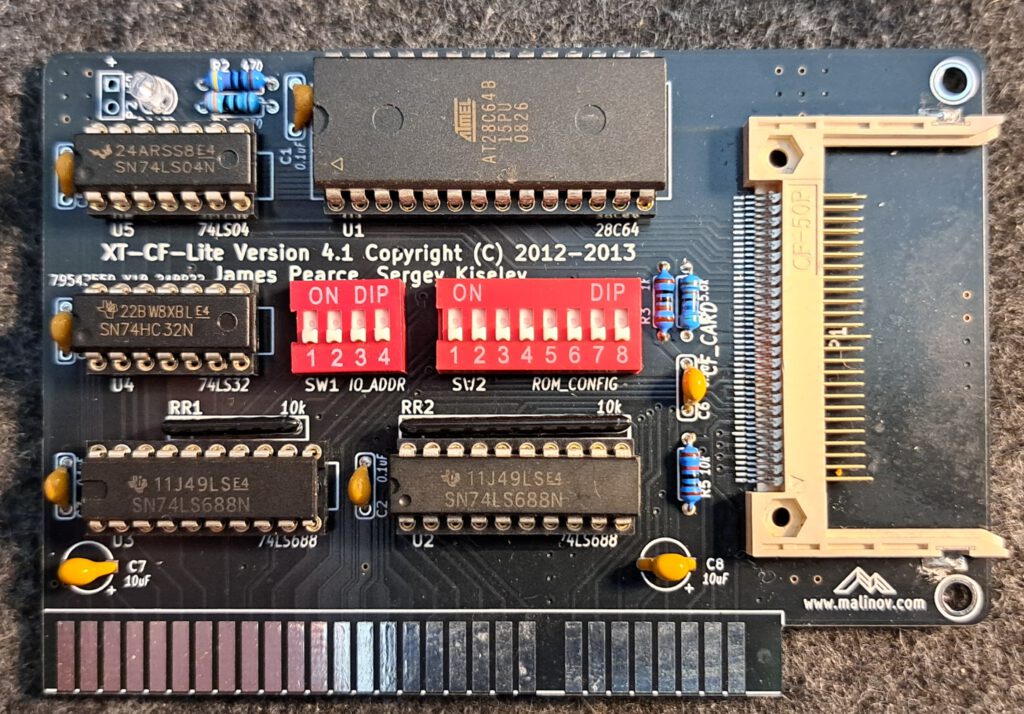
Ein weiterer XT-IDE-Controller mit CompactFlash-Slot, welcher mit dem richtigen Slotblech von der Computerrückseite zugänglich ist. Die Platine ist mit Durchloch-Bauteilen aufgebaut, nur der CompactFlash-Slot bildet eine Ausnahme. Somit sollte die Platine leicht zu löten sein.
Link to the project
Nur zur Klarstellung: Das Projekt ist nicht mein geistiges Eigentum, sondern wurde vom Entwickler mit hohem zeitlichen Aufwand realisiert und der Allgemeinheit zur Verfügung gestellt. Sollte das Projekt gefallen, zollt dem Entwickler doch mal euren Respekt mit einem Like oder vielleicht sogar mit einer (Kaffee-)Spende.
Link to the projectLink status: OK
Views
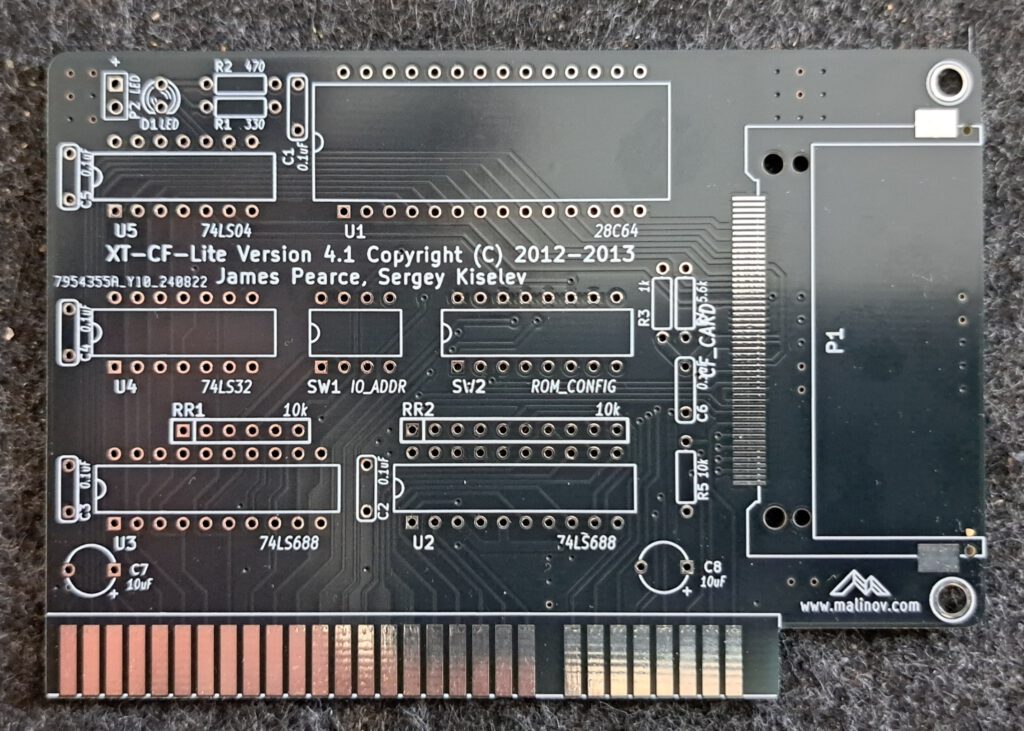
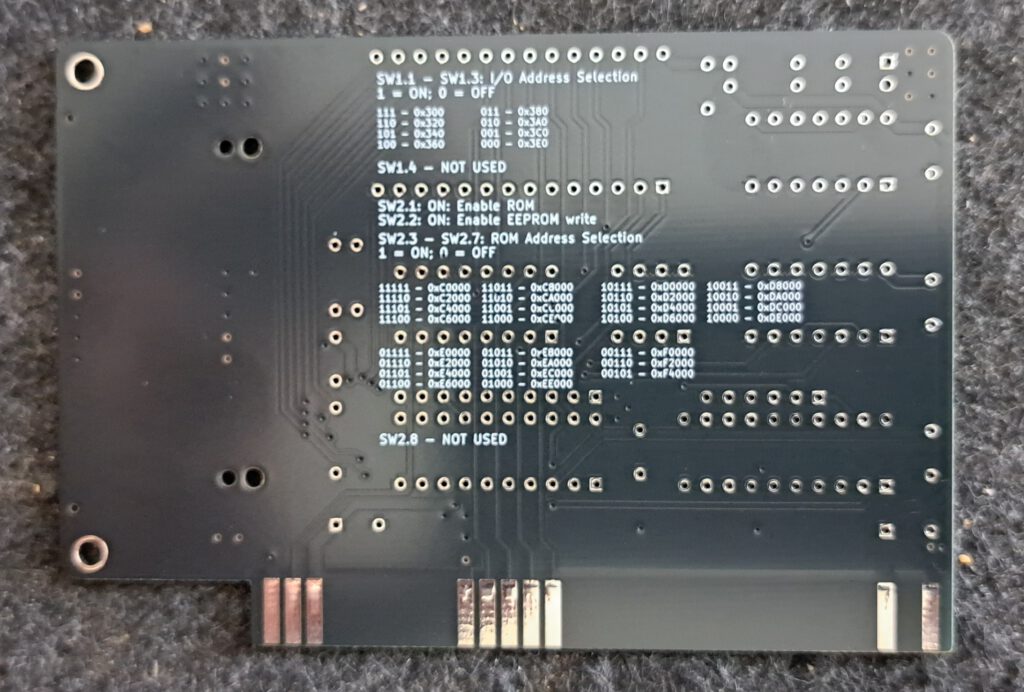
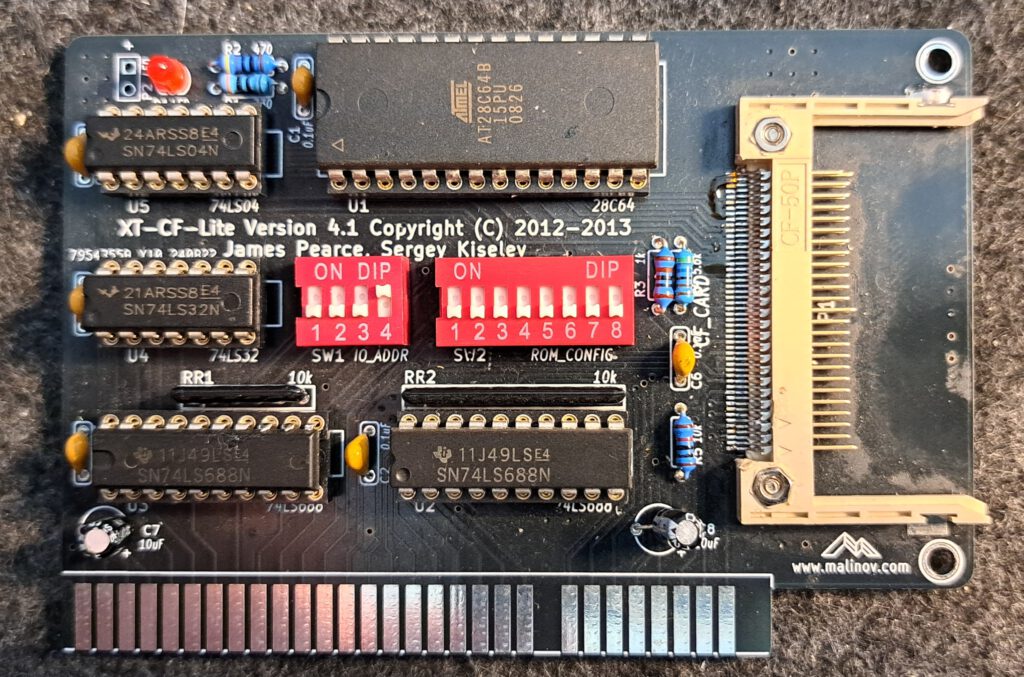
Facts
- Anschluss einer Compact-Flash-Karte
- Logik zur Ansteuerung der Compact-Flash-Karte wie auch des ROMs
- Benötigt 28C64, am besten 28C64B, dann ist es auch über die XT-IDE Software programmierbar.
- Dipschalter zum Einstellen der ROM/IDE-Adresse sowie Einstellungen für das ROM.
Circuit diagrams
Documentation
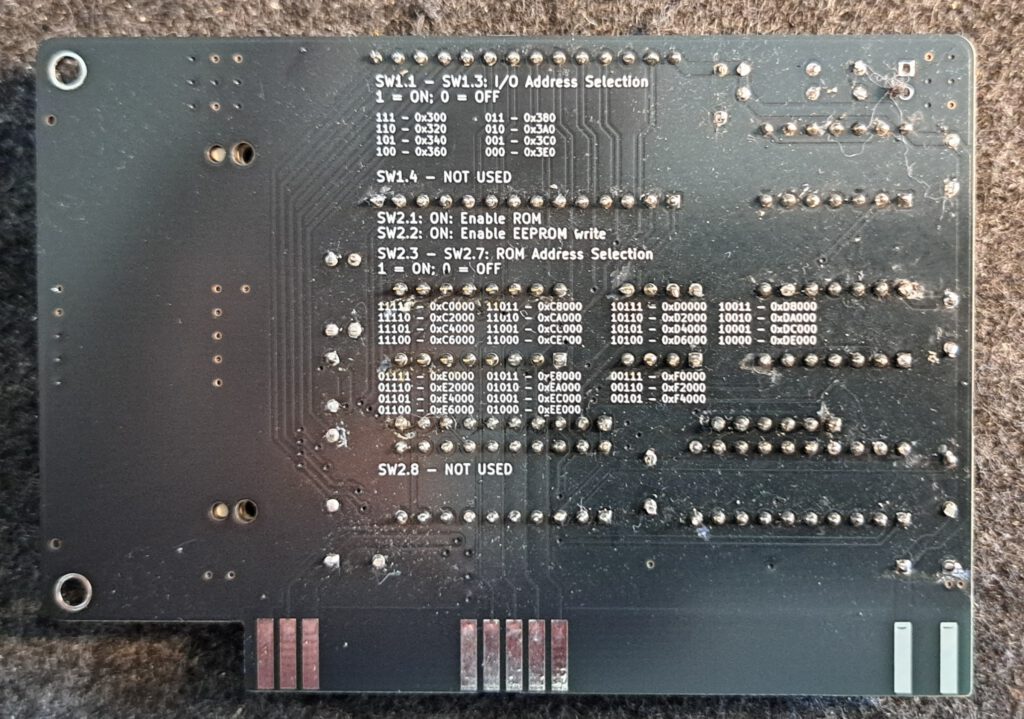
SW1 – I/O Adressauswahl
SW1.4 wird nicht benutzt
| SW1.1 | SW1.2 | SW1.3 | I/O Address |
|---|---|---|---|
| ON | ON | ON | 0x300 |
| ON | ON | OFF | 0x320 |
| ON | OFF | OFF | 0x360 |
| OFF | ON | ON | 0x380 |
| OFF | ON | OFF | 0x3A0 |
| OFF | OFF | ON | 0x3C0 |
| OFF | OFF | OFF | 0x3E0 |
SW2.1 – EEPROM aktivieren
| SW2 | EEPROM Enable |
|---|---|
| 1 | EEPROM ON = Eprom aktiv / OFF = Eprom nicht aktiv |
| 2 | EEPROM Schreibschutz ON=Schreiben erlaubt / OFF = Schreiben nicht erlaubt |
SW2.3 – SW2.7 – EEPROM-Adressauswahl
| SW2.3 | SW2.4 | SW2.5 | SW2.6 | SW2.7 | EEPROM Adresse |
|---|---|---|---|---|---|
| ON | ON | ON | ON | ON | 0xC0000 |
| ON | ON | ON | ON | OFF | 0xC2000 |
| ON | ON | ON | OFF | ON | 0xC4000 |
| ON | ON | ON | OFF | OFF | 0xC6000 |
| ON | ON | OFF | ON | ON | 0xC8000 |
| ON | ON | OFF | ON | OFF | 0xCA000 |
| ON | ON | OFF | OFF | ON | 0xCC000 |
| ON | ON | OFF | OFF | OFF | 0xCE000 |
| ON | OFF | ON | ON | ON | 0xD0000 |
| ON | OFF | ON | ON | OFF | 0xD2000 |
| ON | OFF | ON | OFF | ON | 0xD4000 |
| ON | OFF | ON | OFF | OFF | 0xD6000 |
| ON | OFF | OFF | ON | ON | 0xD8000 |
| ON | OFF | OFF | ON | OFF | 0xDA000 |
| ON | OFF | OFF | OFF | ON | 0xDC000 |
| ON | OFF | OFF | OFF | OFF | 0xDE000 |
| OFF | ON | ON | ON | ON | 0xE0000 |
| OFF | ON | ON | ON | OFF | 0xE2000 |
| OFF | ON | ON | OFF | ON | 0xE4000 |
| OFF | ON | ON | OFF | OFF | 0xE6000 |
| OFF | ON | OFF | ON | ON | 0xE8000 |
| OFF | ON | OFF | ON | OFF | 0xEA000 |
| OFF | ON | OFF | OFF | ON | 0xEC000 |
| OFF | ON | OFF | OFF | OFF | 0xEE000 |
| OFF | OFF | ON | ON | ON | 0xF0000 |
| OFF | OFF | ON | ON | OFF | 0xF2000 |
| OFF | OFF | ON | OFF | ON | 0xF4000 |
Assembly
Record
| Description | Worth |
|---|---|
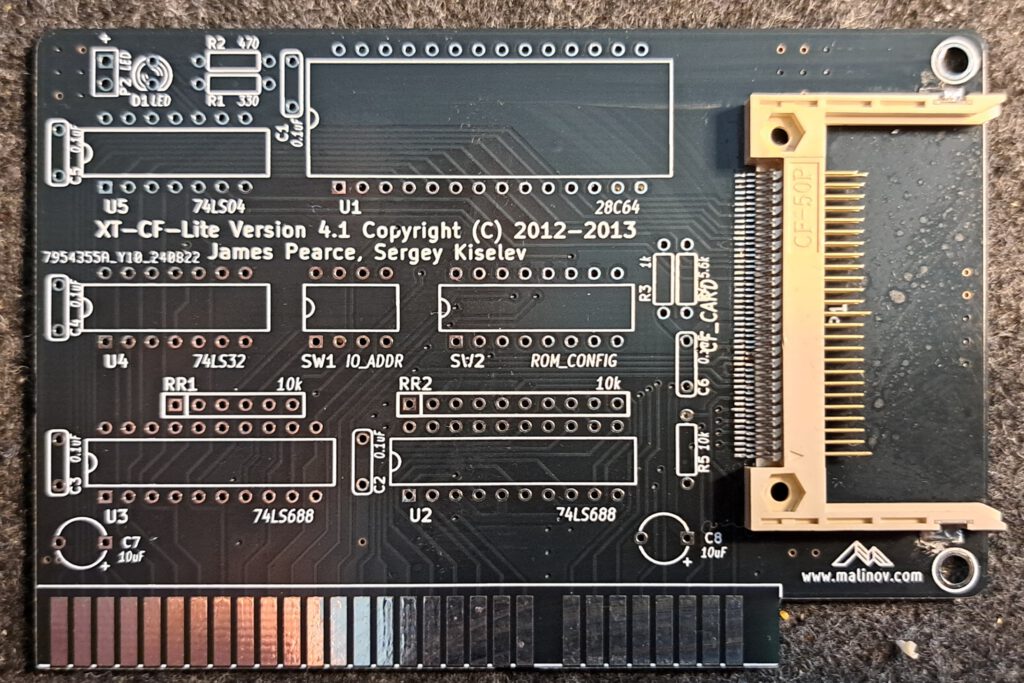
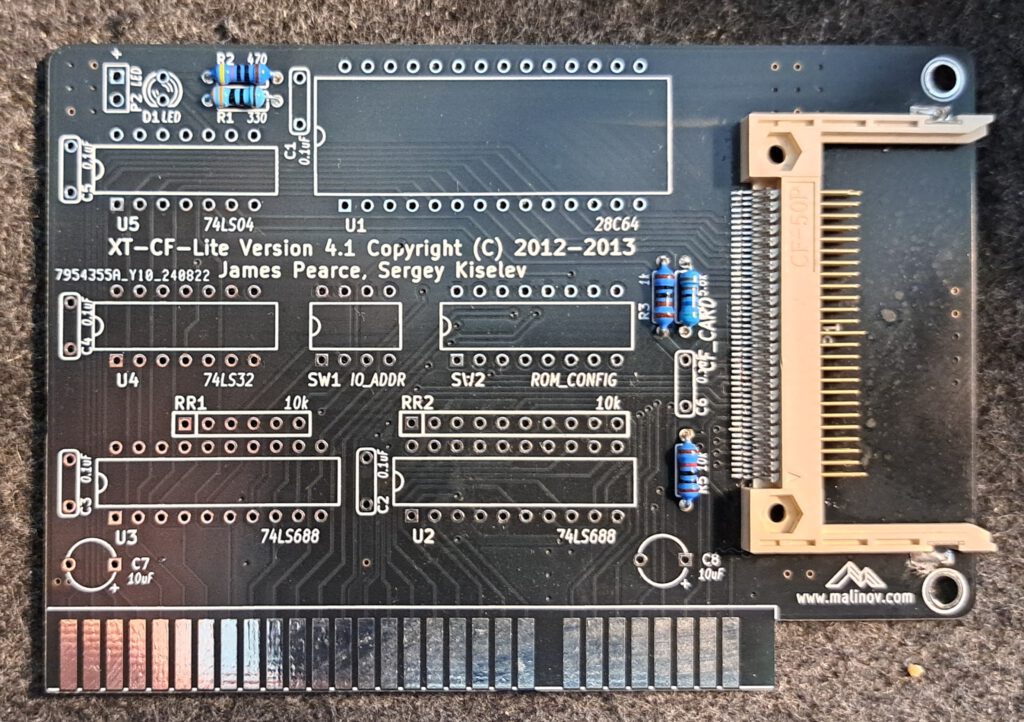
| Gerber available | Yes |
| Gerber file | LinkLink status: OK |
| Ordered where | JLCPCB |
| Piece | 10 |
| Price | ~16€ inkl. Steuern und Porto im großen Paket |
| Special features | Leadfree, Farbe Schwarz |
Components
Die Bauteile habe ich beim schnellen Ali bestellt, der Preis für 1 Einheit lag bei ca. 9,46€. Das Slotblech habe ich bei Mouser für rund 9,80€ bestellt, hier erscheint es billiger, eins mit dem 3D-Drucker zu drucken. Auf Github stehen die Mouser-Teilenummern dabei, solltet ihr sie brauchen.
| Component | Size | Number | Description | Preis € /Stück | erl. |
|---|---|---|---|---|---|
| C1-C6 | 100nF | 6 | Glättungskondensator ICs | 0,36 | |
| C7-C8 | 10 microfarads | 2 | Glättungskondensator ISA Slot | 0,12 | |
| D1 | 3mm | 1 | LED für IDE-Aktivität, ich habe eine blaue genommen | 0,20 | |
| Page 1 | 1 | Ich habe den CF-Slot von einem Adapter abgelötet. Zum Beispiel Mouser 517-N7E50-Q516RB-40 | 3,20 | ||
| R1 | 330Ohm | 1 | Resistance | 0,04 | x |
| R2 | 470Ohm | 1 | Resistance | 0,04 | x |
| R3 | 1kOhm | 1 | Resistance | 0,04 | x |
| R4 | 5,6kOhm | 1 | Resistance | 0,04 | x |
| R5 | 10kOhm | ? | Widerstand, nicht installieren | 0,04 | |
| RR1 | 10kOhm | 1 | 6xWiderstandsarray | 0,38 | |
| RR2 | 10kOhm | 1 | 8xWiderstandsarray | 0,41 | |
| SW1 | 4 | 1 | 4X Dipschalter | 0,30 | |
| SW2 | 8 | 1 | 8X Dipschalter | 0,22 | |
| U1 | 8kB | 1 | 28C64 EEPROM oder 27C64 UV erasable EPROM | 1,54 | |
| U2,U3 | 2 | 74LS688 Comparator | 0,84 | ||
| U4 | 1 | 74LS32 Vierfach-Oder-Gatter | 0,14 | ||
| U5 | 1 | 74LS04 Hex Inverter | 0,20 | ||
| U1 | 28Pin | 1 | IC-Sockel breit | 0,19 | |
| U2,U3 | 20 Pin | 2 | IC-Sockel schmal | 0,34 | |
| U4, U5 | 14Pin | 2 | IC-Sockel schmal | 0,32 | |
| Bracket | 1 | ISA-Slotblech Keystone 9202 | 9,80 | ||
| Screw | 2 | Schraube M3? | 0,50 | ||
| Summer | 19,26€ |
Structure
Variations
Varianten gibt es hier nicht, die 10uF Kondensatoren können mit unterschiedlichen Kondensatortypen bestückt werden, z.B. mit Keramik oder Elektrolytkondensatoren.
Order

Commissioning
Firmware
Complierte XT-IDE Firmware für unterschiedlicher Prozessorgenerationen können unter folgenen Link heruntergeladen werden: https://xtideuniversalbios.orgLink status: Unknown
Auch das Erstellen des Bios per angepasster Make Datei ist relativ einfach und das Toolkit schnell installiert. Eine Anleitung gibt unter folgenden Link: https://xtideuniversalbios.org/wiki/BuildInstructionsLink status: Unknown
Ich habe das Thema schon einmal in folgenden Artikel behandelt und werde deshalb hier nicht weiter darauf Details sind hier zu finden: https://www.fambach.net/retro-xt-ide-bios/Link status: Unknown
Driver
Treiber sind keine nötig.
Configuration
Details gibts hier: https://www.fambach.net/retro-xt-ide-bios/Link status: Unknown
ROM mit Hardware programmierbar
- EEPROM auf Computer Karte stecken
- Comuter Karte in entsprechenden Slot im PC stecken.
- Bios und XTIDECFG auf Diskette oder Festplatte laden und den Rechner starten.
- XTIDECFG starten und das EEPROM konfigurieren.
- EEPROM flashen.
- Restart und alles sollte gehen wenn nicht mal im Kapitel Probleme nachsehen.
ROM nicht mit Hardware programierbar
- Bios und XTIDECFG auf Diskette oder Festplatte laden und den Rechner starten.
- XTIDECFG starten und das ROM konfigurieren.
- EPROM zurück auf das Speichermedium schreiben.
- Geän derte ROM vom Speichermedium lesen und per EPROM Programmer auf ein ROM breennen.
- EPROM auf Computer Karte stecken
- Comuter Karte in entsprechenden Slot im PC stecken.
- Computer starten und alles sollte gehen wenn nicht mal im Kapitel Probleme nachsehen.
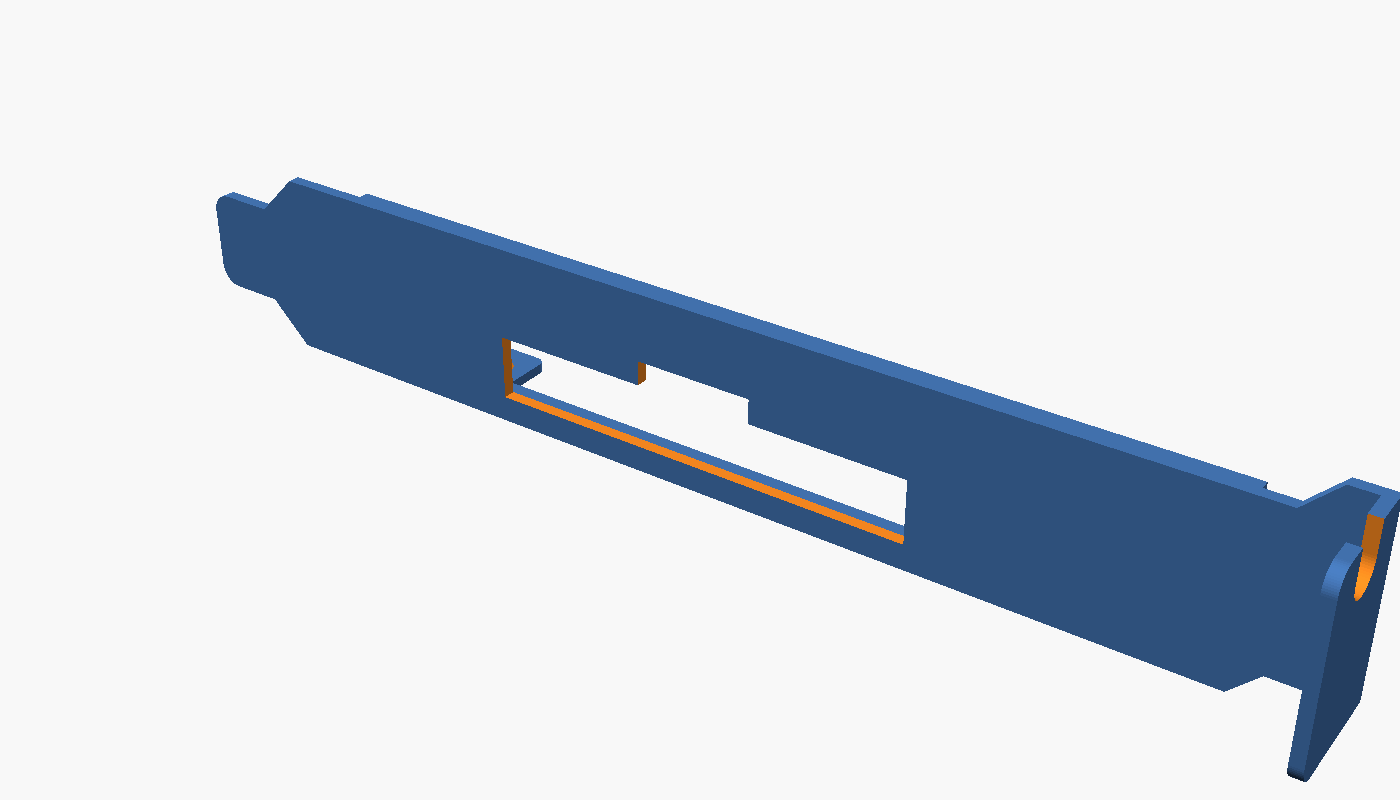
Slotblech
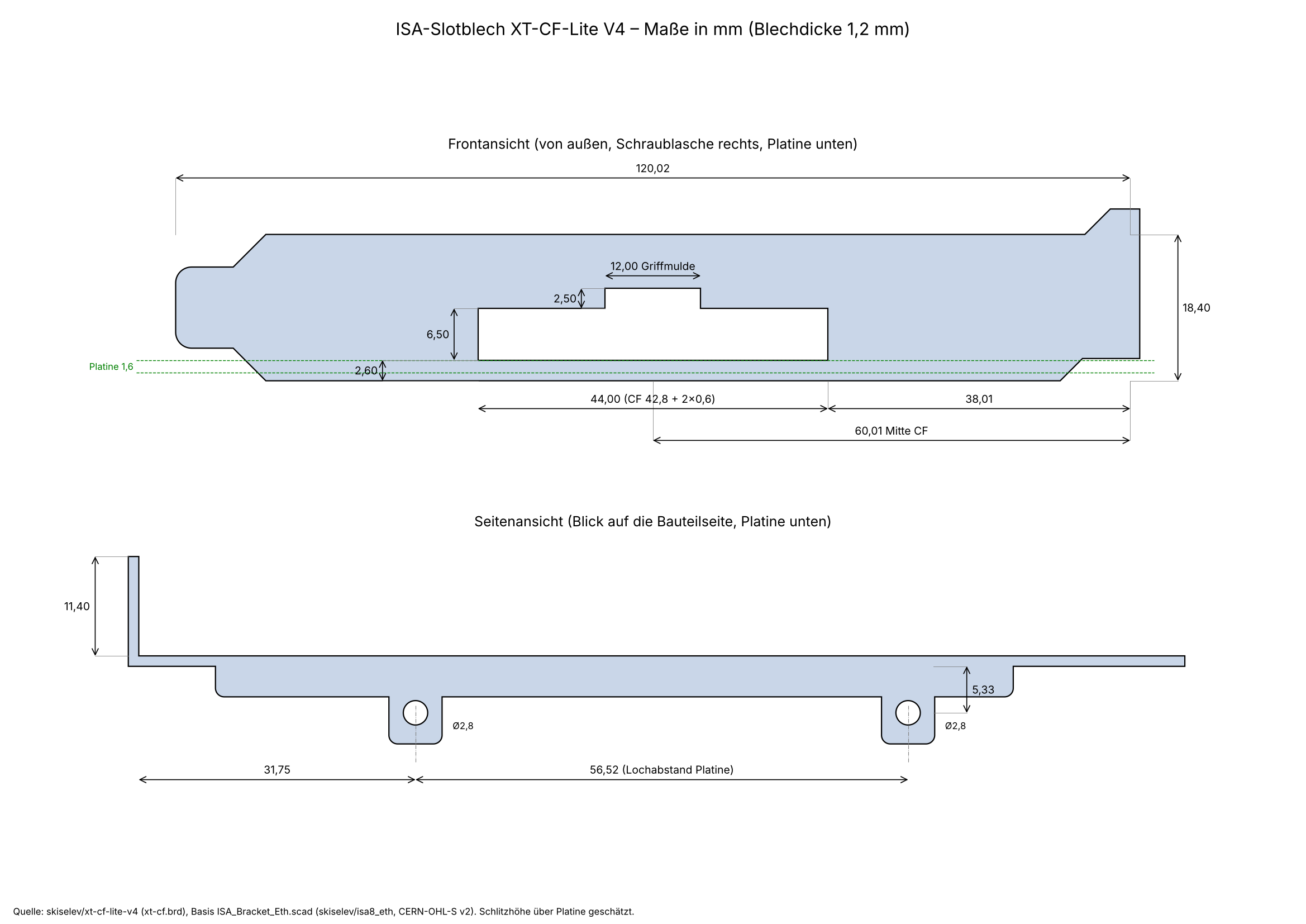
Das Slotblech habe ich mir für den 3D-Drucker selbst erzeugt. Basis ist das ISA-Slotblech von Sergey Kiselev aus dem isa8_eth-ProjektLink status: Unknown (kompatibel zu Keystone 9202). Die Position des CF-Schlitzes habe ich aus dem KiCad-Projekt der XT-CF-LiteLink status: Unknown übernommen. Die Höhe des Schlitzes über der Platine ist geschätzt und passt für CF-Karten Typ I und II.
Maße
| Description | Worth |
|---|---|
| Slotblech | 120,02 x 18,4 mm, 1,2 mm dick (wie Keystone 9202) |
| CF-Schlitz | 44,0 x 6,5 mm (CF-Karte 42,8 mm + 0,6 mm Luft je Seite) |
| Lage CF-Schlitz | Mitte 60,01 mm ab Oberkante, Unterkante auf Höhe der Bauteilseite der Platine |
| Griffmulde | 12 x 2,5 mm über dem Schlitz |
| Platinenbefestigung | 2 Laschen, Bohrung 2,8 mm, Lochabstand 56,52 mm |
Download
Das Archiv enthält die STL-Datei zum Drucken, das OpenSCAD-Skript zum Anpassen (z. B. Schlitzhöhe über cf_slot_bottom / cf_slot_top) und die Maßzeichnung als PDF und SVG. Lizenz wie das Original: CERN-OHL-S v2.
Miscellaneous
Compact Flash Sockel
Die Sockel sind nur schwer zu bekommen und wenn doch, kosten sie meist um die 10€. Ich habe beim schnellen Ali CF->IDE-Adapter bestellt und die Slots abgelötet. Die Adapter haben nur 2,5€ bis 3,5€ gekostet. Wie albern, oder? Wenn jemand eine Quelle für die Teile hat, lasst es mich bitte wissen.
Generelle Tipps
Soldering points
Lötstellen gerade an den ICs nochmal genau, am besten mit dem Mikroskop oder Lupe, auf Kurzschlüsse und Kontakt prüfen. Durchmessen mit Multifunktionsmeter bzw. Durchgangsprüfer.
For small solder joints on through-hole components, use flux if possible; it makes life easier and increases the quality of the connection.
Problems
XTIDE is not found on boot
- This is usually due to an address conflict, either with the ROM or because the wrong HDD controller address was specified. Even if the controller isn't found, XTIDE simply won't be displayed. Check all addresses again, and also check the jumpers on the ROM and controller boards. C800 and D800 have proven to be good values for the ROM address.
- Incorrect ROM used, some EPROMs and EEPROMs are not compatible. Cards can also only support the specified EPROM types. For example, I replaced a 27C256 with a 28C256, but it didn't work because the pinout deviates in two places. A 27C257 must be used here ;).
- When it comes to the ROM on the network card, ensure that it is active, that the size and address are set correctly.
Controller not found
Should the XTIDE be displayed unexpectedly, but the error "Controller not found" appears, then the address/type of the IDE controller is incorrect; check this again in the tool and re-flash the ROM.
Checksum Error
XTIDECONF did not run, this calculates the checksums and sets them. Run the tool and re-flash the ROM.
The ROM cannot be flashed via XTIDECFG
Incorrect ROM version, for example, the AT28C64-B can be flashed but the AT28C64 cannot. If you try to flash the AT28C64, the version on it will no longer work afterwards and the EPROM programmer must be used.
Conclusion
Für rund 11€ bekommt man einen Compact-Flash-Reader mit ROM-Unterstützung für einen XT oder späteren PC. Was will man mehr? Wer Slotbleche aus Metall haben möchte, kann nochmal kräftig in die Tasche packen und für 9-10€ ein Slotblech kaufen, bei dem noch der Schlitz für die CF-Karte ausgefräst werden muss. Leichter erscheint hier der Druck mit dem 3D-Drucker. Die Karten werden auch fertig auf eBay für rund 50€ angeboten. Hier hatte ich meine erste gekauft und werde evtl. ein paar von den übrigen Platinen bestücken und etwas günstiger verkaufen, um mein nächstes Projekt zu finanzieren. Sollte jemand Interesse an der Platine oder am ganzen Gerät haben, bitte melden.
| Description | Worth |
|---|---|
| Successful | Yes |
| Preis pro Stück | ~11 € ohne Slotblech |
| Soldering time | 1-1,5 Stunden (Entspannte Arbeitsweise) |
| Function | Class |
Licence
Stand 10.10.2026, laut Projektseite bzw. Repository.
- Hardware: Schaltplan, KiCad und Gerber im RepoLink status: OK veröffentlicht, Lizenz nicht angegeben
- Software/Firmware: XTIDE Universal BIOS: GPLv2
- Marken: Genannte Marken- und Produktnamen gehören ihren jeweiligen Inhabern.
Related Posts
- Retro Projekt – ISA-Boot EEPROM KarteLink status: Unknown
- Retro – XT-IDE (BIOS)Link status: Unknown
Sources
To the project
GitHub LinkLink status: OK
Parts listLink status: Unknown
Gerber filesLink status: OK
https://xtideuniversalbios.orgLink status: Unknown
https://xtideuniversalbios.org/wiki/BuildInstructionsLink status: Unknown
Retro pages
https://archive.orgLink status: OK – Alte Software, Magazine, Handbücher und viele mehr.
https://theretroweb.comLink status: Broken – PC Hardwareverzeichnis.
https://www.winhistory.de/index.phpLink status: OK – Dos, Windows Versions Beschreibungen.
http://www.win31.de/links.htm – Win 3.1x Tools und Tricks
Retro Forensics
https://forum.classic-computing.de/forumLink status: OK – Deutsch/Englische Forum mit vielen Retro-Computer Enthusiasten.
https://www.vogons.orgLink status: OK – Hier habe ich schon viele Tipps zu Hardware gefunden, sie haben auch eine Treiber Verzeichnis.
https://www.dosforum.deLink status: OK – Forum mit strikten Regeln und sehr hilfreich in Bezug zu DOS, Windows-Fragen werden nicht gerne gesehen.
https://dosreloaded.deLink status: OK – Dos, Hardware Reparatur, Bios Dateien und mehr.
https://www.winhistory-forum.netLink status: Unknown DOS and Windows history.
Retro Shops
https://ram-co-shop.deLink status: Unknown – PC Teile auch neuere, schon viel dort bestellt hat immer funktioniert.
http://www.amoretro.deLink status: Unknown – Verkauft auf EBay und hat ein nettes Verzeichnis alter Hardware
https://retroreiz.deLink status: Unknown – Atari, Nintendo, Sega und anderes.
https://www.retroworld.info/deLink status: Unknown – Aufkleber, Schilder und mehr.
https://retesa-nb.deLink status: OK – Alte Hardware rund um den PC
https://www.retro8bitshop.comLink status: Unknown – C64 lastig
Logbook
| Date | Change | Author |
|---|---|---|
| 10.10.2026 | Abschnitt Lizenz ergänzt (Hardware/Software) | Suffocation |
| 08.10.2026 | Überschriften-Hierarchie korrigiert (H1→H2, Unterebenen eine Stufe tiefer) Kapitel Slotblech eingefügt: 3D-Druck-Slotblech mit CF-Schlitz, Maßzeichnung Front/Seite, Download STL/SCAD | Suffocation |
| 04.10.2026 | Rechtschreibung korrigiert: Tippfehler, Kommas, Groß-/Kleinschreibung, Bindestriche, Formulierungen Block Klarstellung unter Link zum Projekt eingefügt | Suffocation |
| 03.10.2026 | Logbuch-Tabelle auf Log-Liste umgestellt | Suffocation |
| 03.01.2026 | Fehler in BOM behoben | Suffocation |
| 30.03.2025 | Finalisiert | Suffocation |
| 29.08.2024 | Wareneingang | Suffocation |
| 21.08.2024 | Platine Bestellt Post created | Suffocation |