Last Updated on 15. October 2026 by SuffocationLink status: OK
Eine der schönen Errungenschaften der IDF ist die menügesteuerte Konfiguration. Noch schöner finde ich, dass eigene Konfigurationspunkte erstellt werden können. Diese werden dann automatisch in das Hauptmenü eingehängt. Vorab:
- Die Bibliothek „esp_system.h“ wird im Quellcode benötigt, sonst klappt’s nicht
- After making changes to the menu, perform an idf.py clean.
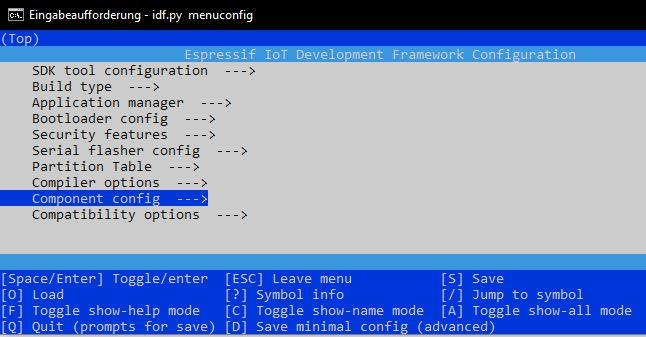
Zur Erstellung solch eines Konfigurationspunktes nehme ich das Programm aus dem Beispiel Console output und ersetze den Text durch einen Konfigurationspunkt. Benannt werden diese grundsätzlich mit CONFIG_ , gefolgt von einem sprechenden Namen.
Source code main.c (GitHubLink status: OK)
/** idf example
 *
 * Example 5 for custom configuration for menuconfig
 *
 * Some parts are copied from the official idf examples found on
 * https://docs.espressif.com/projects/esp-idf/en/latest/esp32/
 *
 * Modified by SteFam @ http://www.fambach.net
 *
 * GPLv3
 * Blah blah blah, free to use.
 * I invested some time and money in those examples if you want to delete this header
 * please do not forget to mention at least my website, thanks!
*/


#include <stdio.h>
#include "esp_system.h"

static const char* text = CONFIG_OUTPUT_TEXT;

void app_main(void)
{
    // single console output
	printf("%s \n",text);

}
Damit diese Konfiguration im Menuconfig angezeigt wird, muss noch eine Datei „Kconfig.projbuild“ erstellt werden. Diese enthält zusätzliche Informationen zum Konfigurationspunkt:
Source code Kconfig.projbuild (GitHubLink status: OK)
menu "L5_Menuconfig"

    config OUTPUT_TEXT
        string "Output Text"
        default "www.fambach.net!"
        help
            Enter the text, that will be shown in the program.


endmenu
Nun einmal Menuconfig starten (>idf.py menuconfig) :
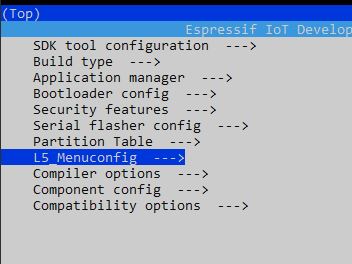
Choose your own menu item 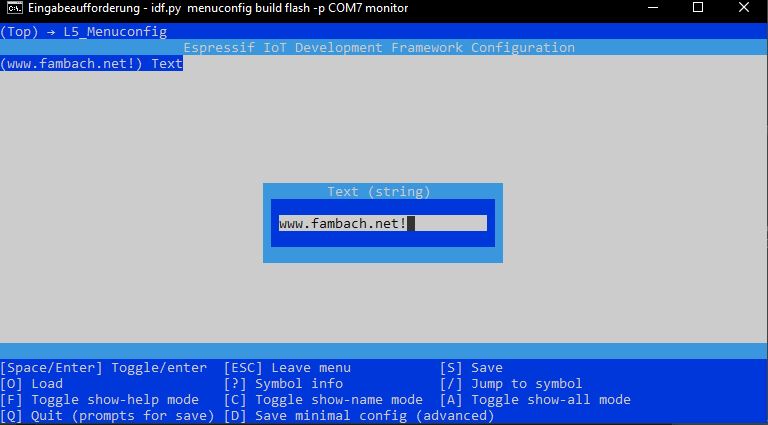
Konfiguration auswählen 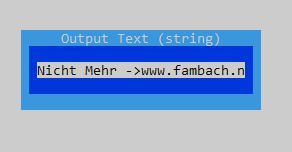
Konfigurationstext ändern 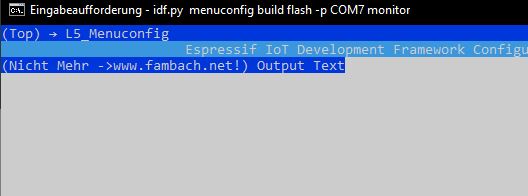
Amended text
Noch bauen und schauen, wie es aussieht (idf.py build flash -p COM7 monitor )
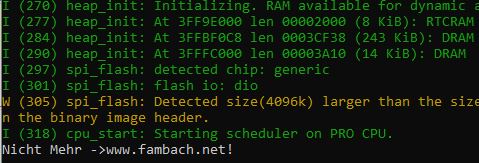
Es gibt nicht nur die Möglichkeit, Text zu formatieren, Zahlen und Auswahllisten sind ebenfalls möglich. Hier ein paar Beispiele
menu "Example Configuration"
config MOSI_GPIO
       int "MOSI GPIO number"
       range 0 46
       default 23 if IDF_TARGET_ESP32
       default 35 if IDF_TARGET_ESP32S2
       help
           GPIO number (IOxx) to SPI MOSI. ...

config INVERSION
       bool "Enable Display Inversion"
       default false
       help
           Enable Display Inversion.

choice
      bool "Mesh AP Authentication Mode"
      default WIFI_AUTH_WPA2_PSK
      help
          Authentication mode.

      config WIFI_AUTH_OPEN
          bool "WIFI_AUTH_OPEN"
      config WIFI_AUTH_WPA_PSK
          bool "WIFI_AUTH_WPA_PSK"
      config WIFI_AUTH_WPA2_PSK
          bool "WIFI_AUTH_WPA2_PSK"
      config WIFI_AUTH_WPA_WPA2_PSK
          bool "WIFI_AUTH_WPA_WPA2_PSK"
endchoice

config MESH_GLOBAL_DNS_IP
       hex "Global DNS"
       depends on MESH_USE_GLOBAL_DNS_IP
       default 0x08080808
       help
           The IP address of global DNS server that is used
           for internal IP subnet formed by the mesh network
           if MESH_USE_GLOBAL_DNS_IP is enabled.
           Note: The IP address is in platform (not network)
           format.
...

endmenu
Es sind auch Abhängigkeiten zwischen Konfigurationspunkten möglich. Diese werden mit den Schlüsselwörtern „depends on“, gefolgt von einem oder mehreren Konfigurationsnamen mit logischen Verknüpfungen, angegeben. Logische Verknüpfungen sind || (oder) oder && (und).
.config SW1_PIN
		int "SW1 pin"
		range 0 39
        default 36
		depends on SW1_ENABLE
		help
			Switch 1 Gpio pin
config SW2_ENABLE
		bool "SW2 Enable"
        default false
		help
			Enable Switch 2
config SW2_PIN
		int "SW2 pin"
		range 0 39
        default 35
		depends on SW2_ENABLE
		help
			SW2 Gpio pin
config LONG_PRESS_ENABLED
		bool "Long press enabled"
        default false
		depends on (SW1_ENABLE || SW2_ENABLE)
		help
		   If this is enabled the system
		   distinguishes between long pressed buttons
                   and short pressed buttons
	config LONG_PRESS_TIME_MS
		int "Long press time ms"
		range 1000 8000
        default 2000
		depends on LONG_PRESS_ENABLED
		help
		  How long should a button be pressed to be
                  marked as a long press; if it is not long pressed
                  it is a short press
...
Conclusion
Die Idee, Konfigurationen auszulagern, ist nicht neu. Sie aber mit einem Menü zu versehen, finde ich sehr charmant gelöst.
Related Posts
Main contributionLink status: Broken
Sources
Link status: OKIDF – KonfigurationLink status: OK
KConfig GuideLink status: OK
KConfig ExtensionsLink status: OK
| Date | Change | Author |
|---|---|---|
| 15.10.2026 | Beispielcode als Code-Block eingefügt (Einbettung über gist-it.appspot.com funktionierte nicht mehr) | Suffocation |
| 03.10.2026 | Rechtschreibung korrigiert: Tippfehler, Kommas, Grammatik Log-Liste eingefügt | Suffocation |
| 08.01.2021 | Post created | Suffocation |
Hello Jürgen,
As stated in the imprint, I do not create guides for beginners but merely document what I develop myself. I don't think professionals need this guide. However, I am happy to make adjustments/additions if you write to me exactly where the problem lies.
To illustrate the project structure, an example project is linked on GitHub, where all necessary files are in the correct positions. Is that not enough? What can I do better here?
Your comment is about a report on using Menuconfig via the console; where does VSCode fit into that? Yes, operation is also possible with VSCode, but here it's based on a menu controlled by the mouse. However, it's also the case for me that VSCode works one day and then doesn't with the next version. Therefore, I would first try to get the IDF running on the console (CMD).
NCurses menus were/are often used under Linux (or similar in the Windows console), which is why I haven't gone into more detail here. Basically, you only need Enter to get into a submenu or edit a menu item, and Esc to get back out. The arrow keys help with navigation, possibly plus Tab to jump or S to save.
The IDF is definitely not particularly suitable for beginners, unfortunately there's no way around it for new ESPs, as the implementation for the Arduino GUI always lags a bit behind. Otherwise, as a beginner, I would recommend using the Arduino GUI.
Hello
Stefan
Hello,
I can't share your enthusiasm for menuconfig.
Yes, it can be called from VS Code/PlatformIO. The madness starts with some keyboard shortcuts at the bottom, but the most important ones (j and k) are missing.
And it's not as simple as just creating a „kconfig.projbuild“ and starting menuconfig. Where does it need to be so that it's recognised?
There is an „o“ key for loading, but 'j' and 'k' don't even work in the window that appears. So how do I navigate to the path where kconfig.projbuild is located?
Your blog seems geared more towards professionals who already know everything. As a beginner, you just spend hours wading through the internet, and Espressif's documentation is also of little help.
Greetings