Last Updated on 15. October 2026 by SuffocationLink status: OK
A task is a (recurring) job for the processor. Multiple tasks compete for the CPU's attention. This article briefly outlines how they are created and what data structures are available for data transmission and synchronisation.
Tasks können zu einer sehr komplexen Angelegenheit werden, weshalb ich hier nur die Spitze des Eisberges ankratzen kann. Dennoch handelt es sich hierbei um den bisher längsten Beitrag der Serie. Für die weitere Recherche sei auch auf die Espressif Website – Kapitel FreeRtosLink status: OK referred.
Basics
Tasks können als gekapselte Aufgaben betrachtet werden. In der Espressif IDF können je nach Anzahl der Prozessor-Kerne ein oder mehrere Tasks parallel/gleichzeitig ausgeführt werden. Grundsätzlich können aber mehrere Tasks gestartet werden, die um den/die Prozessorkern(e) konkurrieren. Immer wenn ein Task den Prozessorkern nicht mehr braucht, gibt er ihn frei und der nächste Task kommt an die Reihe.
Welcher Task als Nächstes bevorzugt wird, hängt grundsätzlich mit seiner Priorität zusammen und wie lange er schon wartet. Wie genau die Abarbeitungsreihenfolge ist, hängt von der Implementierung des Schedulers ab. Die Tasks in der IDF stammen aus dem FreeRtos, hier wacht zusätzlich ein Wachhund (Watchdog) darüber, dass die Tasks nicht zu lange brauchen. Weiterhin wird davon ausgegangen, dass Tasks ewig laufen, sollte ein Task beendet werden, muss dieser vorher gelöscht werden, sonst kommt es zu einem Fehler.
Viele der im Folgenden beschriebenen Funktionen gibt es mehrfach. Zum einen kann bei der Erstellung bestimmt werden, ob der Speicher dynamisch oder statisch zur Kompilierzeit reserviert werden soll. Die statischen Funktionen enden immer mit static.
Zum anderen gibt es Funktionen, die aus einem Interrupt gerufen werden können, diese enden immer mit ‚FromISR‘.
Es wird im Folgenden meist nur auf die Funktionen mit dynamischer Speicherreservierung eingegangen, für weitere Infos sei auch hier auf die IDF Referenz verwiesen.
Task erstellen
Libraries
#include "freertos/FreeRTOS.h"
#include "freertos/task.h""
Tasks are created with the command:
xTaskCreate(
   <pointer zur="" task="" funktion,="" ,
   ,
   ,
   ,
   );;
Gute Programmierpraxis ist es, einen Task immer only so lange laufen zu lassen, wie wirklich nötig ist. Muss ein Task auf einen Wert oder eine Aktion warten, sollte er sich schlafen legen und den Prozessor an einen anderen Task weitergeben. Das Schlafen kann mit der folgenden Funktion eingeleitet werden.
void vTaskDelay(const TickType_t xTicksToDelay);Mit diesem Befehl wartet der Task eine bestimmte Zeit, bevor er wieder bereit zur Ausführung ist. Generell schlafen legen kann man den Task mit dem folgenden Befehl:
// Suspend a specific task
void vTaskSuspend();
// Suspend a task from an interrupt service routine
BaseType_t xTaskResumeFromISR()
// Suspend your own task
vTaskSuspend(NULL);;
In diesem Fall wartet der Task, bis er wieder von außen aktiviert wird. Dies geschieht mit dem folgenden Befehl:
// normal resumption
void xTaskResume();
// from interrupt service routine
void xTaskResumeFromISR();;
FreeRtos-Tasks werden normal nicht beendet, wenn sie wie im Beispiel dennoch enden, wird ein Fehler geworfen. Um dies zu verhindern, muss der Task vor Ende gelöscht werden. Dies geschieht mit der Anweisung:
vTaskDelete( xHandles[task_index] );Zu beachten ist: Wenn wie im Beispiel das xTaskDelete in seiner eigenen Task-Funktion aufgerufen wird, werden alle Anweisungen, die auf diesen Befehl folgen nicht mehr ausgeführt, weil der Task dann schon gelöscht ist.
Das folgende Beispiel erstellt mehrere Tasks, die unterschiedlich lange laufen und, wenn sie aktiv sind, eine Ausgabe erzeugen:
Source code main.c (GitHubLink status: OK)
/** idf example
 *
 * This example shows how to create tasks
 *
 * Some parts are copied from the official idf examples found on
 * https://docs.espressif.com/projects/esp-idf/en/latest/esp32/
 *
 * Modified by SteFam @ http://www.fambach.net
 *
 * GPLv3
 * Blah blah blah, free to use.
 * I invested some time and money in those examples if you want to delete this header
 * please do not forget to mention at least my website, thanks!
*/


#include <stdio.h>
#include <string.h>
#include "freertos/FreeRTOS.h"
#include "freertos/task.h"
#include "freertos/queue.h"
#include "freertos/event_groups.h"
#include "sdkconfig.h"
#include "esp_log.h"
#include "esp_system.h"
#include "bootloader_random.h"


static const char* TAG = "L6_Task";

// event groupe things
static TaskHandle_t xHandles[5];
static EventGroupHandle_t xEventGroup;
static EventBits_t uxBits;

#define BIT_0    ( 1 << 0 )
#define BIT_1    ( 1 << 1 )
#define BIT_2    ( 1 << 2 )
#define BIT_3    ( 1 << 3 )
#define BIT_4    ( 1 << 4 )


/** tasks
 *  Simply produce some output
*/
static void task(void* arg)
{
	// get back task index
    uint32_t task_index = (uint32_t*) arg;
	ESP_LOGI(TAG,"Sub Task %i started!",task_index+1);

	// run at minimum 2 times
	int count = 2 +  esp_random()%10;

	for(int i = 0; i < count ; i++){

		ESP_LOGD(TAG,"Task %i (run %i / %i )", task_index+1, i, count);

		// random delay 250 - 500 ms
		int delay = 250 +  esp_random()%250;

		vTaskDelay(delay);
	}

	// Do not forgett to stop the task.
	// If delete is missing an exception will be thrown
	ESP_LOGD(TAG,"Stopping %s ", pcTaskGetName(xHandles[task_index]));
	vTaskDelete( xHandles[task_index] );

	// you will never see this message, because task was deleted before!
	ESP_LOGI(TAG,"Sub Task %i finished!",task_index+1);

}


void app_main(void)
{
	ESP_LOGI(TAG,"Main Task started!");
	//Allow other core to finish initialization
    vTaskDelay(pdMS_TO_TICKS(100));

	// activate random number genneration without wifi
	// deactivate before the use of wifi or I2C
	ESP_LOGD(TAG,"Init Random without RF");
	bootloader_random_enable();

	//* init switches and set interupt routines
	for(uint32_t i = 0; i <5;i++){

		char buf [20];
		sprintf(buf, "Task_%i",i+1);

		ESP_LOGD(TAG,"Creating %s", buf);

		//start gpio task to handle the buttons
		xTaskCreate(task, buf, 2048, i, 10, &xHandles[i]);

	}
	ESP_LOGI(TAG,"Main Task finihed!");
}
Synchronisation
FreeRtos bietet Datenstrukturen zur Synchronisation und Übergabe der Daten von einem Task zum anderen. Folgende Hilfsmittel konnte ich finden:
- Queues – Dies ist eine Liste. Hier wartet der lesende Task, bis ein Eintrag in der Liste vorhanden ist.
- Traffic lights – Werden genutzt, um Tasks miteinander zu synchronisieren oder gemeinsam genutzte Ressourcen vor Datenfehlern zu schützen.
- Event Groups – Werden zur Synchronisation von Tasks verwendet, sie warten auf das Setzen definierter Bits durch Tasks. Warten kann die Gruppe auf ein oder alle Bits. Sind die Bits gesetzt, wird das Warten der Gruppe beendet.
- Stream Buffer – Datenübertragung per Stream. Der lesende Task wartet so lange, bis im Stream Daten vorhanden sind.
- Message Buffer – Basiert auf dem Stream Buffer. Ein Task kann Nachrichten in den Buffer legen und ein anderer kann auf sie warten.
- Hooks – Werden verwendet, um Tasks auszuführen, wenn der Prozessor gerade nichts zu tun hat.
- Ring Buffer – Ein Ringbuffer ist eine Datenstruktur mit einem fixen Speicher. Wird das Ende des Speichers erreicht, wird versucht, im vorderen Bereich wieder Speicher zu finden. Da der Ringbuffer etwas komplexer ist, habe ich diesen erst mal außen vor gelassen.
- Timer – Timer starten Tasks einmalig oder periodisch, für Timer habe ich einen eigenen PostLink status: OK created.
If these data structures are used from interrupt routines, the ISR functions with the same name must be used for the call.
Es wird bei den Datenstrukturen, außer bei den Semaphoren, immer davon ausgegangen, dass es nur einen Sende-Task und einen Empfänger-Task gibt. Wollen beispielsweise mehrere Ressourcen senden, muss die Sendefunktion als kritischer Bereich (z.B. mit Semaphor) geschützt werden.
Queues
Queues werden verwendet, um Daten auszutauschen. Der sendende Task übergibt Daten an die Queue und kann danach weiterlaufen. Der konsumierende Task holt sich die Daten, wenn er bereit ist.
Library
#include "freertos/FreeRTOS.h"
#include "freertos/task.h"
#include "freertos/queue.h""
Create Queue:
QueueHandle_t xQueue;
xQueue = xQueueCreate( , );
if (xQueue == 0)
{
// Error detection
  ESP_LOGE(TAG, "Error during queue creation");
}
Send data
if(!xQueueSendToBack(, (void*)&, )) {
   // queue full
   ESP_LOGW(TAG, "q - Queue Full");
}
Daten empfangen:
if( ! xQueueReceive( , , ) ){
  ESP_LOGW(TAG, "q - Queue empty!");
}
Das Beispiel unten arbeitet mit zwei Tasks. Einer füllt die Queue, der andere liest die Werte aus. Dadurch, dass der Lese-Task am Anfang langsamer als der Schreibe-Task ist, wird die Queue gefüllt, bis sie voll ist und keinen Wert mehr aufnehmen kann. Durch die folgende Beschleunigung des Lese-Tasks wird die Queue kürzer, bis sie leer ist und der Lese-Task auf den Schreibe-Task warten muss.
Source code main.c (GitHubLink status: OK)
/** idf example
 *
 * Tasks and queues
 *
 * Some parts are copied from the official idf examples found on
 * https://docs.espressif.com/projects/esp-idf/en/latest/esp32/
 *
 * Modified by SteFam @ http://www.fambach.net
 *
 * GPLv3
 * Blah blah blah, free to use.
 * I invested some time and money in those examples if you want to delete this header
 * please do not forget to mention at least my website, thanks!
*/


#include <stdio.h>
#include <string.h>
#include "freertos/FreeRTOS.h"
#include "freertos/task.h"
#include "freertos/queue.h"
#include "sdkconfig.h"
#include "esp_log.h"
#include "esp_system.h"
#include "bootloader_random.h"


static const char* TAG = "L6_Task_Queues";

// event groupe things
static TaskHandle_t writeTaskHandle;
static TaskHandle_t readTaskHandle;
static QueueHandle_t xQueue;
static const int queueSize = 5;

/**
 * Read from queue
*/
static void write_task (void* arg)
{
	const TickType_t xTicksToWait = ( TickType_t )0xff;

	// run forever like a highlander
	while(1)
	{
		// generate random value
		uint32_t value = esp_random()%100;

		// try to send something
		if(!xQueueSendToBack(xQueue, (void*)&value, xTicksToWait)){
			ESP_LOGW(TAG,"q - Queue Full");
			vTaskDelay(500); // wait longer if queue is full
		}else {
			ESP_LOGI(TAG,"w <- %i", value);
		}

		vTaskDelay(500);
	}

}


/**
 *  Write to queue
*/
static void read_task(void* arg)
{
	const TickType_t xTicksToWait = ( TickType_t )0xff;
	uint32_t value;
	int i = 1200;
	// run forever like a highlander
	while(1)
	{
		// increase read speed
		if(i > 100){
			i-=50;
		}

		// try to receive some data
		if( xQueueReceive( xQueue, &value, xTicksToWait ) ){
			ESP_LOGI(TAG,"r -> %i", value);
		} else {
			ESP_LOGW(TAG,"q - Queue empty!");
		}

		// wait a while
		vTaskDelay(i);
	}
}

void app_main(void)
{

	// Create a queue of queueSize x uint32_t
	xQueue = xQueueCreate( queueSize, sizeof( uint32_t ) );
	if( xQueue == 0 )
	{
		ESP_LOGE(TAG,"Error during queue creation");
	}

	//Allow other core to finish initialization
    vTaskDelay(pdMS_TO_TICKS(100));

	ESP_LOGI(TAG,"Create write task");
	xTaskCreate(write_task, "Write Task", 2048, NULL , 10, &writeTaskHandle);
	configASSERT( writeTaskHandle );

	ESP_LOGI(TAG,"Create read task");
	xTaskCreate(read_task, "Read Task", 2048, NULL, 10, &readTaskHandle);
	configASSERT( readTaskHandle );

}
Traffic lights
Semaphoren und Muteces dienen dazu, Bereiche zu sichern und Threads zu synchronisieren. Ich beschreibe hier die Handhabung mit Hilfe des binären Semaphors. Muteces und rekursive Semaphore werden analog erstellt, haben aber noch zusätzliche Funktionalitäten.
Library
#include "freertos/FreeRTOS.h"
#include "freertos/task.h"
#include "freertos/semphr.h""
Create semaphore:
SemaphoreHandle_t xSemaphore = NULL;
xSemaphore = xSemaphoreCreateBinary();
if( xSemaphore == NULL ) {
   // Error
}
Vor der ersten Nutzung muss der Semaphor einmal freigegeben werden.
Fetch semaphore
if( xSemaphoreTake( , timeout) == pdTRUE )
 {
    // it worked ...
    xSemaphoreGive(  );
} else {
    // it didn't work
}
Freigeben des Semaphors:
xSemaphoreGive();;
Das Beispiel unten erstellt 5 Tasks. Alle möchten eine Variable hochzählen. Damit es zu keinen Datenfehlern kommt, ist der kritische Bereich (Hochzählen) mit einem Semaphor gesichert. Innerhalb dieses Bereiches wird den anderen Tasks kurz der Prozessor übergeben, sodass sie versuchen können, den Semaphor zu belegen. Es wird hier explizit der Wert der Variablen erst kopiert, dann den anderen Prozessen die Gelegenheit zur Änderung gegeben und dann erst der geänderte Wert zurückgeschrieben. Dies ist keine gute Praxis, hilft aber dem Beispiel ;). Ihr könnt den Semaphor herausnehmen, indem ihr das u.s. define ausdokumentiert. Die Tasks verhalten sich nun anders ;).
// (de)activate this to disable/enable the semaphores
#define enable_semaphore
Source code main.c (GitHubLink status: OK)
/** idf example
 *
 * This is an example for the use of semaphores
 * We have some tasks that tries to change the same resource
 * the source is shielded by the semaphore.
 *
 * Some parts are copied from the official idf examples found on
 * https://docs.espressif.com/projects/esp-idf/en/latest/esp32/
 *
 * Modified by SteFam @ http://www.fambach.net
 *
 * GPLv3
 * Blah blah blah, free to use.
 * I invested some time and money in those examples if you want to delete this header
 * please do not forget to mention at least my website, thanks!
*/


#include <stdio.h>
#include <string.h>
#include "freertos/FreeRTOS.h"
#include "freertos/task.h"
#include "freertos/queue.h"
#include "freertos/semphr.h"
#include "sdkconfig.h"
#include "esp_log.h"
#include "esp_system.h"
#include "bootloader_random.h"


static const char* TAG = "L6_Task";

// event groupe things
static TaskHandle_t xHandles[5];
SemaphoreHandle_t xSemaphore = NULL;

static uint32_t specialResource = 0;

// (de)activat this to dis-/en-able the semaphores
#define enable_semaphore

/** tasks
 *  Simply produce some output
*/
static void task(void* arg)
{
	// get back task index
    uint32_t task_index = (uint32_t*) arg;

	// run at minimum 2 times
	int count = 2 +  esp_random()%10;

	for(int i = 0; i < count ; i++){

		ESP_LOGD(TAG,"Task %i, try to get the semapore",task_index+1);

#ifdef enable_semaphore
		while(! xSemaphoreTake( xSemaphore, 90)){
			ESP_LOGW(TAG,"Task %i, didn't get the semaphore",task_index+1);
		}
#endif

		ESP_LOGI(TAG,"Task %i, got the semophore",task_index+1);

		//local copy of resource
		uint32_t localCopy = specialResource;

		// a short delay to give the other task the chance
		// to get the semaphor and change the value ;)
		vTaskDelay(200);

		// simply increase the value
		specialResource = localCopy + 1;

		ESP_LOGI(TAG,"Task %i, Value = %i -> Give semaphor back",task_index+1,specialResource);

#ifdef enable_semaphore
		// give back the semaphore
		xSemaphoreGive( xSemaphore );
#endif

		// random delay 250 - 500 ms
		int delay = 250 +  esp_random()%250;
		vTaskDelay(delay);
	}

	// Do not forgett to stop the task.
	// If delete is missing an exception will be thrown
	ESP_LOGI(TAG,"Stopping %s ", pcTaskGetName(xHandles[task_index]));
	vTaskDelete( xHandles[task_index] );

}


void app_main(void)
{

	//Allow other core to finish initialization
    vTaskDelay(pdMS_TO_TICKS(100));

	// activate random number genneration without wifi
	// deactivate before the use of wifi or I2C
	ESP_LOGI(TAG,"Init Random without RF");
	bootloader_random_enable();


	// init the semaphor
	xSemaphore = xSemaphoreCreateBinary();
	if( xSemaphore == NULL )
	{
		ESP_LOGE(TAG,"Error during creation of semaphor");
	} else {
		ESP_LOGI(TAG,"Semaphor created!");
	}


	//* init switches and set interupt routines
	for(uint32_t i = 0; i <5;i++){

		char buf [20];
		sprintf(buf, "Task_%i",i+1);

		ESP_LOGI(TAG,"Creating %s", buf);

		//start gpio task to handle the buttons
		xTaskCreate(task, buf, 2048, i, 10, &xHandles[i]);

	}

	// GO GO GO ...
	// before you can use the semaphor you have to release it once
	xSemaphoreGive( xSemaphore );
}
Zu den rekursiven Muteces sei noch gesagt, diese können immer wieder vom Besitzer-Task belegt werden. Die Anzahl der Belegungen wird mitgezählt und muss sich auch in der Anzahl der Freigaben widerspiegeln. Diese können beispielsweise für Rekursionen verwendet werden, bei denen die gleiche Funktion immer wieder, indem sie sich selbst aufruft, auf die selben Daten zugreifen muss.
Event Groups
Library
#include "freertos/FreeRTOS.h"
#include "freertos/task.h"
#include "freertos/event_groups.h""
Bit setzen:
EventBits_t xEventGroupSetBits(
                  ,

);;
When reusing an existing group, the bits must be reset.
EventBits_t xEventGroupClearBits(
                   ,

);;
Warten auf gesetzte Bits, dies geschieht mit:
xEventGroupWaitBits(
                    ,
                    ,
                    ,
                    ,

 );
// Auswertung
if( xEventGroup == NULL )
 {
 // EVG konnte nicht erstellt werden
    ESP_LOGE(TAG,"Event groupe not created");
} else if(  (uxBits & ( BIT_0 | BIT_1| ... | BIT_n) ) == ( BIT_0 | BIT_1| BIT_2| ... | BIT_n ) )
 {
 // alle bits wurden gesetzt
        ESP_LOGI(TAG,"Program finshed successfull");
} else {
 // nicht alle Bits wurden gesetzt, timeout
       ESP_LOGW(TAG,"Timeout");
}
Hier ein komplettes Beispiel mit mehreren Tasks. Der Haupttask wartet darauf, dass alle Bits gesetzt werden. Sind alle vorhanden, arbeitet der Haupttask weiter.
Source code main.c (GitHubLink status: OK)
/** idf example
 *
 * This should be an example for tasks ...
 * this example is not finished jet
 *
 * Some parts are copied from the official idf examples found on
 * https://docs.espressif.com/projects/esp-idf/en/latest/esp32/
 *
 * Modified by SteFam @ http://www.fambach.net
 *
 * GPLv3
 * Blah blah blah, free to use.
 * I invested some time and money in those examples if you want to delete this header
 * please do not forget to mention at least my website, thanks!
*/


#include <stdio.h>
#include <string.h>
#include "freertos/FreeRTOS.h"
#include "freertos/task.h"
#include "freertos/queue.h"
#include "freertos/event_groups.h"
#include "sdkconfig.h"
#include "esp_log.h"
#include "esp_system.h"
#include "bootloader_random.h"


static const char* TAG = "L6_Task";

// event groupe things
static TaskHandle_t xHandles[5];
static EventGroupHandle_t xEventGroup;
static EventBits_t uxBits;

#define BIT_0    ( 1 << 0 )
#define BIT_1    ( 1 << 1 )
#define BIT_2    ( 1 << 2 )
#define BIT_3    ( 1 << 3 )
#define BIT_4    ( 1 << 4 )


/** tasks
 *  Simply produce some output
*/
static void task(void* arg)
{
	// get back task index
    uint32_t task_index = (uint32_t*) arg;

	// run at minimum 2 times
	int count = 2 +  esp_random()%10;

	for(int i = 0; i < count ; i++){

		ESP_LOGD(TAG,"Task %i (run %i / %i )", task_index+1, i, count);

		// random delay 250 - 500 ms
		int delay = 250 +  esp_random()%250;

		vTaskDelay(delay);
	}

	uxBits = xEventGroupSetBits(
                         xEventGroup,    // The event group being updated.
                        (1<<task_index)); // The bits being set.

	// Do not forgett to stop the task.
	// If delete is missing an exception will be thrown
	ESP_LOGD(TAG,"Stopping %s ", pcTaskGetName(xHandles[task_index]));
	vTaskDelete( xHandles[task_index] );

}


void app_main(void)
{

	//Allow other core to finish initialization
    vTaskDelay(pdMS_TO_TICKS(100));

	// activate random number genneration without wifi
	// deactivate before the use of wifi or I2C
	ESP_LOGD(TAG,"Init Random without RF");
	bootloader_random_enable();

	//* init switches and set interupt routines
	for(uint32_t i = 0; i <5;i++){

		char buf [20];
		sprintf(buf, "Task_%i",i+1);

		ESP_LOGD(TAG,"Creating %s", buf);

		//start gpio task to handle the buttons
		xTaskCreate(task, buf, 2048, i, 10, &xHandles[i]);

	}

	xEventGroup = xEventGroupCreate();
	if(xEventGroup == NULL){
		ESP_LOGE(TAG,"Can not create event group");
	}
	xEventGroupClearBits(xEventGroup, 0xff);

	uxBits = xEventGroupWaitBits(
                 xEventGroup,    // The event group being tested.
                 BIT_0 | BIT_1| BIT_2| BIT_3 | BIT_4,  // The bits within the event group to wait for.
                 pdFALSE,         // BIT_0 ... and BIT_4 should be cleared before returning.
                 pdTRUE,         // wait for all bits
                 portMAX_DELAY ); // Wait a maximum of 100ms for either bit to be set.

	if( xEventGroup == NULL )
	{
		ESP_LOGE(TAG,"Event groupe not created");
	} else if(  (uxBits & ( BIT_0 | BIT_1| BIT_2| BIT_3 | BIT_4) ) == ( BIT_0 | BIT_1| BIT_2| BIT_3 | BIT_4 ) )
    {
        ESP_LOGI(TAG,"Program finshed successfull");
    } else {
        ESP_LOGW(TAG,"Timeout");
    }

}
Stream Buffer
Library
#include "freertos/FreeRTOS.h"
#include "freertos/task.h"
#include "freertos/stream_buffer.h""
Create:
Triggerlevel und MaxAnzBytes sind beide vom Typ const size_t. Ersteres gibt an, wie groß der Bufferstream ist. Zweiteres beschreibt, ab wie viel Bytes der Empfänger aus seiner Wartehaltung erlöst wird.
xStreamBufferCreate(, )Function to send:
The function takes a stream buffer and the data to be sent. The return value provides the number of bytes sent.
size_t xStreamBufferSend(
           ,
           ,
           ,
           )
Received:
size_t  xStreamBufferReceive(
             ,
             ( void * )&,
             ,
             );;
Beispielprogramm
Source code main.c (GitHubLink status: OK)
/** idf example
 *
 * Tasks and Stream buffer Example
 * Two tasks, one is writing to the stream buffer and one is reading from stream buffer.
 * The writing task is faster than the reader. This has an build in errors,
 * when the buffer is full the writer cannot write to the buffer and gets a timeout for writing.
 * This errors can be prevented by increasing the buffer size or the timeout of the writer.
 *
 * Some parts are copied from the official idf examples found on
 * https://docs.espressif.com/projects/esp-idf/en/latest/esp32/
 *
 * Modified by SteFam @ http://www.fambach.net
 *
 * GPLv3
 * Blah blah blah, free to use.
 * I invested some time and money in those examples if you want to delete this header
 * please do not forget to mention at least my website, thanks!
*/


#include <stdio.h>
#include <string.h>
#include "freertos/FreeRTOS.h"
#include "freertos/task.h"
#include "freertos/queue.h"
#include "freertos/stream_buffer.h"
#include "sdkconfig.h"
#include "esp_log.h"
#include "esp_system.h"
#include "bootloader_random.h"


static const char* TAG = "L6_Task";

// event groupe things
static TaskHandle_t senderHandle;
static TaskHandle_t receiverHandle;
static StreamBufferHandle_t streamBuffer;
TickType_t x5s;

static const char sendString[40] = "Go hang a salami - I'm a Lasagna Hog!";


/** tasks
 *  Simply produce some output
*/
static void send(void* arg)
{
	while (1) {
		size_t xBytesSent;

		xBytesSent =  xStreamBufferSend( streamBuffer, ( void * ) sendString , sizeof( sendString ), x5s );
		if(xBytesSent != sizeof( sendString )){
			ESP_LOGE(TAG, "Error while sending only sent %i o %i bytes",xBytesSent,sizeof( sendString ));
		} else {
			ESP_LOGI(TAG,"Send Bytes %i" ,xBytesSent);
		}

		// delay 100 - 500 ms
		vTaskDelay(pdMS_TO_TICKS(100+esp_random()%400));
	}
	// Do not forgett to stop the task.
	// If delete is missing an exception will be thrown
	ESP_LOGD(TAG,"Stopping sender");
	vTaskDelete( senderHandle);

}

static void receive(void* arg){

	char rxBuffer[40];
	while(1){
		size_t xReceivedBytes = xStreamBufferReceive( streamBuffer,
											( void * ) rxBuffer,
											sizeof( rxBuffer ),
											x5s );

		if( xReceivedBytes < 40){
			ESP_LOGI(TAG,"ERROR Received Bytes %i Content: %s" ,xReceivedBytes,rxBuffer);
		} else if(xReceivedBytes > 0 ){
			ESP_LOGI(TAG,"Received Bytes %i Content: %s" ,xReceivedBytes,rxBuffer);
		} else {
			ESP_LOGW(TAG,"No data received");
		}

		// delay 500 - 1000 ms
		vTaskDelay(pdMS_TO_TICKS(500+esp_random()%1000));
	}

	// Do not forgett to stop the task.
	// If delete is missing an exception will be thrown
	ESP_LOGD(TAG,"Stopping receiver ");
	vTaskDelete( receiverHandle);
}


void app_main(void)
{

	//Allow other core to finish initialization
    vTaskDelay(pdMS_TO_TICKS(100));
	x5s = pdMS_TO_TICKS( 500 );


	// activate random number genneration without wifi
	// deactivate before the use of wifi or I2C
	ESP_LOGD(TAG,"Init Random without RF");
	bootloader_random_enable();

	// create stream buffer
	ESP_LOGD(TAG,"Creating stream buffer!");

	// buffer can contain 4 bytes maximum, this is very small let's see if it works
	const size_t xStreamBufferSizeBytes = 40;
	// trigger receiver if 1 byte received (10 = 10 Bytes received)
	const size_t xTriggerLevel = 1;

	streamBuffer = xStreamBufferCreate( xStreamBufferSizeBytes, xTriggerLevel );

        if( streamBuffer == NULL )
        {
           ESP_LOGE(TAG,"FAILED to create stream buffer!");
        }
        else
        {
            ESP_LOGI(TAG,"Streambuffer created");
        }


	ESP_LOGD(TAG,"Creating receiver");
	xTaskCreate(receive, "Receiver", 2048, NULL, 10, &receiverHandle);
	configASSERT( receiverHandle );


	ESP_LOGD(TAG,"Creating sender");
	xTaskCreate(send, "Sender", 2048, NULL, 10, &senderHandle);
	configASSERT( senderHandle );


}
Message Buffer
Der Messagebuffer baut auf dem Streambuffer auf. Zusätzlich können die Daten in Nachrichten gekapselt werden. Eine Nachricht wird durch ihre Länge definiert. Vor Empfang einer Nachricht kann die Länge vom Puffer erfragt werden.
Library
#include "freertos/FreeRTOS.h"
#include "freertos/task.h"
#include "freertos/message_buffer.h""
Create:
xMessageBufferCreate(

);
Write
size_t xMessageBufferSend(
             ,
             ( void * ) ,
             ,

);;
Reading a message:
First, I'll ask about the length of the next message:
size_t xMessageBufferNextLengthBytes(<BufferHandle>);Für den eigentlichen Empfang wird die folgende Funktion verwendet
size_t xStreamBufferReceive(
               <BufferHandle>,
               ( void * ) <EmpfangsBuffer>,
               <LaengeDerNachricht>,
	       <TimeOut>
);
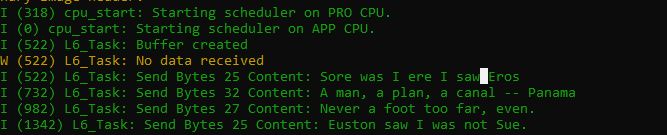
So sieht der Gesamtcode aus. Dieser unterscheidet sich nur geringfügig vom Code des StreamBuffers.
Source code main.c (GitHubLink status: OK)
/** idf example
 *
 * Playing with tasks and message buffer.
 * This example uses two taks and a message buffer to transfer messages from one task to another in a safe manner.
 * Only one reader and one writer is allowed, in case of more than one writer the send function should be part of
 * a critical ares safed by a semaphor or mutex
 *
 * Some parts are copied from the official idf examples found on
 * https://docs.espressif.com/projects/esp-idf/en/latest/esp32/
 *
 * Modified by SteFam @ http://www.fambach.net
 *
 * GPLv3
 * Blah blah blah, free to use.
 * I invested some time and money in those examples if you want to delete this header
 * please do not forget to mention at least my website, thanks!
*/


#include <stdio.h>
#include <string.h>
#include "freertos/FreeRTOS.h"
#include "freertos/task.h"
#include "freertos/queue.h"
#include "freertos/message_buffer.h"
#include "sdkconfig.h"
#include "esp_log.h"
#include "esp_system.h"
#include "bootloader_random.h"


static const char* TAG = "L6_Task";

// event groupe things
static TaskHandle_t senderHandle;
static TaskHandle_t receiverHandle;

uint16_t recDelay = 500;


#define MESSAGE_BUFFER_SIZE 1000
static MessageBufferHandle_t bufferHandle;
TickType_t timeOut;


// some messages ...
static const char* sendString[12] = {
"Sore was I ere I saw Eros",
"A man, a plan, a canal -- Panama",
"Never a foot too far, even.",
"Euston saw I was not Sue.",
"Live on evasions? No, I save no evil.",
"Red Roses run no risk, sir, on nurses order.",
"Salisbury moor, sir, is roomy. Rub Silas.",
"Marge, let's went. I await news telegram.",
"A new order began, a more Roman age bred Rowena.",
"I, man, am regal; a German am I.",
"Tracy, no panic in a pony-cart.",
"Egad! Loretta has Adams as mad as a hatter. Old age!"};


/** tasks
 *  Simply produce some output
*/
static void send(void* arg)
{
	while (1) {
		size_t xBytesSent;

		for(int i = 0 ; i < 12; i++){

			xBytesSent =  xMessageBufferSend( bufferHandle, ( void * ) sendString[i], strlen( sendString[i]), timeOut );
			if(xBytesSent < 1){
				ESP_LOGE(TAG, "Error while sending only sent %i o %i bytes",xBytesSent,strlen( sendString[i] ));
				recDelay -= 50;
			} else {
				ESP_LOGI(TAG,"Send Bytes %i Content: %s" ,xBytesSent, sendString[i] );
			}

			// delay 100 - 500 ms
			vTaskDelay(pdMS_TO_TICKS(100+esp_random()%400));
		}
	}
	// Do not forgett to stop the task.
	// If delete is missing an exception will be thrown
	ESP_LOGD(TAG,"Stopping sender");
	vTaskDelete( senderHandle);

}

static void receive(void* arg){

	char rxBuffer[50];
	while(1){

		int length = xMessageBufferNextLengthBytes(bufferHandle);
		size_t xReceivedBytes = xMessageBufferReceive( bufferHandle,
											( void * ) rxBuffer,
											length,
											timeOut );

		// fix null termination
		rxBuffer[length]='\0';

		if(xReceivedBytes > 0 ){
			ESP_LOGI(TAG,"Received Bytes %i Content: %s" ,xReceivedBytes,(char*)rxBuffer);
		} else {
			ESP_LOGW(TAG,"No data received");
		}

		// delay 500 - 1000 ms
		vTaskDelay(pdMS_TO_TICKS(recDelay+esp_random()%500));
	}

	// Do not forgett to stop the task.
	// If delete is missing an exception will be thrown
	ESP_LOGD(TAG,"Stopping receiver ");
	vTaskDelete( receiverHandle);
}


void app_main(void)
{
	//Allow other core to finish initialization
    vTaskDelay(pdMS_TO_TICKS(100));
	timeOut = pdMS_TO_TICKS( 500 );

	// activate random number genneration without wifi
	// deactivate before the use of wifi or I2C
	ESP_LOGD(TAG,"Init Random without RF");
	bootloader_random_enable();

	// create stream buffer
	ESP_LOGD(TAG,"Creating stream buffer!");

	bufferHandle = xMessageBufferCreate( MESSAGE_BUFFER_SIZE);

        if( bufferHandle == NULL )
        {
           ESP_LOGE(TAG,"FAILED to create buffer!");
        }
        else
        {
           ESP_LOGI(TAG,"Buffer created");
        }

	ESP_LOGD(TAG,"Creating receiver");
	xTaskCreate(receive, "Receiver", 2048, NULL, 10, &receiverHandle);
	configASSERT( receiverHandle );


	ESP_LOGD(TAG,"Creating sender");
	xTaskCreate(send, "Sender", 2048, NULL, 10, &senderHandle);
	configASSERT( senderHandle );

}
Hooks
Es gibt Idle und Tick Hooks. Idle Hooks werden ausgelöst, wenn die CPU im Leerlauf ist. Tickhooks werden über den Tickinterrupt ausgelöst. Zweiteres soll zeitlich nicht sehr zuverlässig sein. Für zeitliche Abfolgen sollten eher Timer oder PWM Signale verwendet werden.
Weiterhin gibt es die Standard-Hooks des FreeRtos und eigene Varianten der IDF.
FreeRTOS Implementation
- Zur Nutzung CONFIG_FREERTOS_LEGACY_HOOKSLink status: OK aktivieren
- Es kann nur einen Idle und einen Tick Hook geben
- FreeRtos Implementierung ist auf single core ausgelegt.
IDF Implementation
- Es können mehrere Hooks/Ticks registriert werden.
- Ein Hook/Tick muss seiner CPU zugewiesen werden
- Die registrierten Hooks/Ticks werden rotierend ausgeführt.
Es dürfen niemals blockierende Codestellen in Hooks und Ticks verwendet werden. Diese müssen immer komplett durchlaufen werden und sollten möglichst kurz sein, da sie sonst andere Tasks behindern könnten.
In Ticks dürfen zusätzlich keine API-Funktionen ohne „FromIsr“ verwendet werden. Log-Ausgaben sind ebenfalls nicht möglich.
Library
#include "freertos/FreeRTOS.h"
#include "freertos/task.h"
#include "esp_freertos_hooks.h"
Idle Hook erstellen
esp_err_t esp_register_freertos_idle_hook_for_cpu(
    <Funktion für Callback>,
    <CPU ID>
)
// oder
esp_err_t esp_register_freertos_idle_hook_for_cpu(
    <Funktion für Callback>
)

// Funktionsprototyp
static bool hook1(void)
{}
Tick erstellen
esp_err_t esp_register_freertos_tick_hook(
     <tickFunctionName>
     <CPU ID>
);

// oder
esp_err_t esp_register_freertos_tick_hook(
     <tickFunctionName>
);

// Funktionsprototyp
static void tick2(void)
{}
Fehler
- ESP_OK: Hat geklappt
- ESP_ERR_NO_MEM: Kein Speicher für den Prozessorkern, um einen Hook zu registrieren
- ESP_ERR_INVALID_ARG: Ungültige CPU
CPU ID abfragen
// core des aktuellen Tasks
const uint32_t core_id = xPortGetCoreID();

// bei zwei Kernen den anderen bekommen
const uint32_t core_id = !xPortGetCoreID();
Hier das Beispielprogramm.
Source code main.c (GitHubLink status: OK)
/** Example
 *
 * Play with tasks, ticks and hooks
 * This example ist the frist I wrote myself,
 * because of the missing espressif examples
 *
 * Created by SteFam @ http://www.fambach.net
 *
 * GPLv3
 * Blah blah blah, free to use.
 * I invested some time and money in those examples if you want to delete this header
 * please do not forget to mention at least my website, thanks!
 *
 *
*/


#include <stdio.h>
#include <string.h>
#include <esp_err.h>
#include "sdkconfig.h"
#include "freertos/FreeRTOS.h"
#include "freertos/task.h"
#include "esp_freertos_hooks.h"
#include "esp_log.h"
#include "esp_system.h"
#include "bootloader_random.h"

static TaskHandle_t calcTask;
static TaskHandle_t tickTask1;
static TaskHandle_t tickTask2;
static const char* TAG = "L6_Task";


/******************** the hooks *************************/

/** Hook 1*/
static bool hook1(void)
{
	ESP_LOGI(TAG,"Hook 1");
	return true;

}

/** Hook 2*/
static bool hook2(void)
{
	ESP_LOGI(TAG,"Hook 2");
	return true;

}


/******************** the tick *************************/

// tick counters
static int ctick1 = 0;
static int ctick2 = 0;

/** the tick */
static void tick1(void)
{
	if(ctick1 %100 == 0){
		xTaskResumeFromISR(tickTask1);
	}
	ctick1++;
}


static void tick2(void)
{
	if(ctick2 %100 == 0){
		xTaskResumeFromISR(tickTask2);

	}
	ctick2++;
}


static void tick_task(void* args){
	while(1){
		// suspend our selves
		vTaskSuspend(NULL);

		// print the tick to log.
		uint32_t i = (uint32_t) args;
		ESP_LOGI(TAG,"100x Tick %i",i);
	}
}

/******************** calc task *************************/
/**
 * Another calculation task
 * so some calculation to keep the cpu bussy
*/
static void calc_task (void* arg)
{
	while(1){
		uint32_t result = 10;
		for(uint32_t i = 0 ; i < 9000; i++){

			result += i+i*1;
			vTaskDelay(pdMS_TO_TICKS(1));
		}
		ESP_LOGI(TAG,"2 - result generated");
		vTaskDelay(pdMS_TO_TICKS(esp_random()%100));
	}
}

/******************** main task *************************/

void app_main(void)
{

	bootloader_random_enable();

	// register two hooks
	ESP_ERROR_CHECK(esp_register_freertos_idle_hook(hook1));
	ESP_ERROR_CHECK(esp_register_freertos_idle_hook(hook2));

	// register two ticks
	ESP_ERROR_CHECK(esp_register_freertos_tick_hook(tick1));
	ESP_ERROR_CHECK(esp_register_freertos_tick_hook(tick2));

	// create tick tasks
	xTaskCreate(tick_task, "Tick Task1", 2048, 1 , 9000, &tickTask1);
	configASSERT( tickTask1 );
	xTaskCreate(tick_task, "Tick Task2", 2048, 2 , 9000, &tickTask2);
	configASSERT( tickTask2 );


	//ESP_LOGI(TAG,"Create calculation task");
	xTaskCreate(calc_task, "Calc Task", 3048, NULL , 9000000, &calcTask);
	configASSERT( calcTask );

	while(1){

		uint32_t result = 10;
		for(uint32_t i = 0 ; i < 9000000; i++){

			result += i+i*1;


		}
		ESP_LOGI(TAG,"1 - result generated");
		vTaskDelay(pdMS_TO_TICKS(esp_random()%100));
	}
}
Ring buffer
Der Ringbuffer der IDF ist eine „interessante“ Sache. Ich spare ihn mir an dieser Stelle mal für einen anderen Zeitpunkt auf, an dem ich ihn wirklich brauche ;).
Library
#include "freertos/FreeRTOS.h"
#include "freertos/task.h"
#include "freertos/queue.h""
Conclusion
Jede Aktion in einen eigenen Task zu verpacken bedarf einiger Übung und Planung. Umso wichtiger ist es, die richtigen Bibliotheksfunktionen zur Verfügung zu haben. Ob diese Funktionalitäten ausreichend sind, muss sich in der Praxis zeigen. Grundsätzlich scheint aber alles, was man braucht, zur Verfügung zu stehen.
Related Posts
Main contributionLink status: Broken
Sources
IDF – Programming GuideLink status: OK
IDF – FreeRtosLink status: OK
IDF – FreeRtos Task ApiLink status: Unknown
IDF – Hooks Link status: Unknown
IDF Beispiel – Task Watchdog (GitHub)Link status: Unknown
Infos zu Ticks und Hooks im Espressif ForumLink status: Unknown
| Date | Change | Author |
|---|---|---|
| 15.10.2026 | Beispielcode als Code-Block eingefügt (Einbettung über gist-it.appspot.com funktionierte nicht mehr) | Suffocation |
| 03.10.2026 | Rechtschreibung korrigiert: Kommas, Tippfehler, Groß-/Kleinschreibung, Grammatik Log-Liste eingefügt | Suffocation |
| 08.01.2021 | Post created | Suffocation |
Hello Markus,
Danke für deinen Kommentar, es freut mich immer wieder wenn der Blog hilft.
Grusd
Stefan
Hello Stefan,
vielen Dank für die Mühe die du dir hier gibst! Dieser Blog zum Thema Tasks mit der IDF ist echt genial und hat mir super weiter geholfen.
5 *****
Gruß – Markus