Last Updated on 16. October 2026 by SuffocationLink status: OK
Direkte Ausgaben über die Konsole werden in der IDF mit printf erreicht. Hiermit sollte man jedoch sparsam umgehen, da es zum Beispiel zu Debugging Zwecken oder zur Fehlerbehandlung andere Mechanismen gibt. Diese können dann auch über Menuconfig ein- und ausgeschaltet werden und belasten so nicht den CODE.
So sieht der Testcode für eine einfache Ausgabe aus:
Source code main.c (GitHubLink status: OK)
/** idf example
 *
 * Some parts are copied from the official idf examples found on
 * https://docs.espressif.com/projects/esp-idf/en/latest/esp32/
 *
 * Modified by SteFam @ http://www.fambach.net
 *
 * GPLv3
 * Blah blah blah, free to use.
 * I invested some time and mony in those examples if you want to delete this header
 * please do not forget to mention at least my website, thanks!
*/


#include <stdio.h>

void app_main(void)
{
	// single console output
	printf("www.fambach.net\n");

}
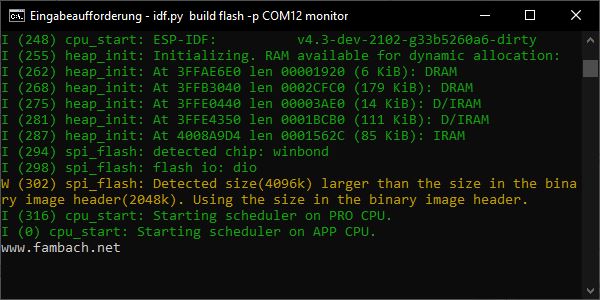
The programme is created, flashed and displayed with a reminder.
>idf.py build flash -p COMx monitorDer Monitor ist eine einfache Möglichkeit, sich auf die serielle Schnittstelle zu hängen, ohne immer Putty oder gar die Arduino Umgebung starten zu müssen. So sieht es bei mir aus:
Conclusion
Even in the IDF, a hello-world programme is nothing to be afraid of.
Related Posts
Main contributionLink status: Broken
Sources
IDF-Start a ProjectLink status: OK
IDF-Creating ExamplesLink status: OK
| Date | Change | Author |
|---|---|---|
| 16.10.2026 | Beispielcode als Code-Block eingefügt (Einbettung über gist-it.appspot.com funktionierte nicht mehr) | Suffocation |
| 04.10.2026 | Rechtschreibung korrigiert: Tippfehler, Kommas, Groß-/Kleinschreibung | Suffocation |
| 03.10.2026 | Log-Liste eingefügt | Suffocation |
| 07.01.2021 | Post created | Suffocation |