Last Updated on 8. October 2026 by SuffocationLink status: OK
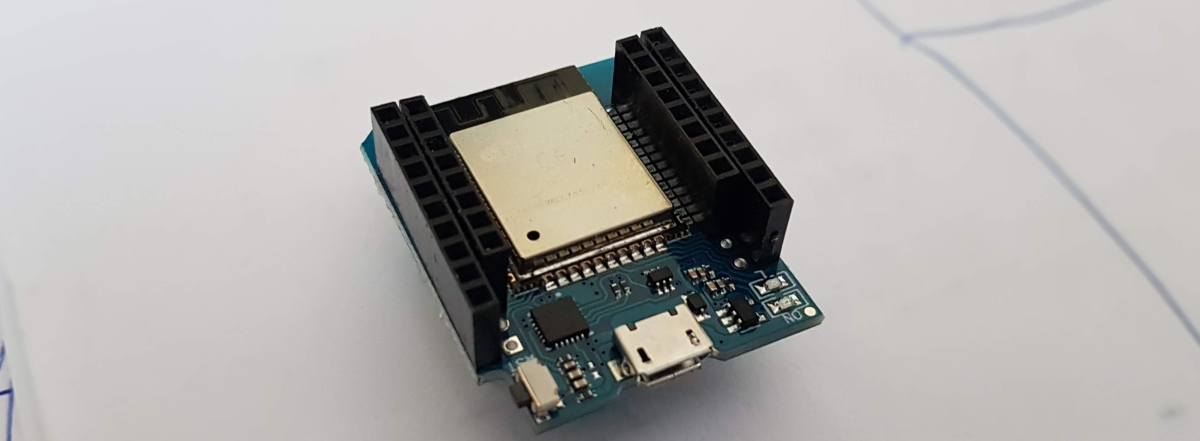
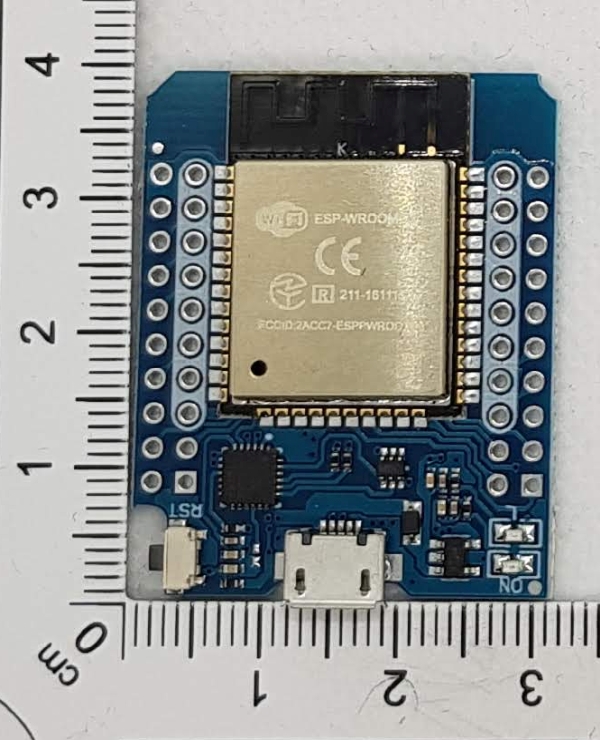
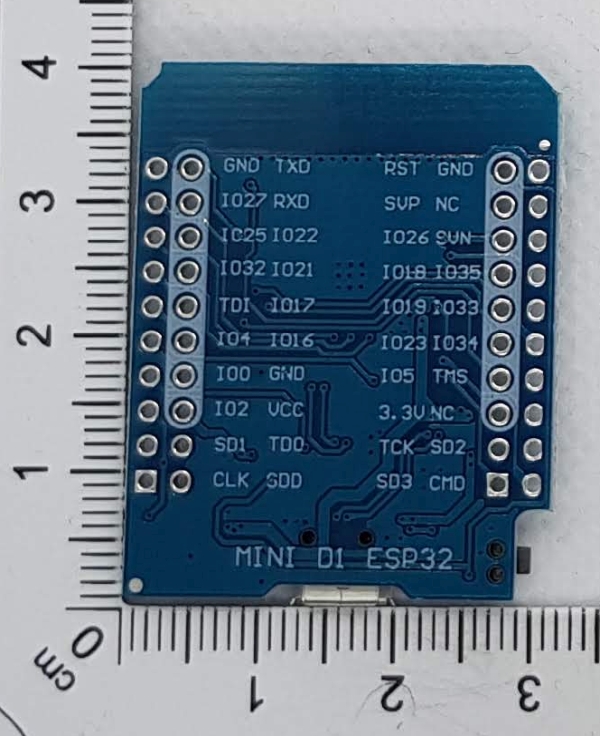
Der WEMOS D1 ESP32 ist der Ersatz für den D1 Mini. Er hat ein aufgedampftes ESP 32 Wroom Modul. Ein USB-Micro-Anschluss, ein Reset-Taster und zwei eingebaute LEDs auf dem ESP sind die einzige Peripherie. Er zählt von seinen Abmessungen eher zu den Kleinen, dies beschränkt in diesem Falle aber nicht die Anzahl der nach außen geführten 40 Pins, da diese in zwei Reihen nach außen geführt sind.
Interessant sind, wie auch beim Wemos D1 Mini, die vielen Erweiterungsplatinen (See manufacturerLink status: Broken).
Link to D1 Mini (predecessor)Link status: OK
Ich habe bei Wemos keine Hinweise über den D1 ESP32 gefunden, deshalb sei in Frage gestellt, ob dieser offiziell auch von Wemos produziert wird.
Facts
- USB Micro Connector (CH9102)
- Reset button
- 18 digitale Pins
- 8 analoge Pins (fast frei konfigurierbar)
- Operating voltage 3.3V
- Connection voltage 5V
- 4M SPI Flash Memory
- 80MHz/240MHz
- 2 LEDs
- Price ~€5
- Dimensions in mm: l/w/h 39/32/13
Pin assignment
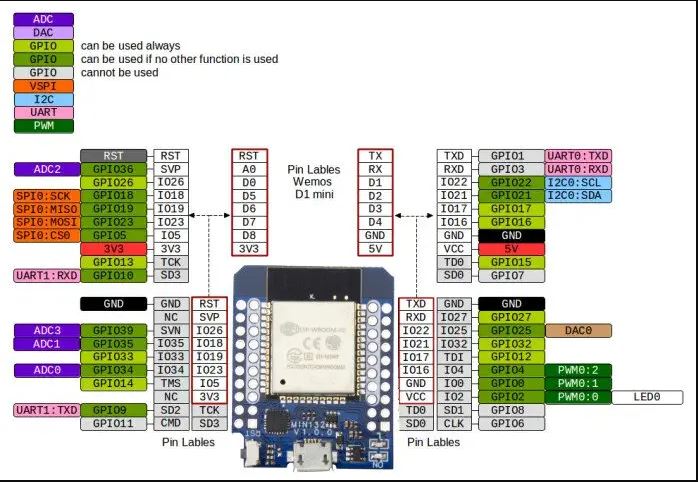
| Pin | Functions | ESP32 Pin |
|---|---|---|
| TX | UART TXD | TXD |
| RX | UART RXD | RXD |
| A0 | IO, ADC2 | GPIO36 |
| D0 | In | GPIO26 |
| D1 | In | GPIO22, I²C SCL |
| D2 | In | GPIO21, I²C SDA |
| D3 | In | GPIO17 |
| D4 | In | GPIO16 |
| D5 | In | GPIO18 |
| D6 | In | GPIO19 |
| D7 | In | GPIO23 |
| D8 | In | GPIO5 |
| G | Ground | Ground |
| 5V | 5V | – |
| 3V3 | 3.3V | 3.3V |
| RST | Reset | RST |
Source: https://www.wemos.cc/en/latest/d1/d1_mini.htmlLink status: OK
Areas of application
- Microcontroller-Projekte mit WiFi
- Remote control
- Alarm clock
- …
Views
Programming
Preparation
Der Wemos kommt mit einer CH9102-USB-Schnittstelle, sollte der Treiber noch nicht installiert sein, muss dieser nachinstalliert werden.
CH9102 USB DriverLink status: OK
Libraries
Zur Programmierung des Wemos sind keine zusätzlichen Bibliotheken nötig. Die ESP-Erweiterung der Arduino GUI muss jedoch installiert sein. Siehe hierzu auch den Link Link status: OKfor setup.
Aktueller Stand Arduino ESP32 Bibliothek V2.0.2
Test programme
Als Testprogramm kann Blink verwendet werden. Dies gibt es bei den Beispielprogrammen der Arduino GUI. Unter diesen findet sich auch das Task-gesteuerte Blink, welches zum Erlernen der Multitaskumgebung auf dem ESP32 ganz nett ist. Dies kann auch über Github bezogen werden:
https://github.com/espressif/arduino-esp32/blob/master/libraries/ESP32/examples/FreeRTOS/FreeRTOS.inoLink status: Broken
I was able to program my Wemos D1 ESP32 with the following settings:
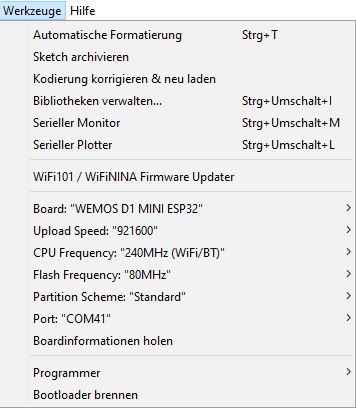
Als Port wählt bitte eure serielle Schnittstelle aus, bei mir ist es COM 15.
Problems
D-Ports werden nicht gefunden
Die D-Ports sind leider nicht gemappt, hier hilft es, einfache Defines mit den entsprechenden Ports zu erstellen. Beispiel:
#ifndef D7
#define D7 23
#endif

#ifndef D5
#define D5 18
#endif
Wemos board not recognised
CH9102Link status: OK Install drivers
Should there be any further problems ZadigLink status: OK Try.
Programming fails
Einstellungen für Board, Port und Programmer überprüfen. Evtl. auch mal andere als die von mir gezeigten ausprobieren. Es gibt auch Board-Settings für den Wemos.
Miscellaneous
Fritzing Wemos D1 ESP32 Mini:
https://forum.fritzing.org/uploads/short-url/wv8xVt6y4tFToPngAeMqUju2oUl.fzpzLink status: OK
Example projects:
https://github.com/wemos/D1_mini_ExamplesLink status: OK
Modell für den 3D-Druck
https://grabcad.com/library/wemos-d1-mini-v3-0-0-1Link status: Unknown
https://grabcad.com/library/wemos-d1-mini-1Link status: Unknown
Conclusion
Der D1 ESP32 ist aus meiner Sicht nicht ganz kompatibel, weil ich keine Boardbeschreibung für die Arduino GUI finden konnte, die auch das Mapping für die D-Ports beinhaltet. Dennoch kann dieser als schneller Ersatz dienen. Durch die zusätzlichen Pins ist er auch für andere Projekte gut geeignet. Mit den durchgeschliffenen Ports ist er auch auf einer Steckplatine betreibbar und insgesamt sehr kompakt.
Related Posts
- D1 Mini Shield – Prototyp-PlatineLink status: OK
- Preview – W600-Pico V1.0.0 1MB FlashLink status: Unknown
- D1 Mini Shield – RGB LED (Einzeln)Link status: Unknown
- D1 Mini Shield – RGB LEDLink status: Unknown
- D1 Mini Shield – PIR (Bewegungssensor)Link status: OK
- D1 Mini Shield – HR8833 MotorLink status: OK
- D1 Mini Shield – AT8870 MotorLink status: OK
- D1 Mini Shield – SG30 LuftqualitätsmessungLink status: OK
- D1 Mini Shield – I2C ConnectorLink status: Unknown
- Wemos C3 MiniLink status: Unknown
Sources
ESP Wroom 32 DatasheetLink status: OK
https://arduino-projekte.info/produkt/d1-mini-esp32-wifi-bluetooth/Link status: OK
CH9102 USB DriverLink status: OK
https://makersportal.com/shop/esp32-d1-mini-bluetoothwifi-boardLink status: OK
https://docs.platformio.org/en/stable/boards/espressif32/wemos_d1_mini32.htmlLink status: OK
| Date | Change | Author |
|---|---|---|
| 08.10.2026 | Überschriften-Hierarchie korrigiert (H1→H2, Unterebenen eine Stufe tiefer) | Suffocation |
| 03.10.2026 | Rechtschreibung korrigiert: Tippfehler, Kommas, Groß-/Kleinschreibung, Bindestriche, Formulierungen Log-Liste eingefügt | Suffocation |
| 12.04.2022 | Post created | Suffocation |
Hi Sven,
If the problem with brownout exceptions still hasn't been solved – here's a tip: insert the following code on the first line in setup().
void setup() {
RTC_CNTL_BROWN_OUT_REG,0);
.........
Hi, I found the ESP32 in the D1-mini format in my bits and bobs box and wanted to tinker with something…
As soon as I try a WifiConnect with the Arduino API, I get a brownout exception and restart. The board is connected to the computer via USB (tested with different cables and USB ports). Always the same rubbish.
Unlike other dev boards, at least the 5V voltage is available on an external pin which can be supplied with an external voltage source. Usually, for many ESP32 projects (with Wi-Fi), it is recommended to stabilise the external voltage with a hefty capacitor between +5V and GND. How should one do this with this board?
As Stefan wrote, mapping the pinouts to the Arduino code is fiddly reverse-engineering.
I would use a different board next time.
Hi Sven,
I'm currently detoxing from technology 😉, so here's just a quick message. I would have initially guessed voltage too (VCC pin). But it could also be down to the settings in the Arduino GUI, memory (size, type...).
Hello
Stefan