Last Updated on 15. October 2026 by SuffocationLink status: OK
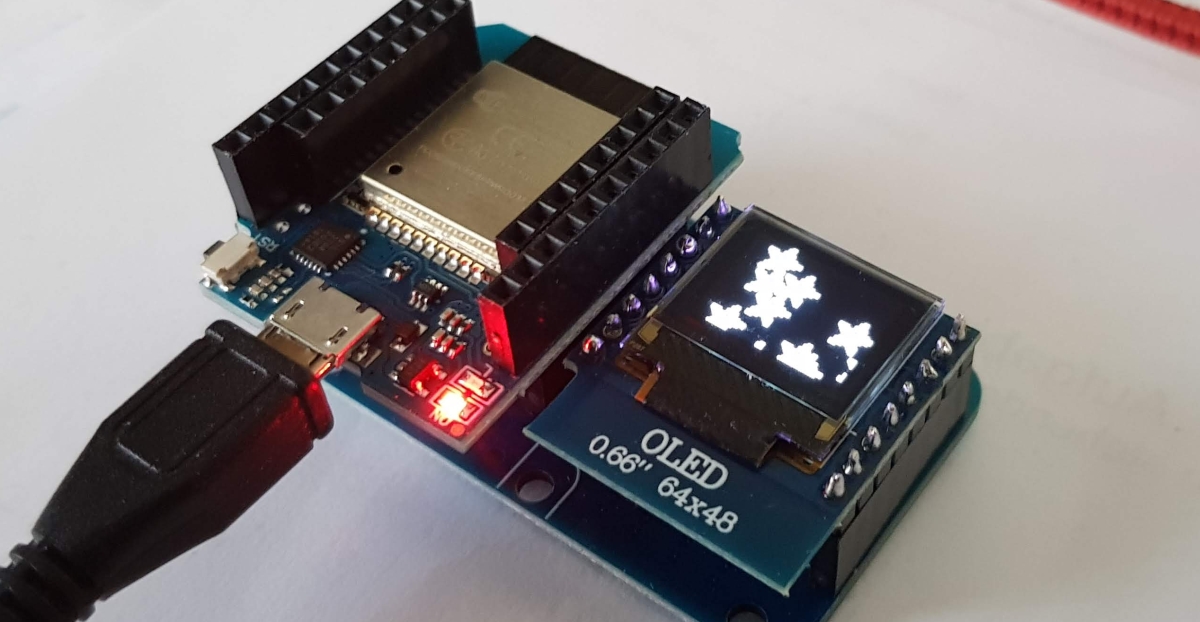
Diese Zusatzplatine bietet zum Display alles, was zur Ansteuerung eines Oled Displays notwendig ist.
For the D1 mini ESP8266 and ESP32, go here:
- Preview – W600-Pico V1.0.0 1MB FlashLink status: OK
- Wemos C3 MiniLink status: OK
- (Wemos) D1 ESP32Link status: OK
- Wemos D1 Mini Pro (V1.1.0)Link status: OK
- Wemos D1 MiniLink status: OK
Facts
- Oled Display 64×48 Pixel
| Description | Name | D1 Mini | D1 Esp32 |
|---|---|---|---|
| I2C Data Pin | SDA D2 | GPIO 4 | GPIO 32 |
| I2C Clock Pin | SCL D1 | GPIO 5 | GPIO 25 |
| I2C Address | 0x3C | 0x3C | |
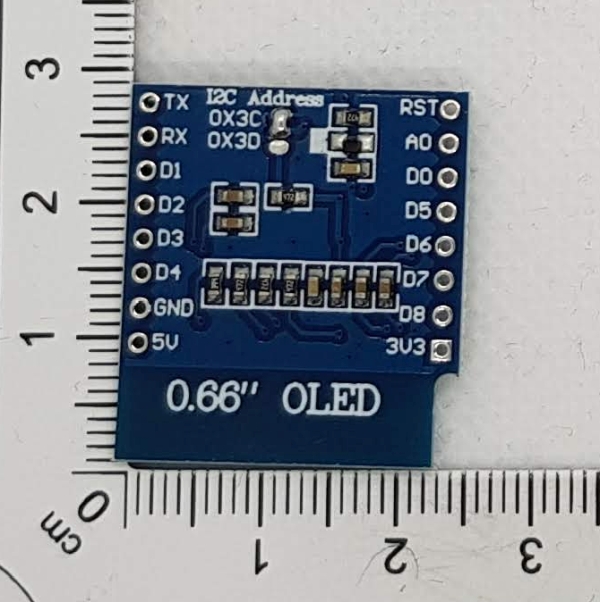
If two displays are to be controlled, the I2C address can be changed to 0x3D by re-soldering a jumper. (See the back of the PCB)
Compatibility
| D1 Type | Compatible | Begründung, wenn nicht |
|---|---|---|
| D1 mini | Yes | |
| D1 mini Pro | Yes | Untested |
| D1 mini Lite | Yes | Untested |
| D1 32 | Yes | |
S2 mini | Yes | Untested |
| C3 | Yes | Untested |
Areas of application
- Ausgabe von Informationen auf dem Display
- Debugging
- Spaß
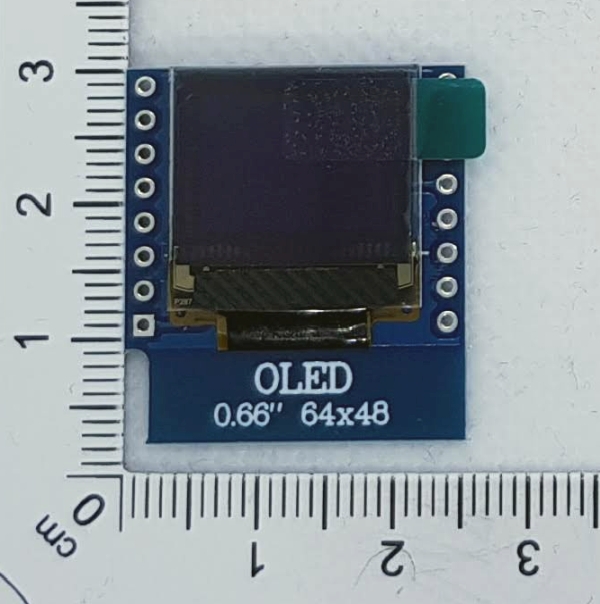
Views
Programming
Libraries
The required libraries can be loaded via the library manager.
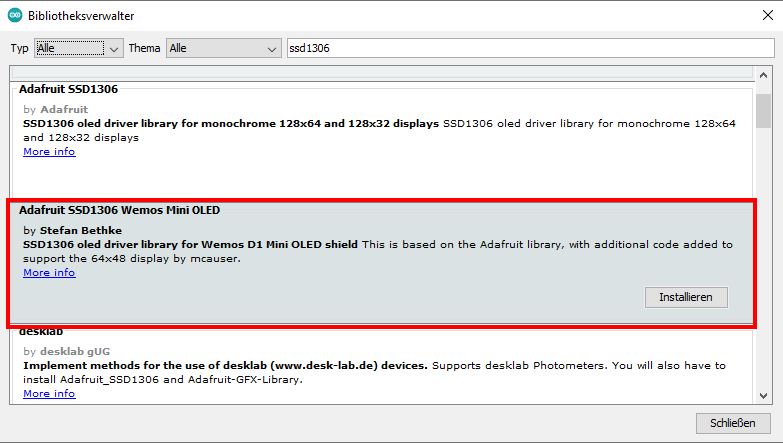
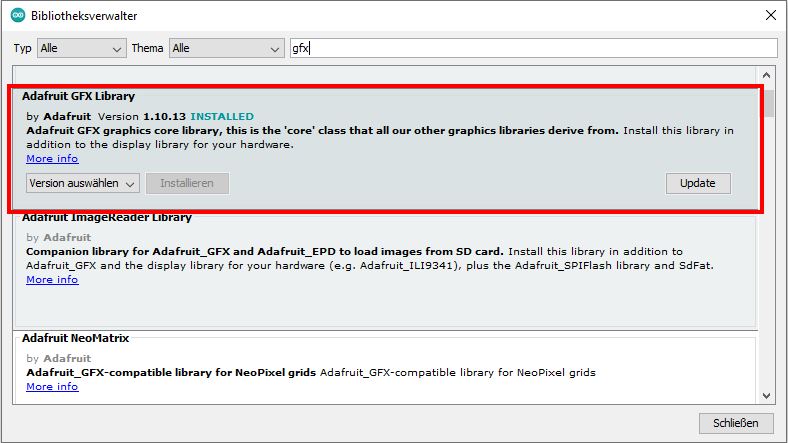
Hier sind noch die Github-Links zu den Bibliotheken:
https://github.com/stblassitude/Adafruit_SSD1306_Wemos_OLEDLink status: OK
https://github.com/adafruit/Adafruit-GFX-LibraryLink status: OK
Arduino ESP32 Library V2.0.2
Arduino ESP8266 Bibliothek V3.0.2
Test programme
I have used the test program from the library:
Source code ssd1306_64x48_i2c.ino (GitHubLink status: OK)
/*********************************************************************
This is an example for our Monochrome OLEDs based on SSD1306 drivers

  Pick one up today in the adafruit shop!
  ------> http://www.adafruit.com/category/63_98

This example is for a 64x48 size display using I2C to communicate
3 pins are required to interface (2 I2C and one reset)

Adafruit invests time and resources providing this open source code,
please support Adafruit and open-source hardware by purchasing
products from Adafruit!

Written by Limor Fried/Ladyada  for Adafruit Industries.
BSD license, check license.txt for more information
All text above, and the splash screen must be included in any redistribution
*********************************************************************/

#include <SPI.h>
#include <Wire.h>
#include <Adafruit_GFX.h>
#include <Adafruit_SSD1306.h>

// SCL GPIO5
// SDA GPIO4
#define OLED_RESET 0  // GPIO0
Adafruit_SSD1306 display(OLED_RESET);

#define NUMFLAKES 10
#define XPOS 0
#define YPOS 1
#define DELTAY 2


#define LOGO16_GLCD_HEIGHT 16
#define LOGO16_GLCD_WIDTH  16
static const unsigned char PROGMEM logo16_glcd_bmp[] =
{ B00000000, B11000000,
  B00000001, B11000000,
  B00000001, B11000000,
  B00000011, B11100000,
  B11110011, B11100000,
  B11111110, B11111000,
  B01111110, B11111111,
  B00110011, B10011111,
  B00011111, B11111100,
  B00001101, B01110000,
  B00011011, B10100000,
  B00111111, B11100000,
  B00111111, B11110000,
  B01111100, B11110000,
  B01110000, B01110000,
  B00000000, B00110000 };

#if (SSD1306_LCDHEIGHT != 48)
#error("Height incorrect, please fix Adafruit_SSD1306.h!");
#endif

void setup()   {
  Serial.begin(9600);

  // by default, we'll generate the high voltage from the 3.3v line internally! (neat!)
  display.begin(SSD1306_SWITCHCAPVCC, 0x3C);  // initialize with the I2C addr 0x3C (for the 64x48)
  // init done

  // Show image buffer on the display hardware.
  // Since the buffer is intialized with an Adafruit splashscreen
  // internally, this will display the splashscreen.
  display.display();
  delay(2000);

  // Clear the buffer.
  display.clearDisplay();

  // draw a single pixel
  display.drawPixel(10, 10, WHITE);
  // Show the display buffer on the hardware.
  // NOTE: You _must_ call display after making any drawing commands
  // to make them visible on the display hardware!
  display.display();
  delay(2000);
  display.clearDisplay();

  // draw many lines
  testdrawline();
  display.display();
  delay(2000);
  display.clearDisplay();

  // draw rectangles
  testdrawrect();
  display.display();
  delay(2000);
  display.clearDisplay();

  // draw multiple rectangles
  testfillrect();
  display.display();
  delay(2000);
  display.clearDisplay();

  // draw mulitple circles
  testdrawcircle();
  display.display();
  delay(2000);
  display.clearDisplay();

  // draw a white circle, 10 pixel radius
  display.fillCircle(display.width()/2, display.height()/2, 10, WHITE);
  display.display();
  delay(2000);
  display.clearDisplay();

  testdrawroundrect();
  delay(2000);
  display.clearDisplay();

  testfillroundrect();
  delay(2000);
  display.clearDisplay();

  testdrawtriangle();
  delay(2000);
  display.clearDisplay();

  testfilltriangle();
  delay(2000);
  display.clearDisplay();

  // draw the first ~12 characters in the font
  testdrawchar();
  display.display();
  delay(2000);
  display.clearDisplay();

  // draw scrolling text
  testscrolltext();
  delay(2000);
  display.clearDisplay();

  // text display tests
  display.setTextSize(1);
  display.setTextColor(WHITE);
  display.setCursor(0,0);
  display.println("Hello, world!");
  display.setTextColor(BLACK, WHITE); // 'inverted' text
  display.println(3.141592);
  display.setTextSize(2);
  display.setTextColor(WHITE);
  display.print("0x"); display.println(0xDEADBEEF, HEX);
  display.display();
  delay(2000);
  display.clearDisplay();

  // miniature bitmap display
  display.drawBitmap(30, 16,  logo16_glcd_bmp, 16, 16, 1);
  display.display();
  delay(1);

  // invert the display
  display.invertDisplay(true);
  delay(1000);
  display.invertDisplay(false);
  delay(1000);
  display.clearDisplay();

  // draw a bitmap icon and 'animate' movement
  testdrawbitmap(logo16_glcd_bmp, LOGO16_GLCD_HEIGHT, LOGO16_GLCD_WIDTH);
}


void loop() {

}


void testdrawbitmap(const uint8_t *bitmap, uint8_t w, uint8_t h) {
  uint8_t icons[NUMFLAKES][3];

  // initialize
  for (uint8_t f=0; f< NUMFLAKES; f++) {
    icons[f][XPOS] = random(display.width());
    icons[f][YPOS] = 0;
    icons[f][DELTAY] = random(5) + 1;

    Serial.print("x: ");
    Serial.print(icons[f][XPOS], DEC);
    Serial.print(" y: ");
    Serial.print(icons[f][YPOS], DEC);
    Serial.print(" dy: ");
    Serial.println(icons[f][DELTAY], DEC);
  }

  while (1) {
    // draw each icon
    for (uint8_t f=0; f< NUMFLAKES; f++) {
      display.drawBitmap(icons[f][XPOS], icons[f][YPOS], bitmap, w, h, WHITE);
    }
    display.display();
    delay(200);

    // then erase it + move it
    for (uint8_t f=0; f< NUMFLAKES; f++) {
      display.drawBitmap(icons[f][XPOS], icons[f][YPOS], bitmap, w, h, BLACK);
      // move it
      icons[f][YPOS] += icons[f][DELTAY];
      // if its gone, reinit
      if (icons[f][YPOS] > display.height()) {
        icons[f][XPOS] = random(display.width());
        icons[f][YPOS] = 0;
        icons[f][DELTAY] = random(5) + 1;
      }
    }
   }
}


void testdrawchar(void) {
  display.setTextSize(1);
  display.setTextColor(WHITE);
  display.setCursor(0,0);

  for (uint8_t i=0; i < 168; i++) {
    if (i == '\n') continue;
    display.write(i);
    if ((i > 0) && (i % 21 == 0))
      display.println();
  }
  display.display();
  delay(1);
}

void testdrawcircle(void) {
  for (int16_t i=0; i<display.height(); i+=2) {
    display.drawCircle(display.width()/2, display.height()/2, i, WHITE);
    display.display();
    delay(1);
  }
}

void testfillrect(void) {
  uint8_t color = 1;
  for (int16_t i=0; i<display.height()/2; i+=3) {
    // alternate colors
    display.fillRect(i, i, display.width()-i*2, display.height()-i*2, color%2);
    display.display();
    delay(1);
    color++;
  }
}

void testdrawtriangle(void) {
  for (int16_t i=0; i<min(display.width(),display.height())/2; i+=5) {
    display.drawTriangle(display.width()/2, display.height()/2-i,
                     display.width()/2-i, display.height()/2+i,
                     display.width()/2+i, display.height()/2+i, WHITE);
    display.display();
    delay(1);
  }
}

void testfilltriangle(void) {
  uint8_t color = WHITE;
  for (int16_t i=min(display.width(),display.height())/2; i>0; i-=5) {
    display.fillTriangle(display.width()/2, display.height()/2-i,
                     display.width()/2-i, display.height()/2+i,
                     display.width()/2+i, display.height()/2+i, WHITE);
    if (color == WHITE) color = BLACK;
    else color = WHITE;
    display.display();
    delay(1);
  }
}

void testdrawroundrect(void) {
  for (int16_t i=0; i<display.height()/2-2; i+=2) {
    display.drawRoundRect(i, i, display.width()-2*i, display.height()-2*i, display.height()/4, WHITE);
    display.display();
    delay(1);
  }
}

void testfillroundrect(void) {
  uint8_t color = WHITE;
  for (int16_t i=0; i<display.height()/2-2; i+=2) {
    display.fillRoundRect(i, i, display.width()-2*i, display.height()-2*i, display.height()/4, color);
    if (color == WHITE) color = BLACK;
    else color = WHITE;
    display.display();
    delay(1);
  }
}

void testdrawrect(void) {
  for (int16_t i=0; i<display.height()/2; i+=2) {
    display.drawRect(i, i, display.width()-2*i, display.height()-2*i, WHITE);
    display.display();
    delay(1);
  }
}

void testdrawline() {
  for (int16_t i=0; i<display.width(); i+=4) {
    display.drawLine(0, 0, i, display.height()-1, WHITE);
    display.display();
    delay(1);
  }
  for (int16_t i=0; i<display.height(); i+=4) {
    display.drawLine(0, 0, display.width()-1, i, WHITE);
    display.display();
    delay(1);
  }
  delay(250);

  display.clearDisplay();
  for (int16_t i=0; i<display.width(); i+=4) {
    display.drawLine(0, display.height()-1, i, 0, WHITE);
    display.display();
    delay(1);
  }
  for (int16_t i=display.height()-1; i>=0; i-=4) {
    display.drawLine(0, display.height()-1, display.width()-1, i, WHITE);
    display.display();
    delay(1);
  }
  delay(250);

  display.clearDisplay();
  for (int16_t i=display.width()-1; i>=0; i-=4) {
    display.drawLine(display.width()-1, display.height()-1, i, 0, WHITE);
    display.display();
    delay(1);
  }
  for (int16_t i=display.height()-1; i>=0; i-=4) {
    display.drawLine(display.width()-1, display.height()-1, 0, i, WHITE);
    display.display();
    delay(1);
  }
  delay(250);

  display.clearDisplay();
  for (int16_t i=0; i<display.height(); i+=4) {
    display.drawLine(display.width()-1, 0, 0, i, WHITE);
    display.display();
    delay(1);
  }
  for (int16_t i=0; i<display.width(); i+=4) {
    display.drawLine(display.width()-1, 0, i, display.height()-1, WHITE);
    display.display();
    delay(1);
  }
  delay(250);
}

void testscrolltext(void) {
  display.setTextSize(2);
  display.setTextColor(WHITE);
  display.setCursor(10,0);
  display.clearDisplay();
  display.println("scroll");
  display.display();
  delay(1);

  display.startscrollright(0x00, 0x0F);
  delay(2000);
  display.stopscroll();
  delay(1000);
  display.startscrollleft(0x00, 0x0F);
  delay(2000);
  display.stopscroll();
  delay(1000);
  display.startscrolldiagright(0x00, 0x07);
  delay(2000);
  display.startscrolldiagleft(0x00, 0x07);
  delay(2000);
  display.stopscroll();
}
That's how it is
Problems
–
Conclusion
Ein Display für alle Projekte, etwas klein, aber für erste Gehversuche reichts.
More posts
Other Shields
- D1 Mini Shield – Prototyp-PlatineLink status: OK
- D1 Mini Shield – RGB LED (Einzeln)Link status: OK
- D1 Mini Shield – RGB LEDLink status: OK
- D1 Mini Shield – PIR (Bewegungssensor)Link status: OK
- D1 Mini Shield – HR8833 MotorLink status: OK
- D1 Mini Shield – AT8870 MotorLink status: OK
- D1 Mini Shield – SG30 LuftqualitätsmessungLink status: OK
- D1 Mini Shield – I2C ConnectorLink status: OK
- D1 Mini Shield – Matrix LED ShieldLink status: OK
- D1 Mini Shield – Buzzer (Pipser)Link status: OK
More ESPs
- October Check 2026 – Neue Mikrocontroller und BoardsLink status: OK
- Ulanzi TC001 Smart Pixel ClockLink status: OK
- ESP WEB Serial LibraryLink status: OK
- ESP32-C3 Seeed Studio XIAOLink status: OK
- ESP32-C3 Super Mini BoardLink status: OK
- Preview – LuatOs ESP32-C3 BoardLink status: OK
- ESP32 Bluetooth GamepadLink status: OK
- ESP01 – DHT11 Temperatur und Feuchte Sensor PlatinenLink status: OK
- ESP01 Relay BoardsLink status: OK
- ESP8266/32 WiFi Manager.Link status: OK
Sources
Sources for the Shield
Manufacturer's websiteLink status: OK
Manufacturer's detailsLink status: OK
https://github.com/stblassitude/Adafruit_SSD1306_Wemos_OLEDLink status: OK
https://github.com/adafruit/Adafruit-GFX-LibraryLink status: OK
Sources for the boards
Manufacturer's websiteLink status: OK
SchematicLink status: OK
CH340 USB DriverLink status: OK
https://arduino-projekte.info/wemos-d1-mini/Link status: OK
https://www.exp-tech.de/plattformen/esp8266/entwicklungsboards/8898/wemos-d1-miniLink status: Broken
| Date | Change | Author |
|---|---|---|
| 15.10.2026 | Beispielcode als Code-Block eingefügt (Einbettung über gist-it.appspot.com funktionierte nicht mehr) | Suffocation |
| 08.10.2026 | Überschriften-Hierarchie korrigiert (H1→H2, Unterebenen eine Stufe tiefer) | Suffocation |
| 04.10.2026 | Rechtschreibung korrigiert: Tippfehler, Kommas, Grammatik | Suffocation |
| 03.10.2026 | Log-Liste eingefügt | Suffocation |
| 10.04.2022 | Post created | Suffocation |