Last Updated on 15. October 2026 by SuffocationLink status: OK
Die meisten GPIO Pins des ESP32 sind, bis auf ein paar Ausnahmen, sowohl Eingänge als auch Ausgänge (siehe hierzu auch das entsprechende Datenblatt). Wie diese digital angesteuert werden, zeigen die nächsten Beispiele.
Basics
Sind die Pins als digital konfiguriert, können sie jeweils den Wert 1= true oder 0= false annehmen.
Ausgang
Hier das Blinkbeispiel mit dem periodischen Timer aus der vorangegangenen Übung. Nur wird jetzt eine LED geschaltet.
Als binären Ausgang konfigurieren
gpio_set_direction(<LED_PIN>, GPIO_MODE_OUTPUT);Wert setzen
gpio_set_level(<LED_PIN>, <0|1>);
Source code main.c (GitHubLink status: OK)
/** idf example
 *
 * Timed gpio example (Blink like application)
 *
 * Some parts are copied from the official idf examples found on
 * https://docs.espressif.com/projects/esp-idf/en/latest/esp32/
 *
 * Modified by SteFam @ http://www.fambach.net
 *
 * GPLv3
 * Blah blah blah, free to use.
 * I invested some time and money in those examples if you want to delete this header
 * please do not forget to mention at least my website, thanks!
*/


#include <stdio.h>
#include "freertos/FreeRTOS.h"
#include "freertos/task.h"
#include "driver/gpio.h"
#include "sdkconfig.h"
#include "esp_log.h"

static const char* TAG ="L6";
static const int LED_PIN = CONFIG_LED_PIN;
static const int DELAY   = CONFIG_LED_BLINK_DELAY_MS;


// method declaration for timer callbacks
static void timer_callback(void* arg);

void app_main(void)
{
	//* setup gpio pins
	 gpio_reset_pin(LED_PIN);
    /* Set the GPIO as a push/pull output */
    gpio_set_direction(LED_PIN, GPIO_MODE_OUTPUT);


	//* setup timer

	//** create arguments for timer task
	const esp_timer_create_args_t periodic_timer_args = {
			/* name of the callback function defined before */
			.callback = &timer_callback,
			/* name is optional, but may help identify the timer when debugging */
			.name = "periodic"
    };

	//** create time itself
	esp_timer_handle_t periodic_timer;
	ESP_ERROR_CHECK(esp_timer_create(&periodic_timer_args, &periodic_timer));

	//** start the timer periodic
	ESP_ERROR_CHECK(esp_timer_start_periodic(periodic_timer, DELAY*1000));

	//** for a single shot do this
	// ESP_ERROR_CHECK(esp_timer_start_single(periodic_timer, DELAY*1000));

}

static bool curState = 0;
static void timer_callback(void* arg)
{
	curState = !curState;
	ESP_LOGV(TAG,"Current LED State = %s", (curState?"TRUE":"FALSE"));
	gpio_set_level(LED_PIN, !curState);
}
Eingang
Mein Code hierzu orientiert sich sehr stark am Beispiel Projekt „examples/peripherals/gpio/generic_gpio“ der IDF.
Das Beispiel ist leider etwas umfangreicher geworden, da es mit zwei essenziellen Mechanismen arbeitet. Zum einen mit den Interrupts und zum anderen mit einem Task. Die Tasks habe ich kurz zuvor eingeführt.
Als binären Eingang konfigurieren
gpio_set_direction(<LED_PIN>, GPIO_MODE_INPUT);Wert abfragen
bool gpio_get_level(<PIN>);Interrupt aktivieren
//Interupt Typ setzten
gpio_set_intr_type(
     <PIN>,
     <
      GPIO_INTR_DISABLE // deaktiviert
      GPIO_INTR_POSEDGE
 // Steigende Flanke
      GPIO_INTR_NEGEDGE
 // Fallender Flanke

      GPIO_INTR_ANYEDGE
 // Beider Flanken
      GPIO_INTR_LOW_LEVEL
 // Eingang Low
      GPIO_INTR_HIGH_LEVEL // Eingang High
     >
);

// Interupt für Pin aktivieren
gpio_intr_enable(<PIN>);
Beispielprogramm
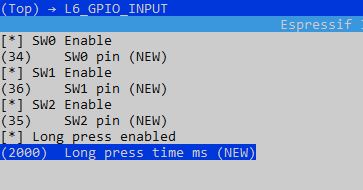
Vor der Verwendung des Beispielprogramms menuconfig nicht vergessen, die Schalter können einzeln aktiviert werden. Zusätzlich kann die Kurz/Lang Unterscheidung eingeschaltet werden. Diese prüft, ob ein Knopf lange oder kurz gedrückt wurde:
Source code main.c (GitHubLink status: OK)
/** idf example
 *
 * Timed gpio input example with three switches
 *
 * Some parts are copied from the official idf examples found on
 * https://docs.espressif.com/projects/esp-idf/en/latest/esp32/
 *
 * Modified by SteFam @ http://www.fambach.net
 *
 * GPLv3
 * Blah blah blah, free to use.
 * I invested some time and money in those examples if you want to delete this header
 * please do not forget to mention at least my website, thanks!
*/


#include <stdio.h>
#include "freertos/FreeRTOS.h"
#include "freertos/task.h"
#include "freertos/queue.h"
#include "driver/gpio.h"
#include "sdkconfig.h"
#include "esp_log.h"

#define ESP_INTR_FLAG_DEFAULT 0
static const char* TAG = "L6_INPUT";
static bool enabled[] = {CONFIG_SW0_ENABLE,CONFIG_SW1_ENABLE,CONFIG_SW2_ENABLE};
static int pin[] = {CONFIG_SW0_PIN,CONFIG_SW1_PIN,CONFIG_SW2_PIN};
static bool debounce[] = {true,true,true};
#ifdef CONFIG_LONG_PRESS_ENABLED
static uint64_t press_time[] = {0,0,0};
#endif
static xQueueHandle gpio_evt_queue = NULL;


static void IRAM_ATTR gpio_isr_handler(void* arg)
{
	// get argument(s)
    uint32_t index = (uint32_t) arg;

	// create an event
	xQueueSendFromISR(gpio_evt_queue, &index, NULL);
}

/** button tasks
 *  check for gpio events
*/
static void button_task(void* arg)
{
    uint32_t index; // =(uint32_t) arg;

	while(true) {

        if(xQueueReceive(gpio_evt_queue, &index, portMAX_DELAY)) {
			//printf("GPIO[%d] intr, val: %d\n", pin[index], gpio_get_level(pin[index]));
			bool level = gpio_get_level(pin[index]);
			if(debounce[index] != level){

				debounce[index] = level;
				if(level){

#ifdef CONFIG_LONG_PRESS_ENABLED
					int32_t elapsed_time= (int32_t)(esp_timer_get_time()-press_time[index]);
					elapsed_time /=1000;
					//elapsed_time -= CONFIG_LONG_PRESS_TIME_MS; // if > 0 a long press was done
					ESP_LOGD(TAG,"GPIO[%d] OFF ms[%i] %spress \n", pin[index], elapsed_time, (elapsed_time - CONFIG_LONG_PRESS_TIME_MS> 0? "long" : "short"));
					press_time[index]=0;
#else
					ESP_LOGD(TAG,"GPIO[%d] OFF \n", pin[index]);
#endif

				} else {
					ESP_LOGD(TAG,"GPIO[%d] ON\n", pin[index]);

#ifdef CONFIG_LONG_PRESS_ENABLED
					press_time[index]=esp_timer_get_time();
#endif
				}

			}else {
				//ESP_LOGD(TAG,"Bounce %i",pin[index]);
			}
		} else {
			ESP_LOGD(TAG, "Timeout waiting for Interrupt, go on next round");
		}
	}
}


void app_main(void)
{
	//install gpio isr service
	ESP_ERROR_CHECK(gpio_install_isr_service(ESP_INTR_FLAG_DEFAULT));


	//* init switches and set interupt routines
	for(int i =0; i <3;i++){
		if(enabled[i]){
			// set up pin
			ESP_LOGI(TAG,"SW%i Activated - Pin =%i ",i,pin[i]);
			ESP_ERROR_CHECK(gpio_reset_pin(pin[i]));

			ESP_ERROR_CHECK(gpio_set_direction(pin[i], GPIO_MODE_INPUT));

			//change gpio intrrupt type for one pin
			ESP_ERROR_CHECK(gpio_set_intr_type(pin[i], GPIO_INTR_ANYEDGE));

			// enable interupt
			ESP_ERROR_CHECK(gpio_intr_enable(pin[i]));

			// set level
			ESP_ERROR_CHECK(gpio_intr_enable(pin[i]));

			// pull mode
			ESP_ERROR_CHECK(gpio_set_pull_mode(pin[i],GPIO_PULLDOWN_ONLY));

			// discrete functions for pull mode
			// enable pullup
			//ESP_ERROR_CHECK(gpio_pullup_en(pin[i]));

			// disable pulldown
			//ESP_ERROR_CHECK(gpio_pulldown_dis(pin[i]));


			//hook isr handler for specific gpio pin
			ESP_ERROR_CHECK(gpio_isr_handler_add(pin[i], gpio_isr_handler, (void*)i));

		}

	}

	//create a queue to handle gpio event from isr
    gpio_evt_queue = xQueueCreate(10, sizeof(uint32_t));

    //start gpio task to handle the buttons
    xTaskCreate(button_task, "button_task", 2048, NULL, 10, NULL);

}
Conclusion
GPIOs sind einfach zu bedienen. Die Handhabung ähnelt der Arduino GUI. Kommen Interrupts dazu, wird der Code schnell komplexer.
Related Posts
Main contributionLink status: Broken
Sources
IDF – Programming GuideLink status: OK
IDF – GPIO & RTC GPIOLink status: OK
| Date | Change | Author |
|---|---|---|
| 15.10.2026 | Beispielcode als Code-Block eingefügt (Einbettung über gist-it.appspot.com funktionierte nicht mehr) | Suffocation |
| 04.10.2026 | Rechtschreibung korrigiert: Tippfehler, Kommas, Groß-/Kleinschreibung, Grammatik | Suffocation |
| 03.10.2026 | Log-Liste eingefügt | Suffocation |
| 18.01.2021 | Post created | Suffocation |