Last Updated on 18. October 2026 by SuffocationLink status: OK
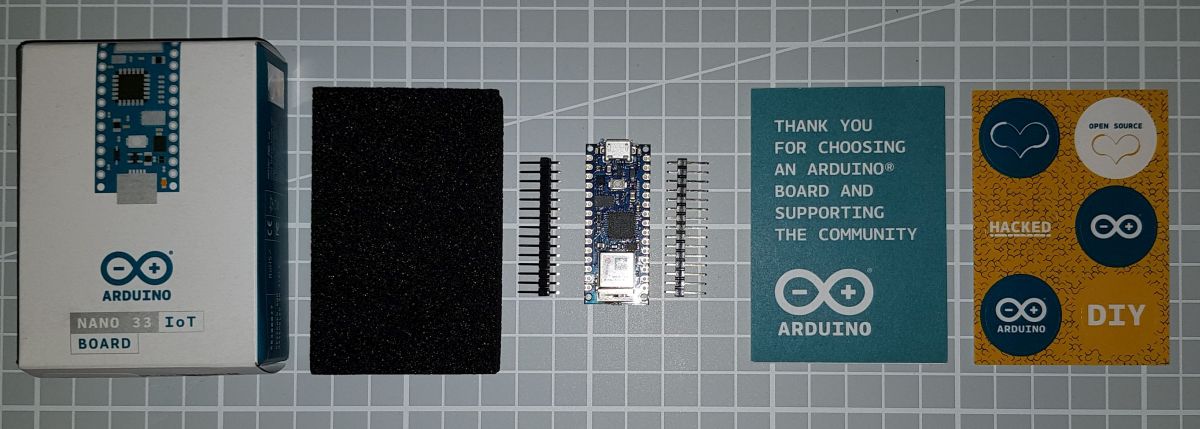
Ich konnte in einem Rausch von Einkaufswahn nicht widerstehen und habe mir das neue Powerpaket von Arduino bestellt. Der 33 IOT ist in der Bauform des Nanos, besitzt jedoch Wifi. Auch ist eine IMULink status: OK integriert, mit der die AccelerationLink status: OK and the situation in the roomLink status: OK bestimmt werden können. Mehr zu diesem erstaunlichen Board in den folgenden Abschnitten.
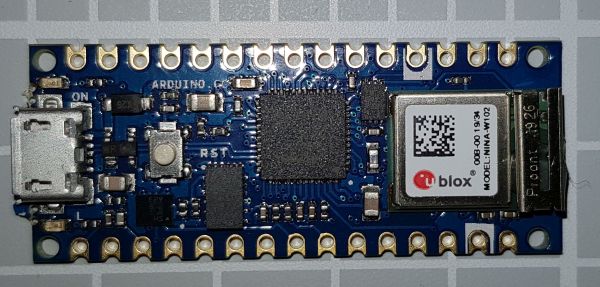
Die WLAN-Kommunikation übernimmt ein u-blox-Baustein, der intern einen ESP32 verbaut hat.
ATTENTIONThis Nano is not compatible with the original Nano as it operates at 3.3V instead of 5V. This is also indicated by the 33 in the name.
Facts
| Arduino Nano 33 IoT | Arduino Nano 33 BLE | |
|---|---|---|
| Manufacturer | Arduino | Arduino |
| Processor | SAMD21 Cortex®-M0+ 32bit low power ARM MCU | 64 MHz Arm® Cortex-M4F (with FPU) |
| Kernel | 1 | |
| Tact | 48 MHz | 64 MHz |
| Flash | 256 KB | 1 megabyte |
| SRAM | 32 KB | 256KB |
| Digitale Pins | 22 | 14 |
| Analoge Eingänge | 8 | 8 |
| PWM-Pins | 5 | 5 |
| Interrupt-Pins | 9 (D2, D3, D9, D10, D11, D13, A1, A5, A7) | 14 |
| UART | 1 | 1 |
| SPI | 1 | 1 |
| I²C | 1 | 1 |
| WLAN | 2,4 GHz 802.11 b/g/n (NINA-W102) · WEP / TKIP / CCMP (AES) | |
| Bluetooth | 4.2 BR/EDR / 4.2 Low power | NINA-B306 Module Bluetooth® Low Energy 5.0 Module Bluetooth® 5 Multiprotocol / Zigbee |
| USB | 1 Micro | 1 Micro |
| Operating voltage | 3,3 V | 3,3 V |
| Input voltage | 5-18 V (max. 21 V) | 5-18 V (max. 21 V) |
| Stromaufnahme | 7 mA | 30 mA |
| Abmessungen | 43,16 x 17,77 mm | 43,16 x 17,76 mm |
| Weight | 5 g | 5 g |
| Weitere Bausteine | ATECC608A Crypto-Chip, 6-Achsen-IMU (LSM6DS3) | LSM9DS1 (9 axis IMU) MPM3610 DC regulator NFC-A tag Nina B306 |
Areas of application
- Bluetooth-gesteuerte Anwendungen
- Connected sensors
- Internet of Things
Views
Programming
Board installieren
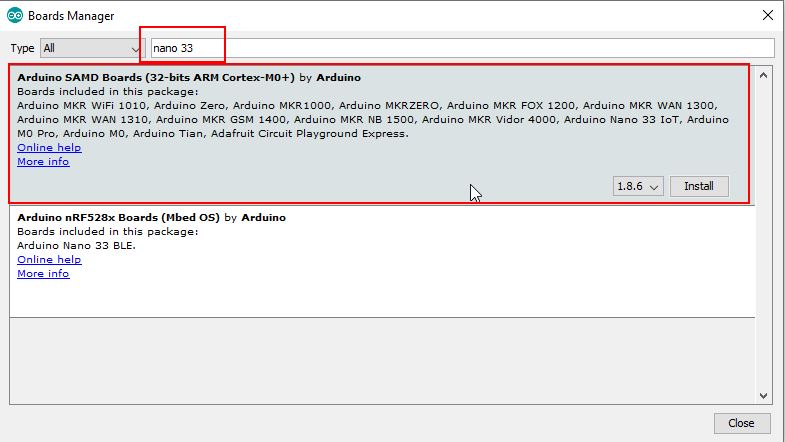
Der Nano33Iot selbst muss über den Board Manager installiert werden.
Libraries
Wi-Fi
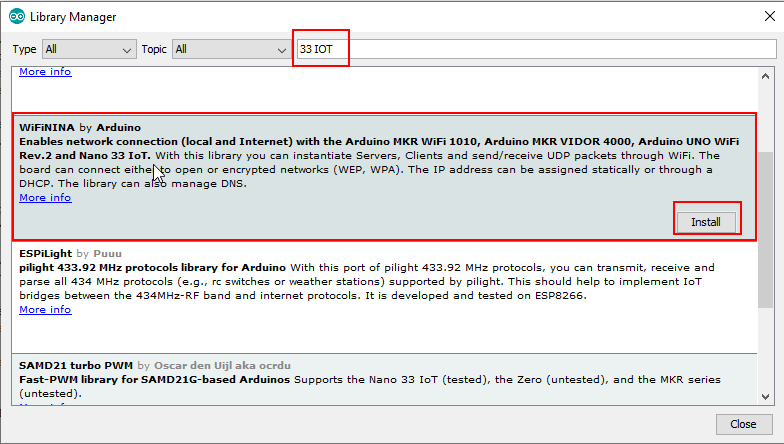
Für das WLAN gibt es die WiFiNINALink status: OK-Bibliothek.
IMU
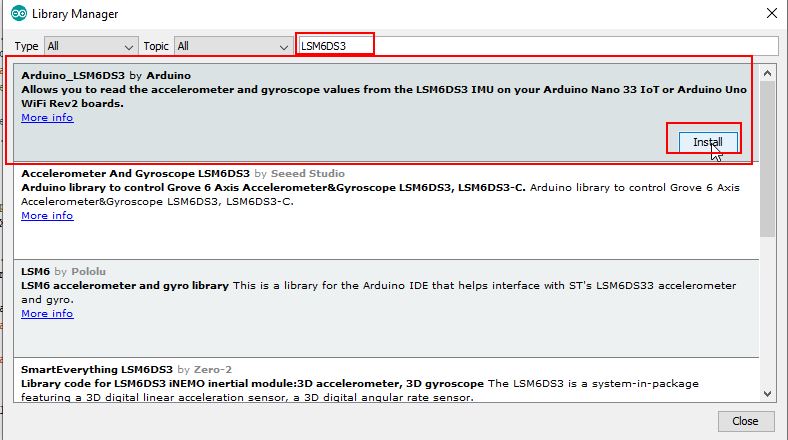
Der IMU-Chip ist ein LSM6DS3Link status: Unknown und Arduino bietet hierfür eine eigene Bibliothek. Die Installation ist über den Bibliothekar möglich.
Bluetooth
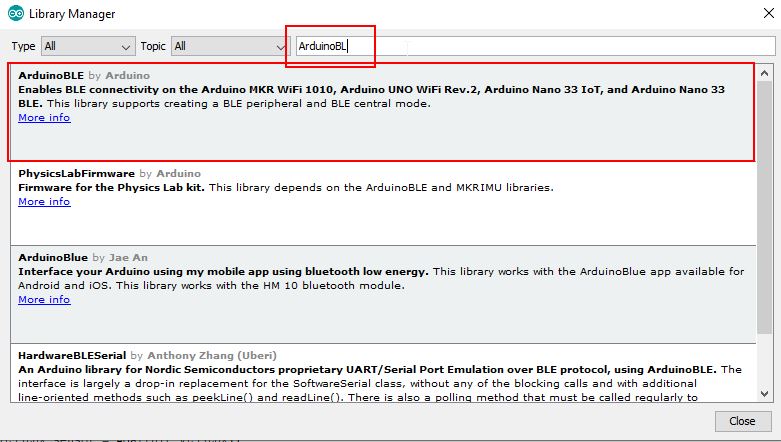
Für Bluetooth hat Arduino eine eigene Bibliothek, die alle ihre Chips unterstützen.
Test programme
Bluetooth
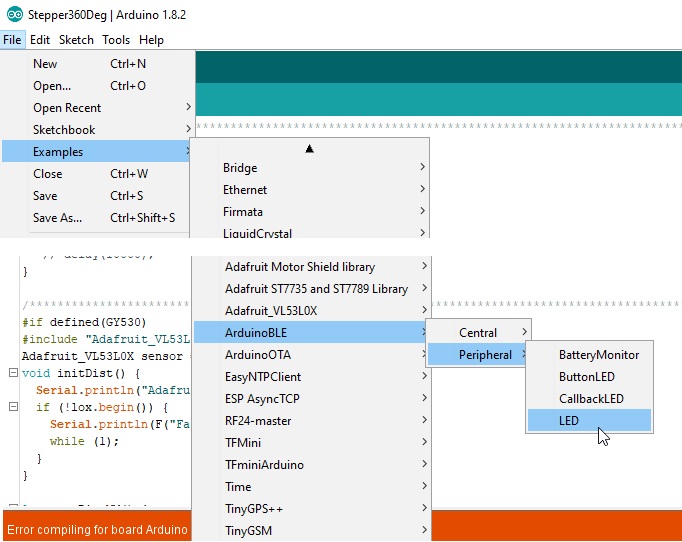
Bei der ArduinoBLE-Bibliothek ist ein einfaches Testprogramm enthalten. Mit diesem kann die LED auf dem Nano-Board mit Bluetooth ein-/ausgeschaltet werden.
Testprogramm auswählen, kompilieren und auf den Arduino spielen.
Android-App fürs Handy installieren, um Werte an das Bluetooth-Device zu schicken.
LightBlue Google Play StoreLink status: OK
Na gut, auch für Apfelnutzer:
LightBlue Apple StoreLink status: OK
Applikation starten
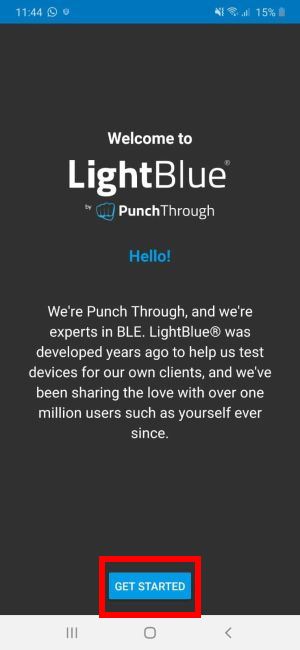
Device auswählen
Below, enter 0 = for LED off or anything else for LED on and press the Write button.
Miscellaneous
Programming over the network
https://github.com/jandrassy/ArduinoOTALink status: Unknown
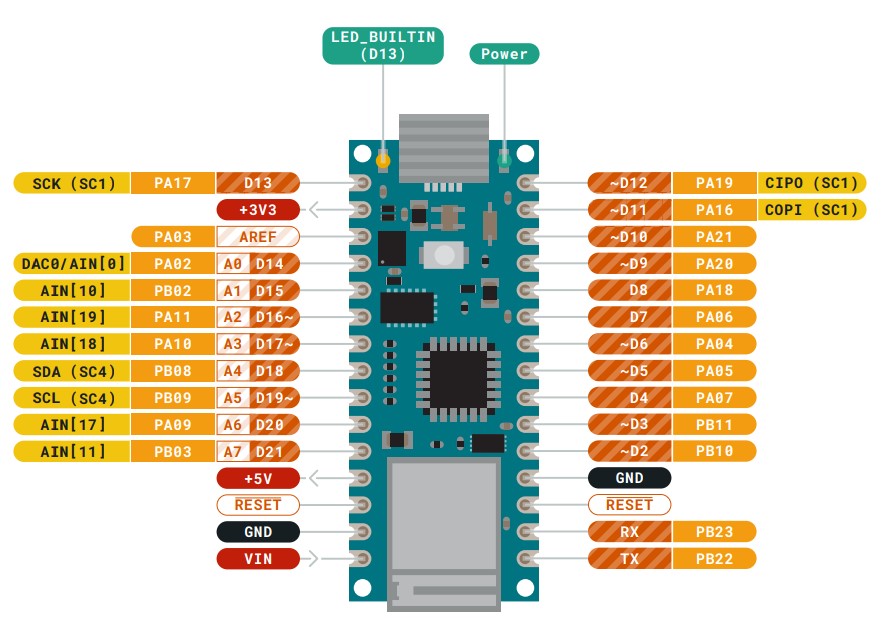
Full pinout on Arduino
https://content.arduino.cc/assets/Pinout-NANO33IoT_latest.pdfLink status: Unknown
Fritzing part
https://content.arduino.cc/assets/Arduino%20Nano%2033%20IOT.fzpzLink status: Unknown
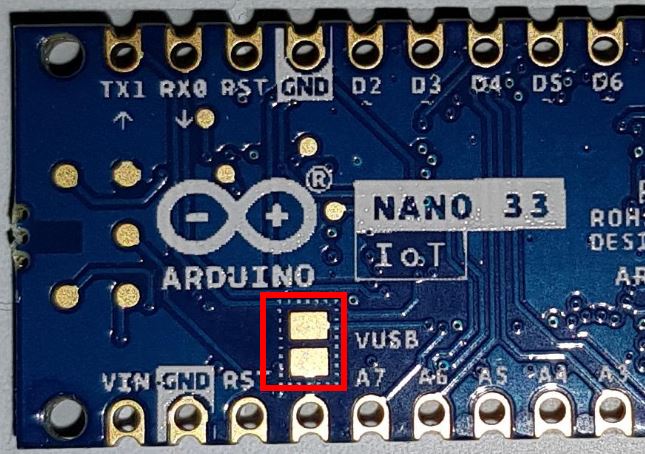
5-Volt-Versorgung auf aktivieren
Am 5-Volt-Pin kann die 5V-USB-Spannung angezapft werden. Dies ist gut für Sensoren, die eine 5V Versorgungsspannung brauchen. Aber bitte aufpassen, 5V an den Eingängen kann den Nano beschädigen.
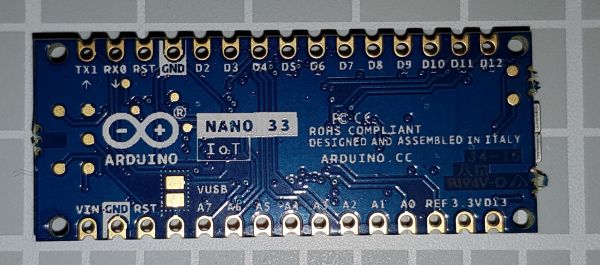
Der 5V-Pin ist bei Auslieferung nicht angeschlossen. Hierfür sind zwei Kontaktfelder auf der Unterseite, die mittels Lötzinn verbunden werden müssen. Siehe hierzu auch die folgende Abbildung.
Problems
No BLE connection on the phone
Ich vermute, mein Samsung Galaxy S8 ist zu alt, ich sehe zwar im Bluetooth Monitor den Arduino, kann ihn aber in LightBlue nicht verwenden.
Conclusion
Mit dem 33 IOT haben die Arduino-Entwickler gezeigt, dass sie verstanden haben, mit Wifi in der IOT-Welt weiterzukommen. Das Board lässt fast keine Wünsche übrig. So wäre ein Kompassmodul zur Komplettierung der IMU ganz nett, ist aber auch von außen anschließbar. Der Arduino bietet viele Anschlüsse analog und digital, Interrupts für gezielte Rückmeldungen wie Odometrien sind genügend vorhanden. Alles, was man für den Roboterbau braucht. Die Wifi-Verbindung scheint stabil zu sein, auch die Beispielprogramme funktionieren ohne Probleme.
Ein kleiner Wermutstropfen bleibt der hohe Preis von 25€-35€. Wer nicht so viele Ports braucht, ist hier mit dem ESP8266Link status: Unknown or its successor ESP32Link status: Unknown günstiger unterwegs und bekommt unter 10€ noch ein Display dazu. Die IMU muss jedoch extern betrieben werden.
Der USB-Port ist etwas gewöhnungsbedürftig, nach dem Programmieren wird ein Reset durchgeführt, das erinnert an den Leonardo.
Related Posts
- Arduino Nano 33 BLELink status: OK
- RF NanoLink status: Unknown
- Arduino Nano V3Link status: Unknown
Sources
Arduino-HerstellerseiteLink status: Unknown
Arduino Bluetooth ContributionLink status: Unknown
https://github.com/jandrassy/ArduinoOTALink status: Unknown
https://www.arduino.cc/en/Reference/WiFiNINALink status: OK
https://www.arduino.cc/en/Guide/NANO33IoTLink status: Unknown
https://content.arduino.cc/assets/Arduino%20Nano%2033%20IOT.fzpzLink status: Unknown
https://content.arduino.cc/assets/Pinout-NANO33IoT_latest.pdfLink status: Unknown
| Date | Change | Author |
|---|---|---|
| 18.10.2026 | TablePress-Tabelle durch Datenblock aus dem Modell ersetzt | Suffocation |
| 08.10.2026 | Überschriften-Hierarchie korrigiert (H1→H2, Unterebenen eine Stufe tiefer) | Suffocation |
| 04.10.2026 | Rechtschreibung korrigiert: Tippfehler, Kommas, Bindestriche, Groß-/Kleinschreibung | Suffocation |
| 03.10.2026 | Log-Liste eingefügt | Suffocation |
| 29.04.2020 | Post created | Suffocation |