Last Updated on 15. October 2026 by SuffocationLink status: OK
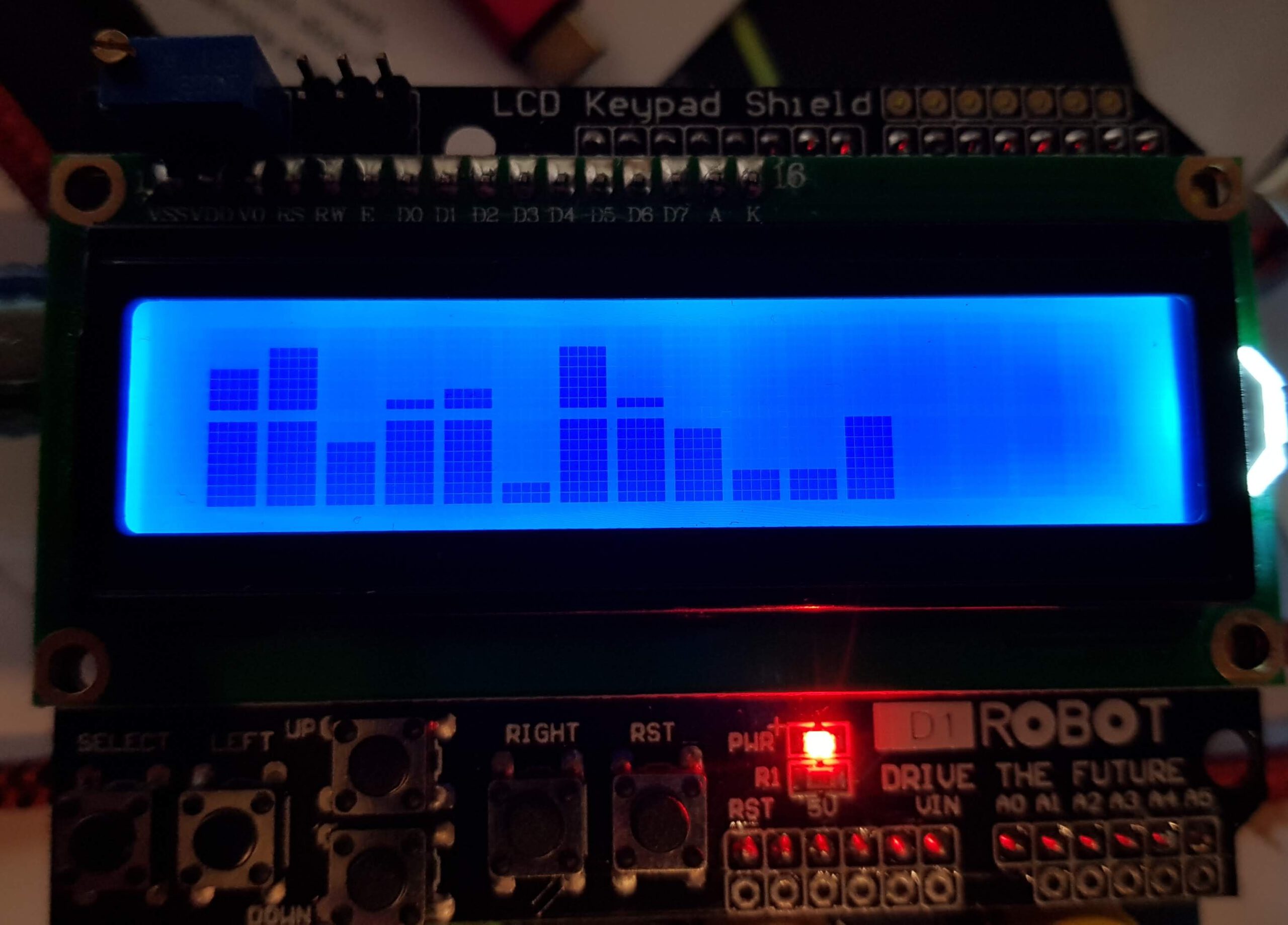
Ich bin immer wieder verwundert, dass es doch ein paar Leser hier im Blog gibt. Neulich schrieb mich Siegfried an und meinte, er möchte ein paar Balken auf einem Crystal-LCD-Display darstellen, ob ich das schon mal gemacht habe. Die Antwort war Nein, das sollte sich aber bald ändern.
Facts
Parts list
Arduino OneLink status: OK
Arduino LCD ShieldLink status: OK
Areas of application
- Darstellung von Messwerten in Abhängigkeit der Zeit
- Equalizer-Visualisierung
Views
It's there at the end 😉
Analyse
Such an LCD display consists of several rows and columns. Only one character fits into each row and column combination.
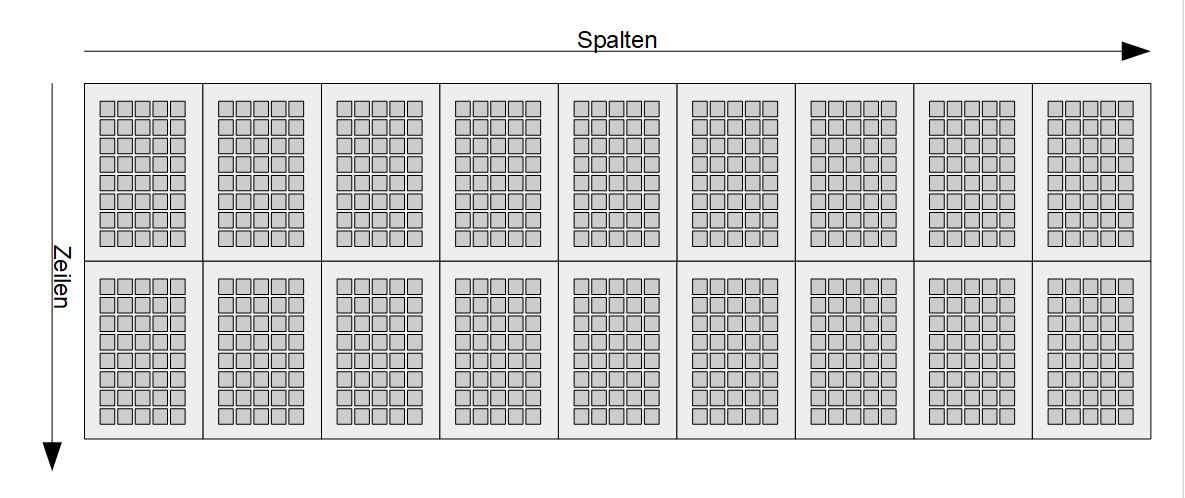
Die Pixel eines Zeichens können nicht einzeln angesprochen werden, es ist aber möglich, eigene Zeichen zu erstellen.
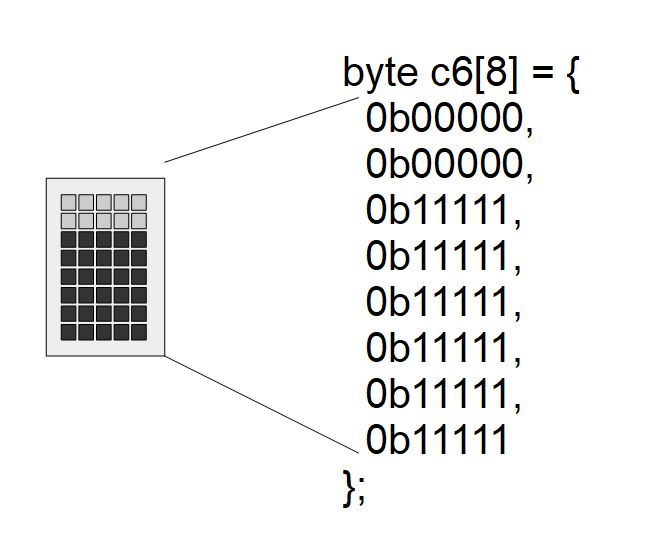
Somit habe ich für jeden Füllstand ein Zeichen erstellt. Das leere Zeichen habe ich weggelassen, weil bei meinem Display das gleiche wie bei C8 angezeigt wurde und da ich vorher das Display lösche, macht es keinen Unterschied.
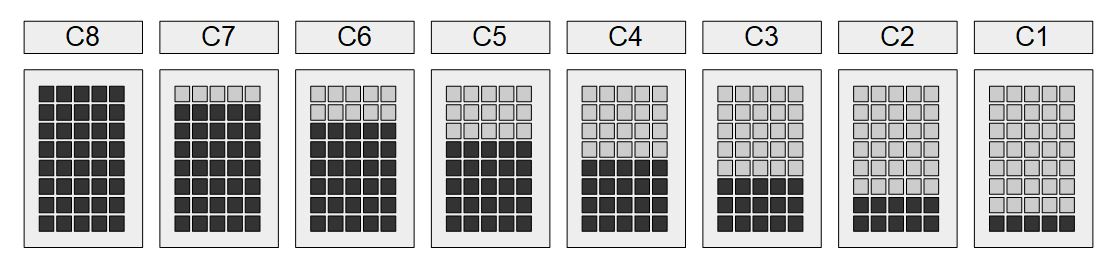
Um beide Zeilen nutzen zu können, müssen die jeweiligen Ergebnisse zweigeteilt (für mehr Zeilen sind mehr Teilungen nötig) werden, ist die untere Zeile voll (also C8), geht es weiter mit der oberen.
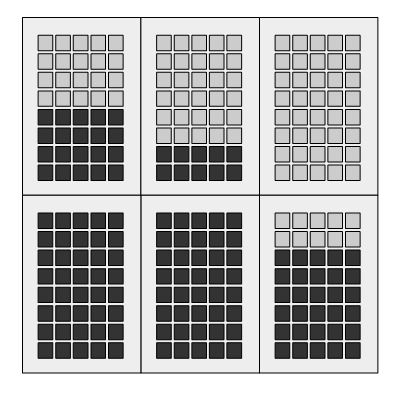
The values for each bar are stored in an array. The array is then directly converted into the bars.
Programming
Libraries
The library for the display is already included in the Arduino GUI.
#includeTest programme
Source code LcdBarChart.ino (GitHubLink status: OK)
/**
   Display a bar chart on an lcd displa 2 Lines 16 Cols

   GPLv3
   Visit https://fambach.net if you want
*/


/******************************************************************/
// global data
#define BAR_COUNT 16 // how many bars should we display
int values[BAR_COUNT];

#define ROWS 2        // rows of display
#define COLS 16       // columns of display
#define UPPER 1000    // upper value of measurement eg 1065 hpa
#define LOWER 100     // lower value of measurement eg 650 hpa
#define CHAR_LINES 8  // lines in a character

/******************************************************************/
// LCD init
#include <LiquidCrystal.h>
#include "CustomChars.h"

LiquidCrystal lcd(8, 9, 4, 5, 6, 7);

void initDisplay() {
  lcd.begin(COLS, ROWS);    // start the library
  lcd.setCursor(0, 0);      // set the cursor to the upper left corner
  lcd.print("Bar Chart");   // print a simple message
  initCustomChars(lcd);     // add the own chracters
  digitalWrite(6, LOW);     // only for my board to switch the buzzer off
  delay(2000);              // wait some seconds to show the text
}

void displayBars() {
  lcd.clear();
  // determine which is smaller the screen or the array, take the smaller one
  int end =  min(COLS ,  BAR_COUNT);

  // loop over the array with values
  for (int col = 0; col < end ; col ++) {

    // map the measurement values to pixel lines
    uint8_t value = map(values[col], LOWER, UPPER, 0, 16);

    // loop over the rows of the display and set the right character
    for (int row = ROWS - 1; row >= 0 ; row--) {
      lcd.setCursor(col, row);

      if (value == 0) {
        break;
      }

      if ( (value - CHAR_LINES) > 0 ) {
        lcd.write((byte) CHAR_LINES);
      } else {
        lcd.write((byte)value);
        break;
      }
      value -= CHAR_LINES;
    }

  }
  digitalWrite(6, LOW); // only for my board to switch the buzzer off

}

/******************************************************************/
// array functions
void initArray(boolean randValues) {
  for (int i = 0; i < BAR_COUNT; i++) {
    if (randValues) {
      values[i] = random(LOWER, UPPER);
    } else {
      values[i] = LOWER;
    }
  }
}

void shiftArrayToTheRight() {
  for (int i = BAR_COUNT - 1 ; i > 0 ; i--) {
    values[i] = values[i - 1];
  }
  values[0] = 0;
}

/******************************************************************/
void setup() {
  initArray(false);
  initDisplay();
}

void loop() {

  // shift array to the right
  shiftArrayToTheRight();
  // add new value at left
  values[0] = random(LOWER, UPPER);


  displayBars();
  delay(4000);

}
Das Testprogramm generiert alle 4 Sekunden einen neuen zufälligen Wert. Mit jedem neuen Wert werden die Ergebnisse im Array um eins nach rechts geschoben. Ist das Array voll, wird der letzte Wert verworfen.
Und so sieht’s aus:
Problems
Komische Fragmente in den benutzerdefinierten Zeichen
Wenn ich die Reihenfolge im Setup ändere, also die benutzerdefinierten Zeichen hinzufüge, bevor ich etwas auf dem Display ausgegeben habe, bekomme ich diese Fragmente. Ich nehme an, das Display-Init hat in der Bibliothek noch einen Fehler und erst mit der ersten Ausgabe ist es richtig initialisiert.
Miscellaneous
nix …
Conclusion
Nachdem die Funktion des Displays erst einmal klar war und ich wusste, dass ich über die benutzerdefinierten Zeichen gehen muss, war es fast ein Kinderspiel. Die Daten in einem Array zu organisieren, bietet eine gute Möglichkeit, sie später zu manipulieren und in Schleifen abzuarbeiten. Ich hoffe, es gefällt euch, vielen Dank an Siegfried für die Idee, solltet ihr noch Erweiterungswünsche oder Fragen haben, lasst einen Kommentar da.
Related Posts
- Preview – Rundes1,28 zoll TFT LCD DisplayLink status: OK
- TFT_eSPI Display LibraryLink status: OK
Sources
https://www.arduino.cc/en/Reference/LiquidCrystalLink status: OK
https://de.wikipedia.org/wiki/Fl%C3%BCssigkristallanzeigeLink status: OK
https://maxpromer.github.io/LCD-Character-Creator/Link status: OK
https://www.hackster.io/jacoslabbert99/arduino-lcd-icons-custom-characters-548f38Link status: OK
| Date | Change | Author |
|---|---|---|
| 15.10.2026 | Beispielcode als Code-Block eingefügt (Einbettung über gist-it.appspot.com funktionierte nicht mehr) | Suffocation |
| 03.10.2026 | Rechtschreibung korrigiert: Tippfehler, Kommas, Groß-/Kleinschreibung, Formulierungen Log-Liste eingefügt | Suffocation |
| 25.02.2022 | Post created | Suffocation |