
Last Updated on 15. October 2026 by SuffocationLink status: OK
Ein Bekannter hat mir neulich sein Leid geklagt. Er sei jetzt im Home-Office und befürchte, dass sein Arbeitgeber seine Computer Daten trackt. Da der Computer nach wenigen Minuten in den Standby-Modus schaltet, kam er auf die Idee, immer wieder die Mouse zu bewegen, um dies zu verhindern. Seine Funkmouse reiche sogar bis zur Toilette, sagte er mir und richtete seinen Dank an die Hersteller solcher Mäuse.
Nun ist der Bekannte nicht nur ein guter, sondern auch ein Beamter und diese brauchen bekanntlich ihren Mittagsschlaf. Die Mouse an die Katze zu binden (sieht jemand die Ironie) oder sie auf einen Plattenspieler mitlaufen zu lassen, ist nicht ganz perfekt.
Abends, die Kinder ins Bett bringend, ließ ich in dieser Richtung meine Gedanken schweifen. Mir kam der ESP32-S2Link status: OK ins Gedächtnis, der über die Möglichkeit verfügt, ein HID (Human Interface Device), also bspw. ne Mouse oder Tastatur, zu emulieren.
Somit war ein neues Projekt geboren – eine Mouse zu emulieren, die dann eingreift, wenn man gerade inaktiv ist. Natürlich wäre eine Softwareemulation auf dem Rechner auch denkbar, aber die meisten Firmenrechner sind gegen die Installation fremder Software abgesichert.
Facts
- Einfaches Anstecken der FAKE-Mouse an die USB Schnittstelle.
Mouse greift ein, wenn länger als 3 Minuten keine Aktion erkannt wurde.War nicht möglich, keine Rückmeldung vom ComputerMouse hört auf, sobald der Benutzer wieder etwas macht.Same reason as above- The mouse movements should be random in pace and time intervals.
Selected Hardware
LILYGO EP32 S2 V1.1Link status: Unknown
Alternatives
LILYGO T8 ESP32-S2 Display V1.1Link status: Unknown
Areas of application
- Funny mouse movements on the screen
- Liberation from the yoke of employers.
- Ausleben des Beamtentums (Eine Entschuldigung an Beamte, die für ihr Geld richtig arbeiten müssen)
Views
Photos are available at LILYGO EP32 S2 V1.1Link status: Unknown.
Programming
Libraries
The two required libraries, USB.h and USBHIDMouse.h, are included in the ESP32 library from version 2.0 onwards.
Test programme
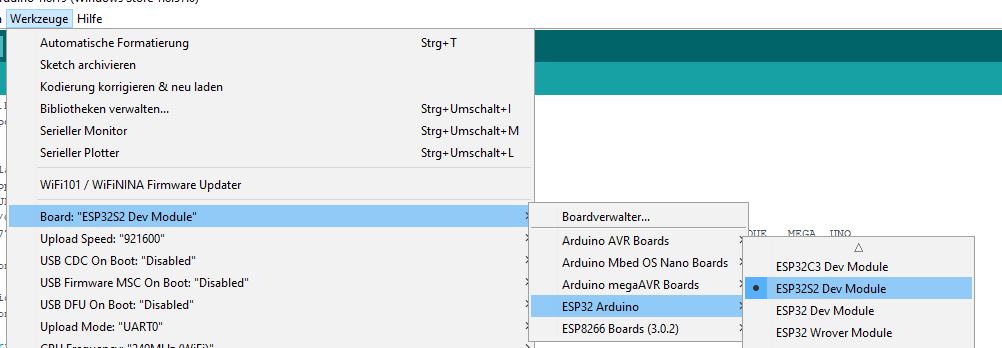
Demos are available in the example projects below.
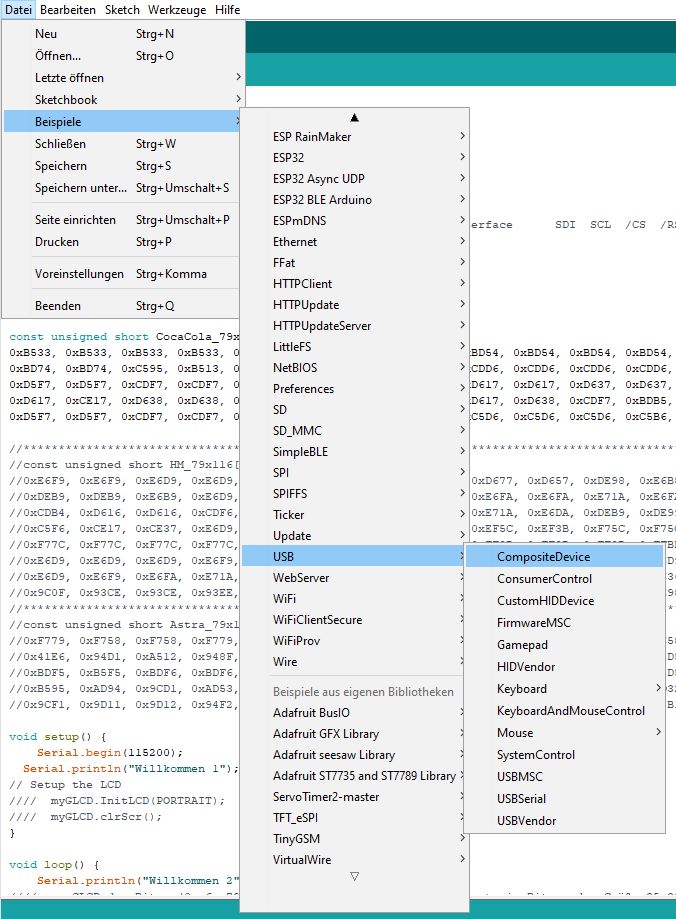
Das Beispiel zur MouseButtonControl habe ich als Basis für meine Bestrebungen genutzt und mein eigenes erstellt:
Source code AutoMouseToKeepTheComputerAlive.ino (GitHubLink status: OK)
/**
 * Small programm that moves the mouse to keep the computer in active mode.
 * Arduino ESP lib 2.0 higher can be used, no addtional libs needed.
 *
 * Visit http://fambach.net if you want.
 */
#include "USB.h"
#include "USBHIDMouse.h"
USBHIDMouse Mouse;

#define DELAY_MIN  5000
#define DELAY_MAX 60 * 1000 // 180 * one second = 1.5 minute
#define DIST_X_MIN 10 // 10 pixel
#define DIST_X_MAX 200 // 10 pixel
#define DIST_Y_MIN 10 // 10 pixel
#define DIST_Y_MAX 180 // 10 pixel


int range = 5;              // output range of X or Y movement; affects movement speed
int responseDelay = 10;     // response delay of the mouse, in ms


void setup() {
  // initialize mouse control:
  Mouse.begin();
  USB.begin();
}

void loop() {

  int distX = random(DIST_X_MIN,DIST_X_MAX);
  int distY = random(DIST_Y_MIN,DIST_Y_MAX);

  // delay between 5 seconds and 3 minutes
  long responseDelay = random(DELAY_MIN, DELAY_MAX);

  Mouse.move(-distX, -distY, 0);

  // delay(2000);document out to see the mouse moving
  delay(100);
  // and go back
  Mouse.move(distX, distY, 0);

  // a delay so the mouse doesn't move too fast:
  delay(responseDelay);
}
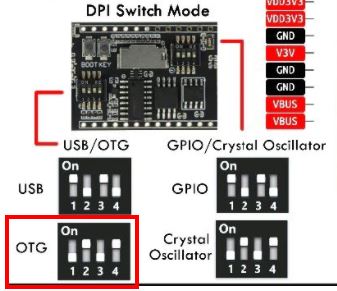
Install the firmware and set the DIP switches to HID mode (OTG).
Problems
The mouse is not keeping the computer alive.
Possibly the time between movements is too short, so the computer still goes into standby mode.
Einfach den Wert für das Delay verlängern. Ruhig auch mal auf 2000 stellen, dann sieht man die Mouse springen.
Miscellaneous
Bewegungen der eigenen Mouse erfassen
Stefan (siehe Kommentare) schlägt vor, die Schaltung in die Mouse zu integrieren, zum einen könnte man die Mousebewegungen dann mittracken, zum anderen bräuchte es bei geschickter Verdrahtung noch nicht einmal OTG Fähigkeit.
Evtl. wäre auch ein durchgeschleifter USB Port etwas, ein Arduino Clone mit Hostshield. Die eigene Mouse an den Hostshield angeschlossen und die Daten der Mouse einfach weiter an den Rechner übertragen. Pausiert die Mouse, übernimmt der Arduino Clone.
Conclusion
Das Programm war schnell geschrieben und funktioniert, in den nächsten Tagen werde ich es dem Usertest übergeben.
Related Posts
- Espressif IDF – GPIOsLink status: Unknown
- Espressif IDF – TasksLink status: Unknown
- Espressif IDF – MenuconfigLink status: Unknown
- Espressif IDF – TimerLink status: Unknown
- Espressif IDF – LognachrichtenLink status: Unknown
- Espressif IDF – FehlerbehandlungLink status: Unknown
- Espressif IDF – KonsolenausgabeLink status: Unknown
- Espressif IDF – Projekt erstellenLink status: Unknown
- LILYGO EP32 S2 V1.1Link status: Unknown
- VS-Code Espressif IDFLink status: OK
Sources
https://github.com/espressif/arduino-esp32Link status: OK (Lib zum Nachschlagen der USB und Mouse Bibliothek)
https://ericdraken.com/usb-mouse-jiggler/Link status: OK (Er hat ein ähnliches Projekt mit einem anderen Board gemacht)
https://github.com/seife/marble_fxLink status: OK
https://github.com/seife/marble_fx_digistumpLink status: OK
| Date | Change | Author |
|---|---|---|
| 15.10.2026 | Beispielcode als Code-Block eingefügt (Einbettung über gist-it.appspot.com funktionierte nicht mehr) | Suffocation |
| 04.10.2026 | Rechtschreibung korrigiert: Tippfehler, Kommas, Groß-/Kleinschreibung, Grammatik | Suffocation |
| 03.10.2026 | Log-Liste eingefügt | Suffocation |
| 06.02.2022 | Post created | Suffocation |
Indeed, I use a mouse jiggler, though one based on an Arduino micro. While I understand the locking of the screen after a short period in the office to prevent unauthorised access to confidential data when one is away from their desk, it is rather annoying to have to log back in after practically every longer phone call, other conversation, visit to the coffee machine, the toilet, etc.
This makes sense for data security in the office – but surely not for a single person working from home.
The idea of only operating the mouse jiggler when needed doesn't sound bad. How about operating the mouse or keyboard with a PS/2 connector on the controller, and converting that to USB or BT HID? There are already projects for that. If there's no input for 2 minutes, then the mouse jiggler could step in, and any real movement would deactivate it again until the next timeout...
I was hoping to find a hint here for using the ESP32-C3 as a HID, unfortunately, it just seemed like clickbait (that would fit someone helping an employee shirk their duties) as the article only mentions the S3, with which HID is no problem.
It would be nice if the title were corrected
Heading is corrected. However, I was still very annoyed about the clickbait accusation, do you perhaps tend to make snap judgments? Courteous interaction is different!
I do find it more than a little concerning to have such employees, but the HR department also knows all the tricks, don't worry. You can find such devices on every corner since remote working became a thing. They're called mouse jigglers. https://amzn.to/3UiKn70 Simple, effective, affordable.
Hello Stefan,
Thank you for your comment, indeed a Tiny is sufficient for that. To test the OTG function of the ESP is a nice toy, and for him who only has a hammer, the whole world is a nail ;).
As a cheap example, I also referred to the Tiny in the sources:
https://ericdraken.com/usb-mouse-jiggler/
I have now also included your links in the sources.
I've also ordered a few of the Tiny boards and wanted to test this again with an Atmel and cheaper.
https://de.aliexpress.com/item/32409396629.html?gatewayAdapt=glo2deu&spm=a2g0o.order_list.0.0.21ef5c5fL9oQ38
I like the idea with the mouse, I've added it under miscellaneous.
Hello
Stefan
For this, an ESP32-S2 is complete overkill. An Arduino Leonardo clone (e.g. „CJMCU Beetle“ for a very suitable form factor) or even a Digispark (ATTiny85) would suffice.
The best thing would be to build that into the mouse, so that after you've finished using the mouse, it keeps jiggling for another 30 minutes, and then stops if the official happens to oversleep whilst having their lunch nap… 😉 Example: https://github.com/seife/marble_fx and https://github.com/seife/marble_fx_digistump
BTW: The title mentions ESP32-C3, but the text ESP32-S2..?