Last Updated on 10. October 2026 by SuffocationLink status: OK
TTGO T-Call 1.3 ist ein ESP32 Modul, das mithilfe des SIM800L Chips einen GSM-Zugang bietet. Ich habe das Modul in Verbindung mit einer ThingsMobile SIM-Karte getestet.
Facts
- ESP32 and SIM800LLink status: Unknown Chip
- Micro-SIM-Slot
- Aerial socket
- Reset button
- Connector for a battery
- USB 3.1 Type C port
Pinout

Areas of application
- GPS-Tracker (braucht GPS-Modul)
- Smart auto control
- Home automation
- Alarm systems
- Weather stations
- Überall dort einsetzbar, wo es GSM, aber kein WIFI gibt …
Views
Programming
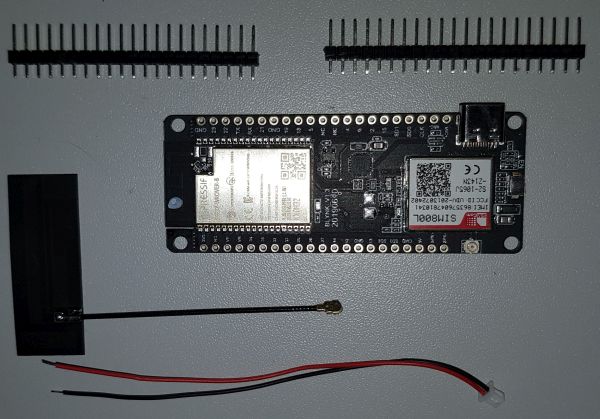
TTGO T-Call 1.3 Set 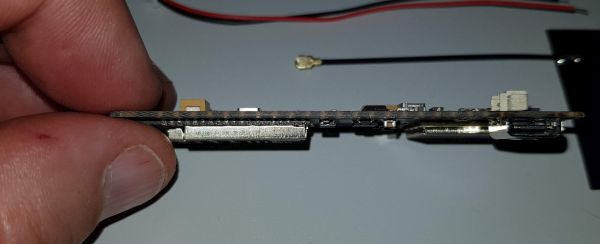
TTGO T-Call 1.3 from the site 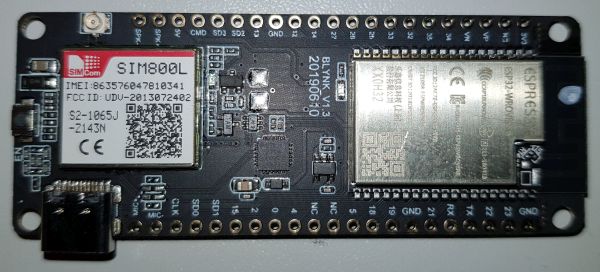
TTGO T-Call 1.3 von oben 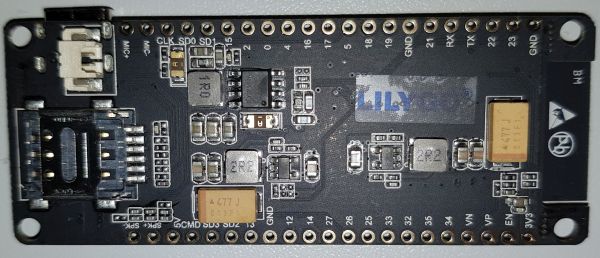
TTGO T-Call 1.3 von unten 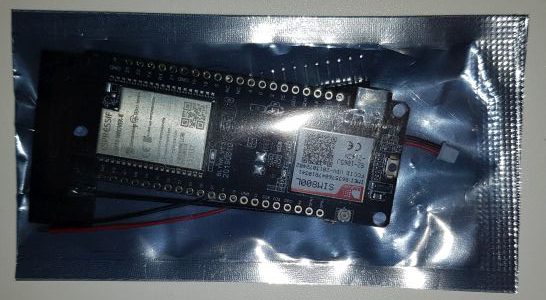
TTGO T-Call 1.3 Packaged
Preparation
I am using a SIM card from Things Mobile.
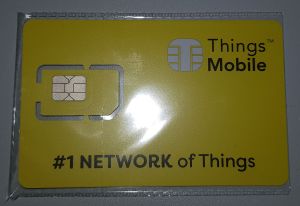
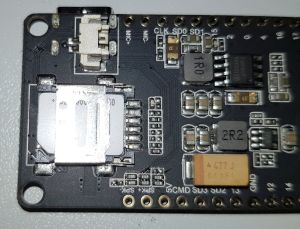
Diese wird bis zur MicroSD Karte herausgebrochen und muss dann in den Kartenslot auf der Rückseite des TTGO Moduls gesteckt werden. Zum Öffnen der Abdeckung diese vorsichtig in Pfeilrichtung „open“ (Im Bild nach rechts) schieben.
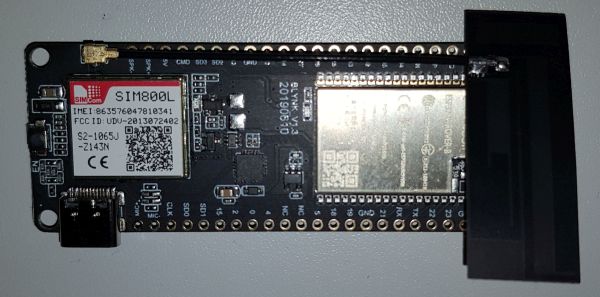
Dann muss noch die GSM-Antenne aufgesteckt werden:
Libraries
Zur Ansteuerung des Sim800L Chips wird eine Bibliothek benötigt. Es gibt mehrere Implementierungen, ich habe die TinyGSM verwendet, hier der Link:
https://github.com/vshymanskyy/TinyGSMLink status: OK
The library can be installed via the librarian 😉.
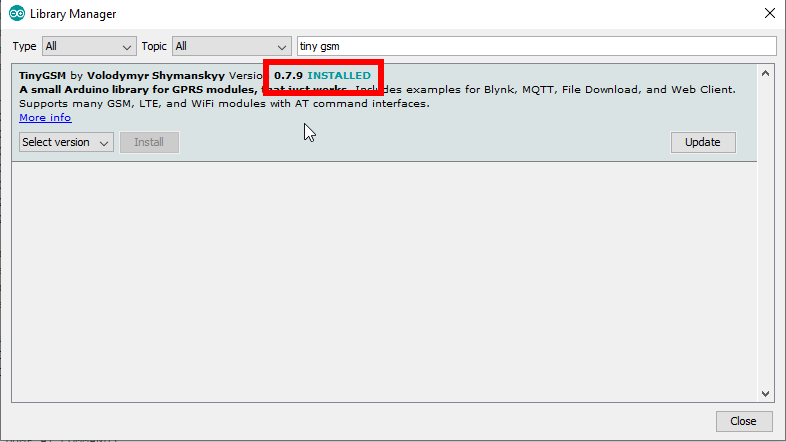
Ich verwende aktuell die Version 0.10.1. Diese Version funktioniert bei mir nur mit der neuesten ESP32-Anbindung (Version 1.0.4)
Test programme
First Test – TTGO Example
Das Beispiel von GitHub herunterladen, hier der Link:
Arduino TinyGSMLink status: OK
Für thingsmobile habe ich nur als APN „TM“ eintragen müssen:
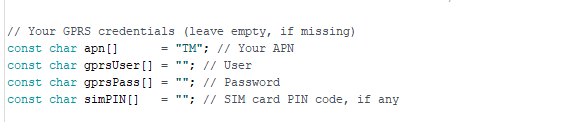
Wenn ihr einen Benutzer, Passwort oder SIM-PIN habt, müssen diese hier auch noch eingetragen werden.
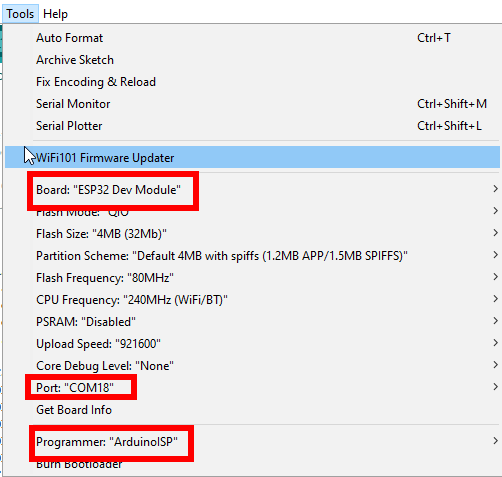
Build the project and upload it to the ESP. I've used the following settings for the ESP32 (please adjust the Comport to your own):
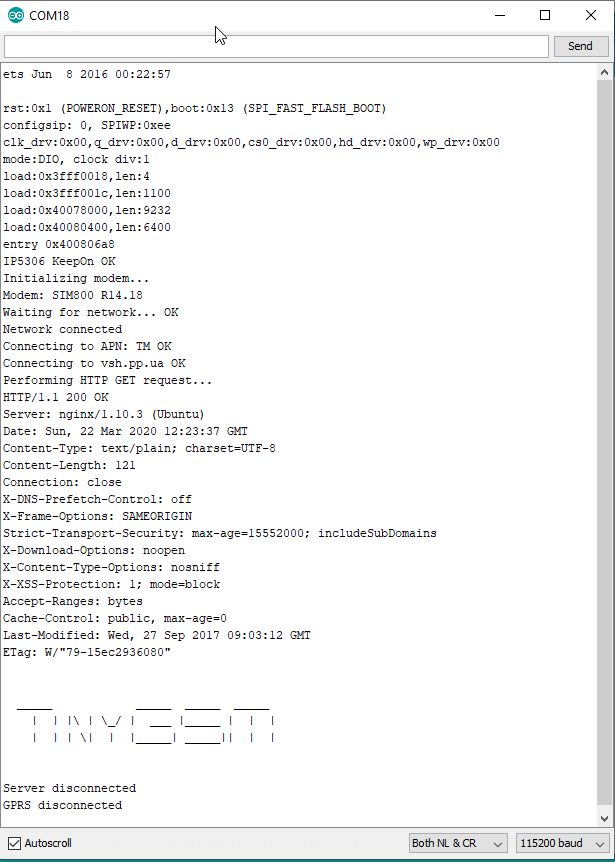
This is how it looks on the console:
Send SMS
Auch wenn SMS-Schreiben nicht zu meinen bevorzugten Kommunikationsformen zählt, ist es doch eine der wichtigeren für ein mobiles Gerät wie dieses. Deshalb habe ich mir noch das AllFunctions-Beispiel aus der TinyGSMLink status: OK taken the library and adapted it to the board:
Source code AllFunctions.ino (GitHub GistLink status: OK)
/**
 * SMS Test with TinyGSM Lib
 *
 * Tested on TTGO T-Call 1.3
 *
 * Lib: https://github.com/Xinyuan-LilyGO/TTGO-T-Call
 *
 * For further information see also
 * www.fambach.net
 *
 * GPLv2
 */


const char apn[]  = "TM";
const char gprsUser[] = "";
const char gprsPass[] = "";
const char simPIN[]   = ""; // SIM card PIN code, if any
const char wifiSSID[]  = "TEST";
const char wifiPass[] = "TEST123456789";

// TTGO T-Call pin definitions
#define MODEM_RST            5
#define MODEM_PWKEY          4
#define MODEM_POWER_ON       23
#define MODEM_TX             27
#define MODEM_RX             26
#define I2C_SDA              21
#define I2C_SCL              22

// Set serial for debug console (to the Serial Monitor, default speed 115200)
#define SerialMon Serial

// Set serial for AT commands (to the module)
#define SerialAT Serial1


// Select your modem:
#define TINY_GSM_MODEM_SIM800
#define TINY_GSM_RX_BUFFER   1024  // Set RX buffer to 1Kb


// See all AT commands, if wanted
// #define DUMP_AT_COMMANDS

// Define the serial console for debug prints, if needed
//#define TINY_GSM_DEBUG SerialMon

// Range to attempt to autobaud
#define GSM_AUTOBAUD_MIN 9600
#define GSM_AUTOBAUD_MAX 38400

/*
 * Test enabled
 */
//#define TINY_GSM_TEST_GPRS true
//#define TINY_GSM_TEST_WIFI true
//#define TINY_GSM_TEST_CALL true
#define TINY_GSM_TEST_SMS true
//#define TINY_GSM_TEST_USSD true
//#define TINY_GSM_TEST_BATTERY true
// powerdown modem after tests
#define TINY_GSM_POWERDOWN false

// set GSM PIN, if any
#define GSM_PIN ""

// Set phone numbers, if you want to test SMS and Calls
#define SMS_TARGET  "+49***********" // < ---- enter you phone number here
//#define CALL_TARGET "+380xxxxxxxxx"


#include <Wire.h>
#include <TinyGsmClient.h>

#ifdef DUMP_AT_COMMANDS
  #include <StreamDebugger.h>
  StreamDebugger debugger(SerialAT, SerialMon);
  TinyGsm modem(debugger);
#else
  TinyGsm modem(SerialAT);
#endif

void setup() {
  // Set console baud rate
  SerialMon.begin(115200);
  delay(10);

  // Keep power when running from battery
  Wire.begin(I2C_SDA, I2C_SCL);
 // bool   isOk = setPowerBoostKeepOn(1);
 // SerialMon.println(String("IP5306 KeepOn ") + (isOk ? "OK" : "FAIL"));

// Set-up modem reset, enable, power pins
  pinMode(MODEM_PWKEY, OUTPUT);
  pinMode(MODEM_RST, OUTPUT);
  pinMode(MODEM_POWER_ON, OUTPUT);

  digitalWrite(MODEM_PWKEY, LOW);
  digitalWrite(MODEM_RST, HIGH);
  digitalWrite(MODEM_POWER_ON, HIGH);


// Set GSM module baud rate and UART pins
  SerialAT.begin(115200, SERIAL_8N1, MODEM_RX, MODEM_TX);
  delay(3000);

  // Restart takes quite some time
  // To skip it, call init() instead of restart()
  SerialMon.println("Initializing modem...");
  modem.restart();
  // Or, use modem.init() if you don't need the complete restart

  String modemInfo = modem.getModemInfo();
  SerialMon.print("Modem: ");
  SerialMon.println(modemInfo);

  // Unlock your SIM card with a PIN if needed
  if (strlen(simPIN) && modem.getSimStatus() != 3 ) {
    modem.simUnlock(simPIN);
  }

   SerialMon.println("Initializing modem... done");
}

void loop() {

  // Restart takes quite some time
  // To skip it, call init() instead of restart()
  DBG("Initializing modem...");
  if (!modem.restart()) {
  // if (!modem.init()) {
    DBG("Failed to restart modem, delaying 10s and retrying");
    delay(3000);
    // restart autobaud in case GSM just rebooted
    TinyGsmAutoBaud(SerialAT,GSM_AUTOBAUD_MIN,GSM_AUTOBAUD_MAX);
    delay(10000);
    return;
  }

  String name = modem.getModemName();
  DBG("Modem Name:", name);

  String modemInfo = modem.getModemInfo();
  DBG("Modem Info:", modemInfo);

#if TINY_GSM_TEST_GPRS
  // Unlock your SIM card with a PIN if needed
  if ( GSM_PIN && modem.getSimStatus() != 3 ) {
    modem.simUnlock(GSM_PIN);
  }
#endif

#if TINY_GSM_TEST_WIFI
  DBG("Setting SSID/password...");
  if (!modem.networkConnect(wifiSSID, wifiPass)) {
    DBG(" fail");
    delay(10000);
    return;
  }
  SerialMon.println(" OK");
#endif

#if TINY_GSM_TEST_GPRS && defined TINY_GSM_MODEM_XBEE
  // The XBee must run the gprsConnect function BEFORE waiting for network!
  modem.gprsConnect(apn, gprsUser, gprsPass);
#endif

  DBG("Waiting for network...");
  if (!modem.waitForNetwork()) {
    delay(10000);
    return;
  }

  if (modem.isNetworkConnected()) {
    DBG("Network connected");
  }
bool res = false;
String imei="";
#if TINY_GSM_TEST_GPRS
  DBG("Connecting to", apn);
  if (!modem.gprsConnect(apn, gprsUser, gprsPass)) {
    delay(10000);
    return;
  }

  res = modem.isGprsConnected();
  DBG("GPRS status:", res ? "connected" : "not connected");

  String ccid = modem.getSimCCID();
  DBG("CCID:", ccid);

  imei = modem.getIMEI();
  DBG("IMEI:", imei);

  String cop = modem.getOperator();
  DBG("Operator:", cop);

  IPAddress local = modem.localIP();
  DBG("Local IP:", local);

  int csq = modem.getSignalQuality();
  DBG("Signal quality:", csq);

  // This is only supported on SIMxxx series
  // String gsmLoc = modem.getGsmLocation();
  // DBG("GSM location:", gsmLoc);

  // This is only supported on SIMxxx series
  // String gsmTime = modem.getGSMDateTime(DATE_TIME);
  // DBG("GSM Time:", gsmTime);
  // String gsmDate = modem.getGSMDateTime(DATE_DATE);
  // DBG("GSM Date:", gsmDate);

  String ussd_balance = modem.sendUSSD("*111#");
  DBG("Balance (USSD):", ussd_balance);

  String ussd_phone_num = modem.sendUSSD("*161#");
  DBG("Phone number (USSD):", ussd_phone_num);
#endif

#if defined(TINY_GSM_MODEM_HAS_GPS)
  modem.enableGPS();
  String gps_raw = modem.getGPSraw();
  modem.disableGPS();
  DBG("GPS raw data:", gps_raw);
#endif

#if TINY_GSM_TEST_SMS && defined(SMS_TARGET)
  res = modem.sendSMS(SMS_TARGET, String("Hello from ") + imei);
  DBG("SMS:", res ? "OK" : "fail");

  // This is only supported on SIMxxx series
  res = modem.sendSMS_UTF16(SMS_TARGET, u"Привіііт!", 9);
  DBG("UTF16 SMS:", res ? "OK" : "fail");
#endif

#if TINY_GSM_TEST_CALL && defined(CALL_TARGET)
  DBG("Calling:", CALL_TARGET);

  // This is NOT supported on M590
  res = modem.callNumber(CALL_TARGET);
  DBG("Call:", res ? "OK" : "fail");

  if (res) {
    delay(1000L);

    // Play DTMF A, duration 1000ms
    modem.dtmfSend('A', 1000);

    // Play DTMF 0..4, default duration (100ms)
    for (char tone='0'; tone<='4'; tone++) {
      modem.dtmfSend(tone);
    }

    delay(5000);

    res = modem.callHangup();
    DBG("Hang up:", res ? "OK" : "fail");
  }
#endif

#if TINY_GSM_TEST_BATTERY
  uint8_t chargeState = -99;
  int8_t percent = -99;
  uint16_t milliVolts = -9999;
  modem.getBattStats(chargeState, percent, milliVolts);
  DBG("Battery charge state:", chargeState);
  DBG("Battery charge 'percent':", percent);
  DBG("Battery voltage:", milliVolts / 1000.0F);

 // float temp = modem.getTemperature();
  //DBG("Chip temperature:", temp);
#endif

#if TINY_GSM_TEST_GPRS
  modem.gprsDisconnect();
  if (!modem.isGprsConnected()) {
    DBG("GPRS disconnected");
  } else {
    DBG("GPRS disconnect: Failed.");
  }
#endif

#if TINY_GSM_TEST_WIFI
  modem.networkDisconnect();
  DBG("WiFi disconnected");
#endif

#if TINY_GSM_POWERDOWN
  // Try to power-off (modem may decide to restart automatically)
  // To turn off modem completely, please use Reset/Enable pins
  modem.poweroff();
  DBG("Poweroff.");
#endif

  // Do nothing forevermore
  while (true) {
    modem.maintain();

  }
}
Telefonnummer an der gekennzeichneten Stelle eintragen und auf das Modul spielen. Nachdem es gebootet hat, solltet ihr eine SMS erhalten.
Problems
Projekt lässt sich nicht kompilieren
Bei mir haben einige Versionen der TinyGSM-Lib nicht funktioniert. Einfach mal ein paar Versionen ausprobieren. Ich bin bei Version 0.7.9 gelandet.
Addendum: Mit dem Update der ESP32-Bibliotheken auf Version 1.0.4 hat auch die aktuelle Version 0.10.1 der TinyGSM-Bibliothek bei mir funktioniert.
Miscellaneous
Andere Anbieter für SIM-Karten
Wenn man nicht viel Datenvolumen braucht, bieten sich jegliche Prepaid-Karten an. Hier ein paar (not sponsored) Links zu den Anbietern.
- https://www.netzclub.net/Link status: OK
- https://www.sim4iot.de/Link status: OK
- https://www.blau.de/Link status: OK
- https://www.alditalk.de/Link status: OK
- https://www.lidl.de/de/lidl-connect/s7373597Link status: OK
Conclusion
Nettes Board, dank der Beispiele des Herstellers und der Bibliothek leicht zu programmieren. Auch der Preis von rund 14€ kann überzeugen.
Related Posts
- Welcome to my blogLink status: OK
- Preview – SideKick64Link status: OK
- Preview – Picocomputer 6502Link status: Unknown
- October Check 2026 – Neue Mikrocontroller und BoardsLink status: OK
- Retro Projekt – LaufwerksalternativenLink status: OK
- Ulanzi TC001 Smart Pixel ClockLink status: OK
- Preview – Luckfox Lyra Ultra WLink status: Unknown
- Preview – Luckfox Lyra Zero WLink status: Unknown
- Preview – Luckfox LyraLink status: Unknown
- Arduino VENTUNO QLink status: OK
- Arduino UNO QLink status: OK
Sources
Github Library Link status: OK
Manufacturer LilygoLink status: Unknown
https://randomnerdtutorials.com/esp32-sim800l-publish-data-to-cloud/Link status: OK
https://www.hardwareschotte.de/magazin/usb-standards-im-ueberblick-a41540Link status: OK
| Date | Change | Author |
|---|---|---|
| 10.10.2026 | Gist-Einbettung durch Code-Block ersetzt (Gist als Quelle verlinkt) | Suffocation |
| 04.10.2026 | Rechtschreibung korrigiert: Tippfehler, Kommas, Groß-/Kleinschreibung, Bindestriche | Suffocation |
| 03.10.2026 | Log-Liste eingefügt | Suffocation |
| 22.03.2020 | Post created | Suffocation |
Hello Stefan, thank you too for the good compilation of information. This has enabled me to switch over excellently from my first ESP8266 prototypes.
My goal was a GSM/GPS module that sends position data via secure websockets.
When I realised I couldn't get the combination of PPPoS, WSS and GPS to work with Arduino libraries, I had to switch to the creepy ESP-IDF SDK. There are also plenty of examples for all the individual components there, but you dive into the annals of C programming.
With a few modifications (correct UART config, correct RX pin, increasing the buffers) everything worked for the first time last night and I had a really nice alcohol-free beer!
As a SIM card, I use Netzclub's free data cards (200MB for free, then throttled to 64kBit/s, which suits my needs).
I hope to find the time to strip down my project to a sample with comments and will then post a link here in the forum.
Markus's VG
Hello Markus,
Thank you for your contribution. I've also „played around“ with the Espressif IDF; you can't get past it. Especially if you want to program the new ESP32-S2, you don't have any other choice. In my opinion, the code in the IDF is exponentially harder to read, but you can expect the most up-to-date changes to be in the IDF. I'm also considering switching to it.
I think the free data card is great, I've already included it in the post.
Hello
Stefan
Many thanks for the SMS example. I've also bought the following GPS module (GPS Module GPS-NEO-6M-00) and soldered it to the TX and RX connections. However, I'm not managing to receive GPS data from it using TinyGPS++ or many other methods. I'm using TX = 1, RX = 3 in the program code. I've also tried many other pin numbers, but nothing is working. Do you have any ideas?
“’#include
#include
// The TinyGPS++ object
TinyGPSPlus gps;
HardwareSerial SerialGPS(1);
void setup() {
Serial.begin(115200);
SerialGPS.begin(4800, SERIAL_8N1, 3, 1);
}
void loop() {
while (SerialGPS.available() > 0) {
gps.encode(SerialGPS.read());
if (gps.location.isUpdated()) {
Serial.println(„Latitude= „);
Serial.print(gps.location.lat(), 6);
Serial.print(F(“Longitude= „));
Serial.println(gps.location.lng(), 6);
}
}
“
Hello Tinkerpete,
I don't have a specific suspicion, perhaps a few pointers. I had tested the neo6 V2 once, the link is here:
https://www.fambach.net/gy-neo6mv2-gps-modul/
I couldn't quite work that out from the ESP datasheet, but I think the pins are quite freely configurable.
Andreas Spies has made a video about that, which I haven't seen yet though: youtu.be/GwShqW39jlE?t=182
In my example, I didn't explicitly use the hardware Serial, but rather Serial2, assigning pins and a baud rate to it.
What you can also try is the SoftwareSerial, here any bidirectional IO port should work.
Hello
Stefan
Thank you for your detailed reply. At the moment, I've desoldered the GPS module again and connected it to an Uno. I had problems there at first too, but now I'm finally getting the output from the GPS module via RX=2 and TX=3! So it's not defective, at least. Now I'm trying a more differentiated output with TinyGPSPlus, which strangely doesn't work with all the examples from the internet. When I have it back on the T-Call, I'll try the GPIO 17 and GPIO 16 you mentioned.
Hello,
Slightly longer addendum from me, GPIO16/17 on the top are marked (NC) for not connected.
I've now tested my example with pins 32/33 and it works (at 9800 baud).
I must mention that I have only addressed the Neo6-M module now and no further components.
Another thing that occurred to me is that some modules are a bit fussy about the supply voltage; you could try setting this to 5V (at least for my module, check the datasheet first).
Greetings Stefan
Hello Tinkerpete,
Did it work out for you now?
Yes, it works for me: http://steinlaus.de/wie-man-mit-aldi-talk-dem-esp32-die-freiheit-gibt/
Hello Thomas
Thanks for your contribution. These things are really amazing and at least in the test it worked well. Which SIM cards do you use? I tested it with Aldi and Things Mobile.
https://www.sim4iot.de/ I found it too.
Hello
Stefan
I haven't managed to send an SMS with the example code yet.
I am using a prepaid SIM card from Blau, which is actually installed in a GPS tracker and was temporarily removed for testing purposes.
I ordered 2 SIM cards from Things Mobile yesterday.
When the cards come in, we're moving on to round 2 😉
Best regards
Thomas
Thank you very much for your contribution.
I've also got a few of these chips and thanks to your description, I was able to get started straight away.
I've only used the small Wemos so far and am entering new territory with the GSM module.
The tip regarding the SIM card is also promising.
Thank you