Last Updated on 4. October 2026 by SuffocationLink status: OK
Beim Stöbern im Netz bin ich auf eine interessante Bibliothek gestoßen. Die Fauxmo-Bibliothek ist zur Anbindung des ESP8266/32 an eine Alexa gedacht. Die Bibliothek simuliert ein Philips Hue Device, welches direkt über die Alexa gesteuert werden kann. Es bedarf keiner zusätzlichen Services oder anderer Skills.
Here's the link to the library
https://bitbucket.org/xoseperez/fauxmoesp/src/master/Link status: OK
Dependencies
Je nach Controller wird eine der folgenden asynchronen Libs benötigt:
ESP8266: ESPAsyncTCPLink status: OK
ESP32: AsyncTCPLink status: OK
ESP Programme
Here's my flashing variant, Alexa only controls the built-in LED here:
https://gist.github.com/sfambach/287b4e5e5b9058da4cfb677d4625418fLink status: OK
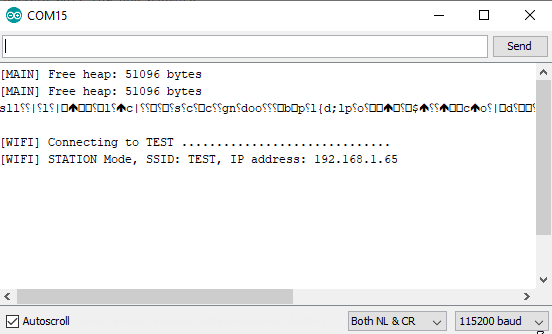
Code auf den Controller spielen, schauen, ob die Netzwerkverbindung aufgebaut wird:
Dann geht es weiter mit der Alexa …
Alexa
Sagen: „Alexa, suche neue Geräte“
The Alexa should then find the blue light.
With
„Alexa, blaue Lampe einschalten“,
„Alexa, blaue Lampe ausschalten“
Can the LED on the ESP be controlled?.
Conclusion
The library is easy to integrate and performs its job reliably.
Related posts
- ESP32 HiGrow V1.0 (Plant Spike)Link status: OK
- Control ESP with AlexaLink status: OK
- ESP8266 Arduino GUI setupLink status: OK
- OTA – ESP32fota TestLink status: OK
- Put the ESP8266 to sleepLink status: OK
- MQTT Protocol + Experimental SetupLink status: OK
- NodeMCU V2 Motor BoardLink status: OK
- ESP8266 SSD1306 Monochrom OLED 128×64 I2CLink status: OK
- Spice up NodeMCU V3 with an OLED displayLink status: OK
- Setting up ESP32 with the Arduino GUILink status: OK
Sources
https://bitbucket.org/xoseperez/fauxmoesp/src/master/Link status: OK
https://github.com/originallyus/node-red-contrib-alexa-localLink status: OK
https://github.com/me-no-dev/AsyncTCPLink status: OK
https://github.com/me-no-dev/ESPAsyncTCPLink status: OK
| Date | Change | Author |
|---|---|---|
| 04.10.2026 | Rechtschreibung korrigiert: Tippfehler, Kommas, Groß-/Kleinschreibung | Suffocation |
| 03.10.2026 | Log-Liste eingefügt | Suffocation |
| 22.03.2020 | Post created | Suffocation |
Thank you very much, that's exactly what I was looking for.
I know I'm 3 years too late.
But I can't find the link to your example project (Blue Lamp / Built-in LED).
Hello Michael,
The time isn't that important ;). Apparently the GIST plugin isn't working anymore. I've linked the Gist code directly.
Greetings Stefan
Hello,
Excellent explanation, thank you!
It worked straight away.
What happens when I flash multiple ESPs in this way?
Do the IDs then always have to have different names, or can I make them generic (ID1, ID2, ID3…) and rename them later in Alexa?
And: how many devices can be managed with ONE ESP in this way.
Hello,
Glad it worked out.,
To be honest, I've only tried it with one. But I think different names/IDs have to be assigned. However, I've read that it can lead to problems.
Greetings Stefan
Hello,
First of all, thank you for the excellent explanation.
I'm trying to get the sketch to work on a NodeMCU V2. The Wi-Fi connection is also working, but Alexa isn't finding any devices. I'd be grateful for any suggestions.
LG
Is the NodeMCU on the same (sub) network?
Hello,
Alexa doesn't recognise the device for me.
The ESP32 is on the same Wi-Fi but isn't being detected. I've also tried your libraries and the latest Fauxmoesp. I think it's no longer detectable because of Alexa.
I would really appreciate a suggestion for a solution.
Same problem here. What do you mean by same subnet?
Alexa is connected to the same Wi-Fi as the NodeMCU, i.e. the ESP32. In the router menu, the ESP is recognised as connected.
The device must be on the same network, meaning the same IP range and the same V-LAN, if such a thing exists. I've had another go with a relay board, perhaps the steps there will help further: https://www.fambach.net/preview-esp01-relais-modul/
Hello,
Very nice explanation 🙂
However, I have a question: if I turn on a Philips Hue light in my network via Alexa, does the relay connected via ESP32 also turn on at the same time? Is there already any knowledge about what causes this bug, or is there already a fix for it?
I had that problem too... they then coincidentally had the same designation. The solution is then to re-learn the Hue lamps to the Bridge.
LG