Last Updated on 4. October 2026 by SuffocationLink status: OK
Der I2c, oder auch 2 Wire Bus genannt, arbeitet mit zwei Kabeln und theoretisch mit einer Geschwindigkeit von bis zu 5 Mbit/s. Für den Hobbybedarf mit Freiluftverkabelung sind es wahrscheinlich eher weniger.
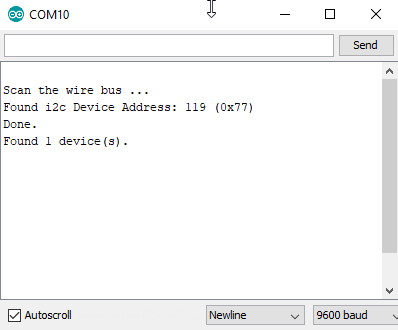
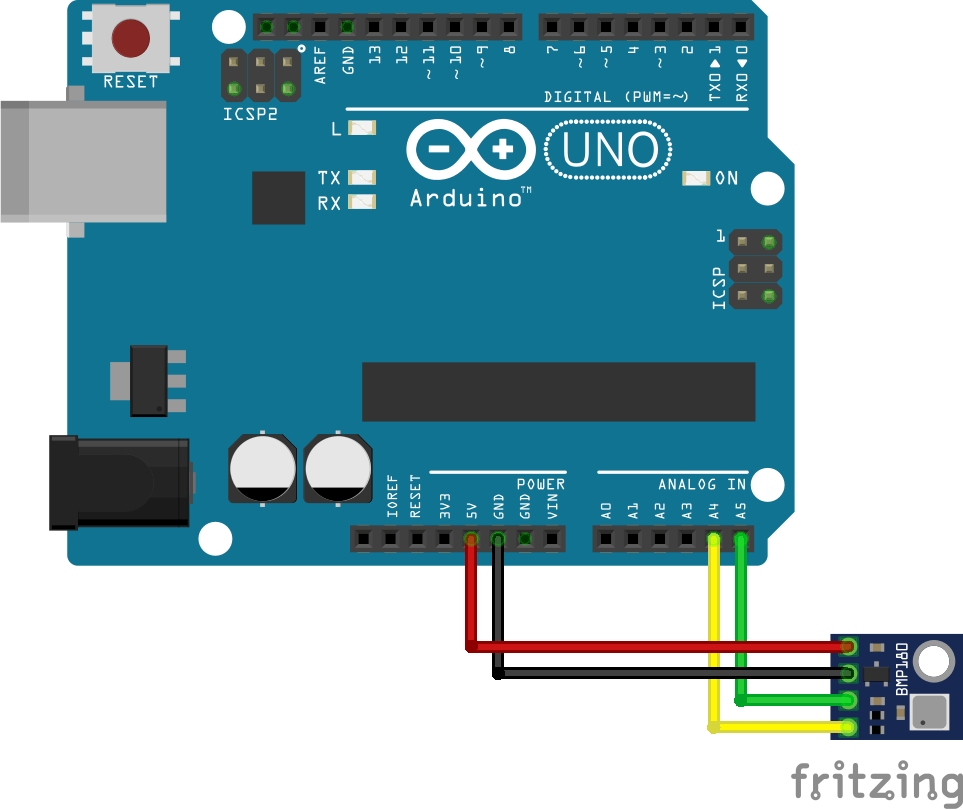
Der Uno hat den Wire-Anschluss am analogen Ausgang 4 und 5. Zum Testen habe ich ein GY-68 Barometer angeschlossen, welches auf Port 0x77 des I2C Busses arbeitet.
Purpose
- Finding the address of a module
- As a first communication test
Circuit
Libraries
Ich verwende die Wire Bibliothek, diese ist im Standard enthalten und muss nur per Include eingebunden werden.
Programme
Das folgende Testprogramm habe ich mir aus einigen Beispielen zusammen „gesucht“. Es dient dazu, einfach mal zu schauen, ob die aufgebaute Schaltung auch richtig verdrahtet ist.
Das Programm geht alle Adressen des I2C Busses durch und klopft mal beim Empfänger an. Antwortet dieser, wird der Port und am Schluss die Anzahl der gefundenen Teilnehmer angezeigt.
Source code
Output
Problems
The Wire module is not responding
Just swap SDA and SDC.
Sollte das Problem immer noch bestehen, mal versuchen, Pullup Widerstände in die Schaltung einzubauen. Der Uno hat allerdings schon Pullups, sollte also eigentlich nicht nötig sein.
Conclusion
Wenn man mal nicht weiß, ob ein Modul funktioniert oder welche Adresse es hat, ist der Scanner sehr hilfreich.
Sources
https://de.wikipedia.org/wiki/I%C2%B2CLink status: OK
https://www.mikrocontroller.net/topic/88806Link status: OK
https://playground.arduino.cc/Main/I2cScannerLink status: OK
https://gist.github.com/tfeldmann/5411375Link status: OK
| Date | Change | Author |
|---|---|---|
| 04.10.2026 | Rechtschreibung korrigiert: Tippfehler, Kommas | Suffocation |
| 03.10.2026 | Log-Liste eingefügt | Suffocation |
| 31.03.2018 | Post created | Suffocation |