Last Updated on 20. October 2026 by SuffocationLink status: OK
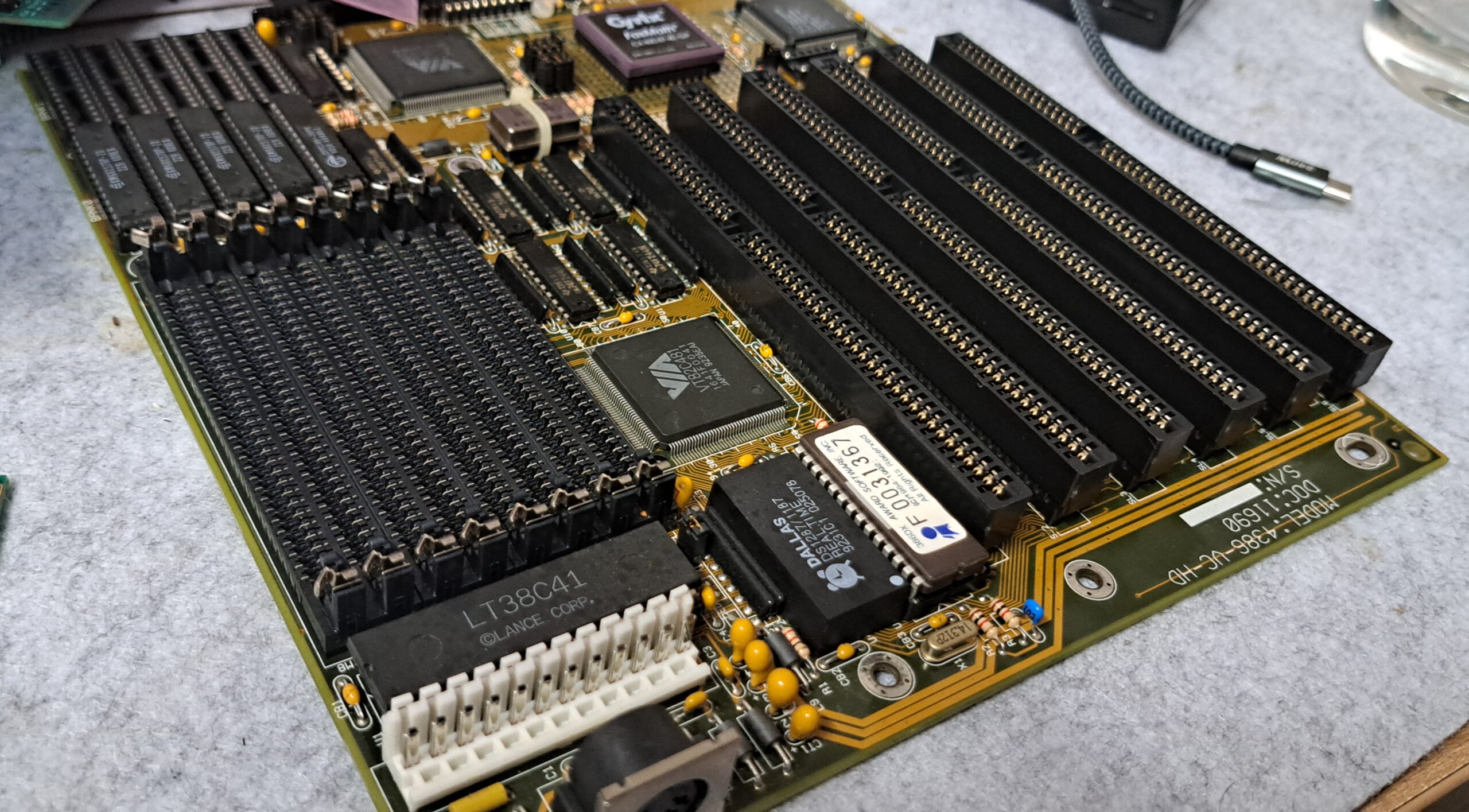
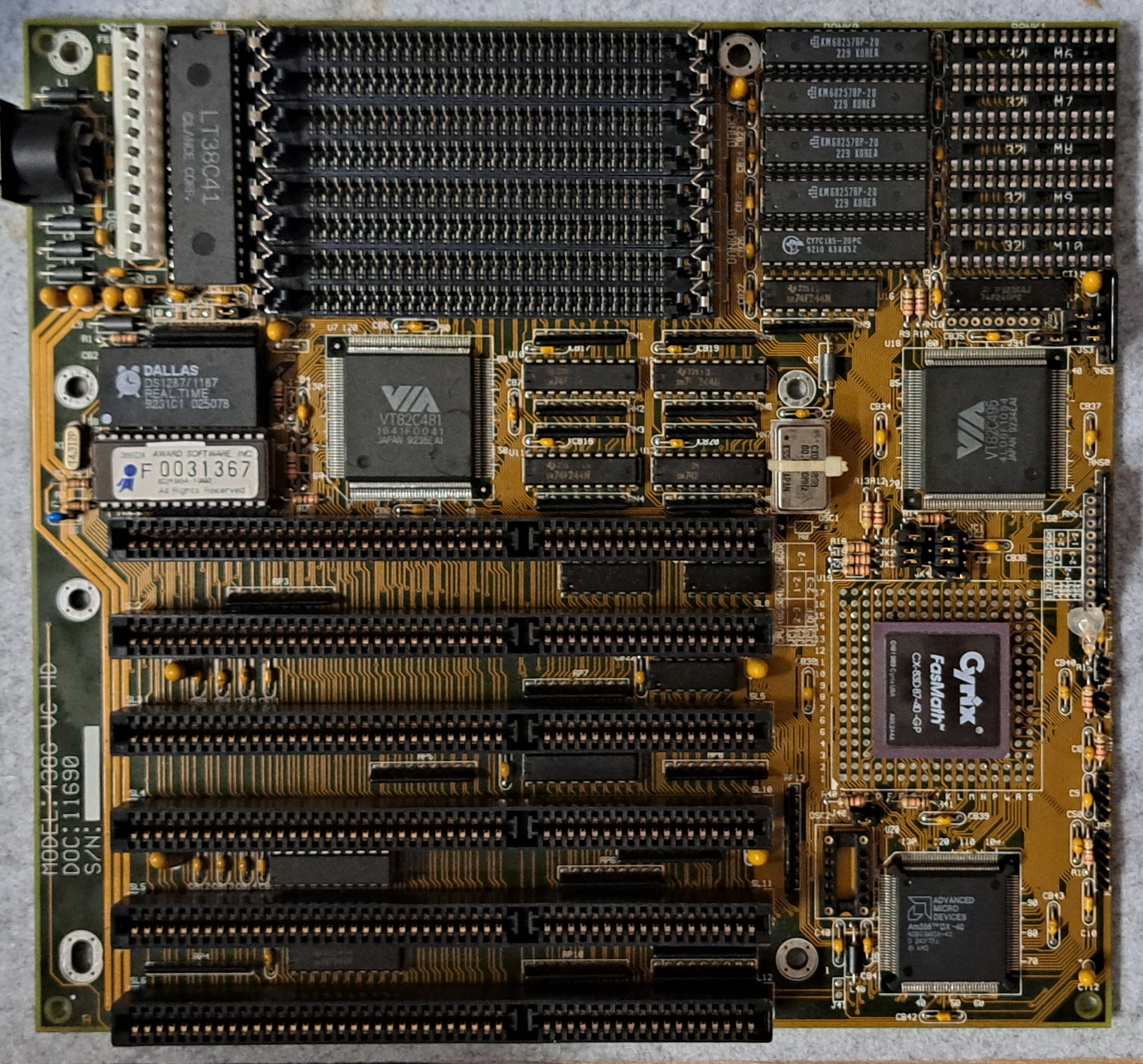
Ein 386DX40-Mainboard von FIC (Chipsatz von VIA) mit Platz für einen Coprozessor, der in diesem Fall auch bestückt ist (Cyrix FasMath CX-83D87-40). Die CPU ist fest aufgelötet (PQFP-132) und kann nicht getauscht werden; laut Aufdruck auf dem Foto ist es ein AMD Am386DX-40. Der im Handbuch vorgesehene 486-Sockel (Socket 1, PGA-169) ist auf diesem Board nicht bestückt, es sind nur die Lötpunkte rund um den Coprozessor-Sockel vorhanden. Ein Umstieg auf einen 486 ist damit nicht ohne Löten möglich.
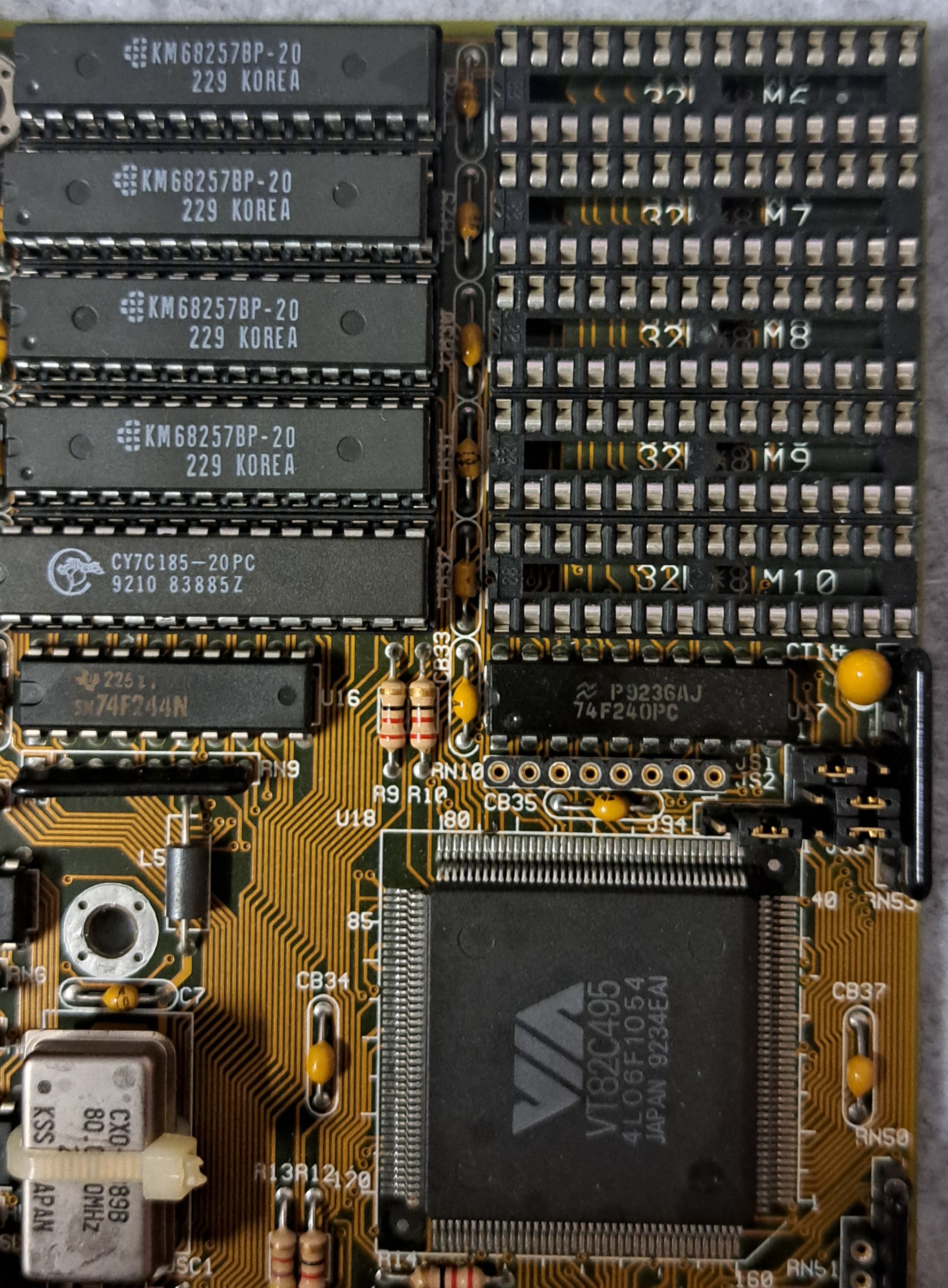
8 SIMM-Steckplätze ermöglichen es, bis zu 32 MB Speicher zu adressieren (mit 386er). 128 KB Cache ist sehr reichlich für ein 386er-Board. Das Board wirkt sehr aufgeräumt, alle ISA-Steckplätze sind 16 Bit. Mal schauen, wie es mit der Performance aussieht. Beim ViaLink status: Broken VT82C495 scheint es sich um einen der späteren Chipsätze zu handeln, da er auch 486er-Prozessoren unterstützt und auf solchen Boards auch seine Anwendung fand.
Views
Facts
| 4386-VC-HD | 386-SC-HG | |
|---|---|---|
| Manufacturer | FIC | FIC |
| Teilenummer | 4386-WC-HD | 11140 |
| Chipset | VIA · VIA VT82C495 (Venus) / VT82C481 | Symphony Laboratories · Symphony Labs SL82C460 (Haydn II, mit Cache) |
| Base | PQFP-132, PGA-68, Socket 1 | PGA-132, PGA-121 |
| Unterstützte CPUs | Intel 80386DX oder AMD Am386DX, fest aufgelötet (PQFP-132), nicht tauschbar, 387DX-Koprozessor, Intel 486 DX/DX2/SX im 486-Sockel (Socket 1) – nur wenn der Sockel bestückt ist, Intel 487SX | Intel/AMD 386DX 25–40 MHz, 387DX oder Weitek 3167 als Coprozessor (PGA-121) |
| Tact | 20 MHz, 25 MHz, 33 MHz, 40 MHz, 50 MHz | 25 MHz, 33 MHz, 40 MHz |
| Cache | 0, 64, 128 oder 256 KB auf dem Board (8 Sockel + TAG-RAM; optionaler Dirty-Bit-Baustein) | 32 oder 128 KB auf dem Board |
| Speichertakt | wie CPU-Takt | |
| Speichersteckplätze | 8 SIMM 30-polig | 8 SIMM 30-polig |
| RAM höchstens | 128 MB | 32 MB |
| Power supply | AT (P8 + P9) | AT (P8 + P9) |
| Form factor | Baby AT | Baby AT |
| Lüfteranschlüsse CPU | 0 | 0 |
| Lüfteranschlüsse Gehäuse | 0 | 0 |
| Steckplätze | 6 · ISA 16 Bit | 6 · ISA 16 Bit |
| Connections | 1 · AT-Tastatur (DIN) | 1 · AT-Tastatur (DIN) |
| BIOS-Hersteller | AMI oder Award | AMI |
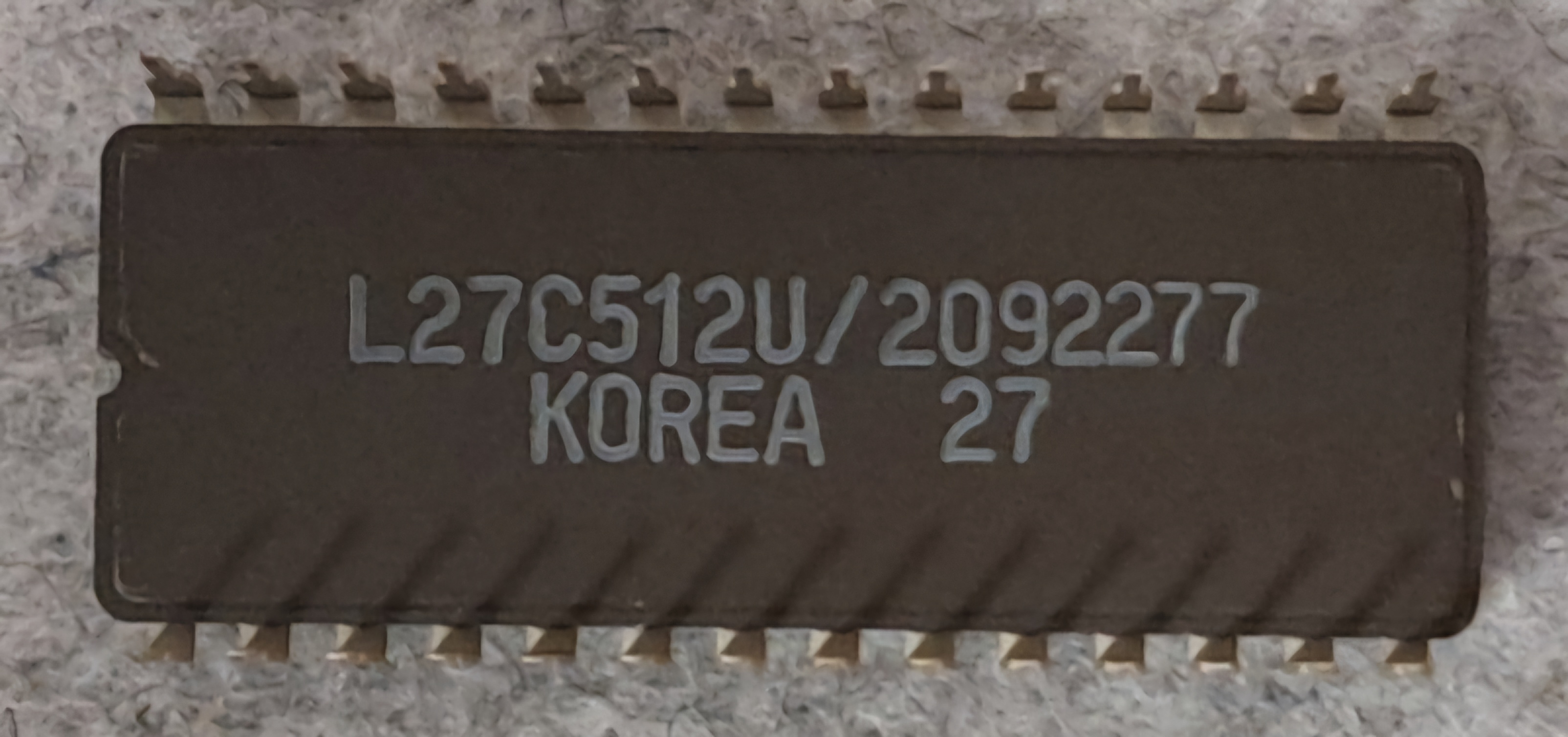
| BIOS-Baustein | EPROM 27C512, gesockelt | |
| Erscheinungs Monat/Jahr | 1992 | 1991 |
| Hinweis | Die 386-CPU ist fest aufgelötet (PQFP-132) und lässt sich nicht tauschen. Der 486-Sockel (Socket 1) liegt als Ring um den 387-Sockel (PGA-68) und ist nicht auf jedem Board bestückt; ohne ihn ist kein Umstieg auf einen 486 möglich. |
Mein Exemplar
| Designation | Herkunft | Path | Manufacturer | Verbaute CPU | BIOS | Hinweis | Links |
|---|---|---|---|---|---|---|---|
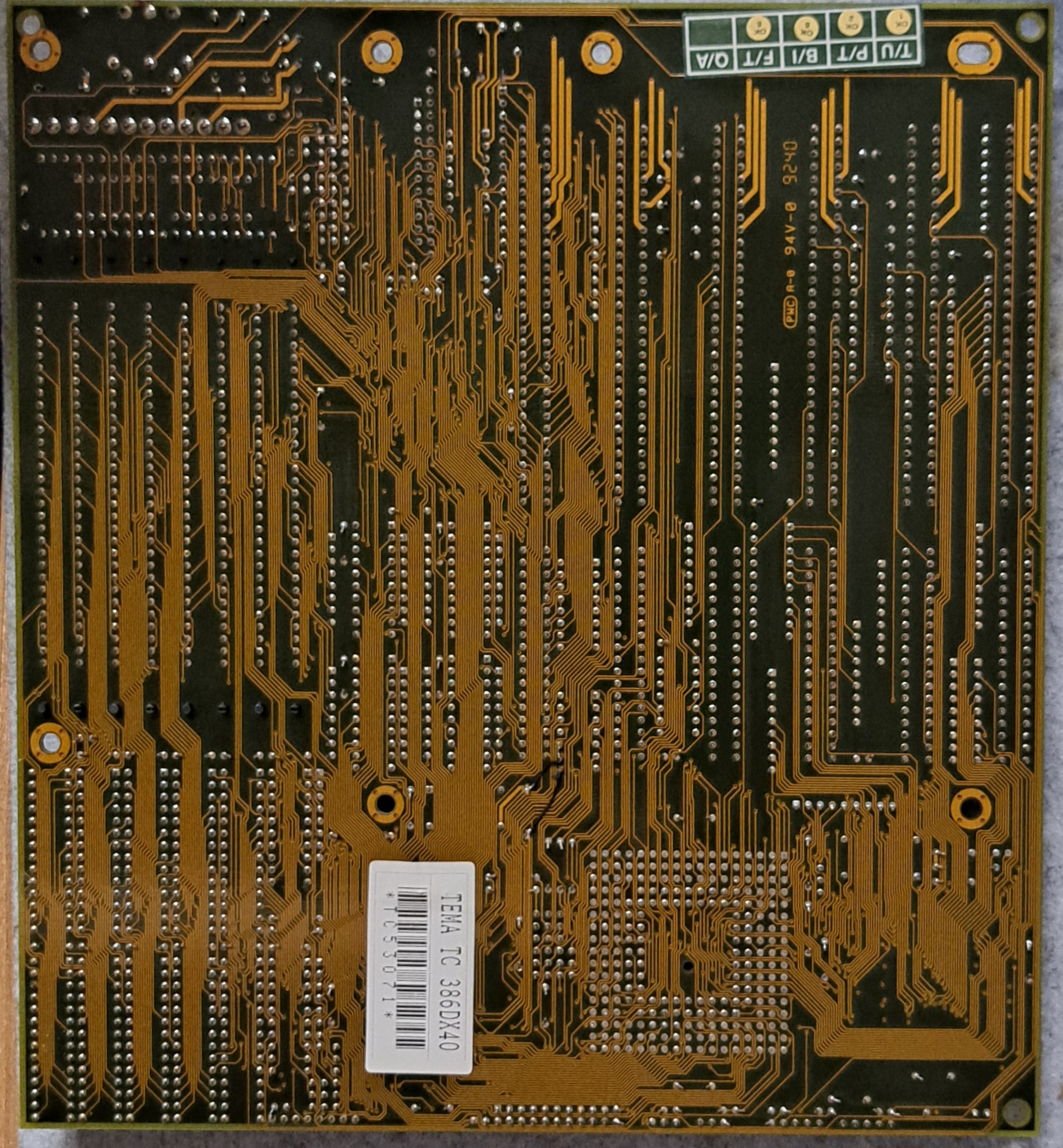
| DOC 11690 (Revision unbekannt) | belegt | Hardware → Intern → Mainboard-Revisionen | FIC | Am386DX-40 | Award, gesockeltes EPROM TMS27C512 (Original 09/16/92-VENUS); betrieben mit AMI-BIOS von The Retro Web | Sein Exemplar (Beitrag 12288): AMD Am386DX-40 fest verlötet (PQFP-132), Cyrix FasMath CX-83D87-40 im PGA-68-Sockel; der 486-Sockel (Socket 1) ist nicht bestückt, nur Lötpunkte. Aufdruck der Platine: MODEL 4386-VC-HD, DOC 11690. CPU vom Foto abgelesen (Stefan: 386DX-40, 19.10.2026). Unterseite: Aufkleber «TEMA TC 386DX40», Strichcode *TC53071* (Händler/PC-Bauer, nicht Hersteller; TEMA nicht ermittelt). Platine datiert 9240 (Woche 40/1992). | 1 |
User manual
Source: FIC 4386-VC-HD – The Retro WebLink status: Broken
BIOS
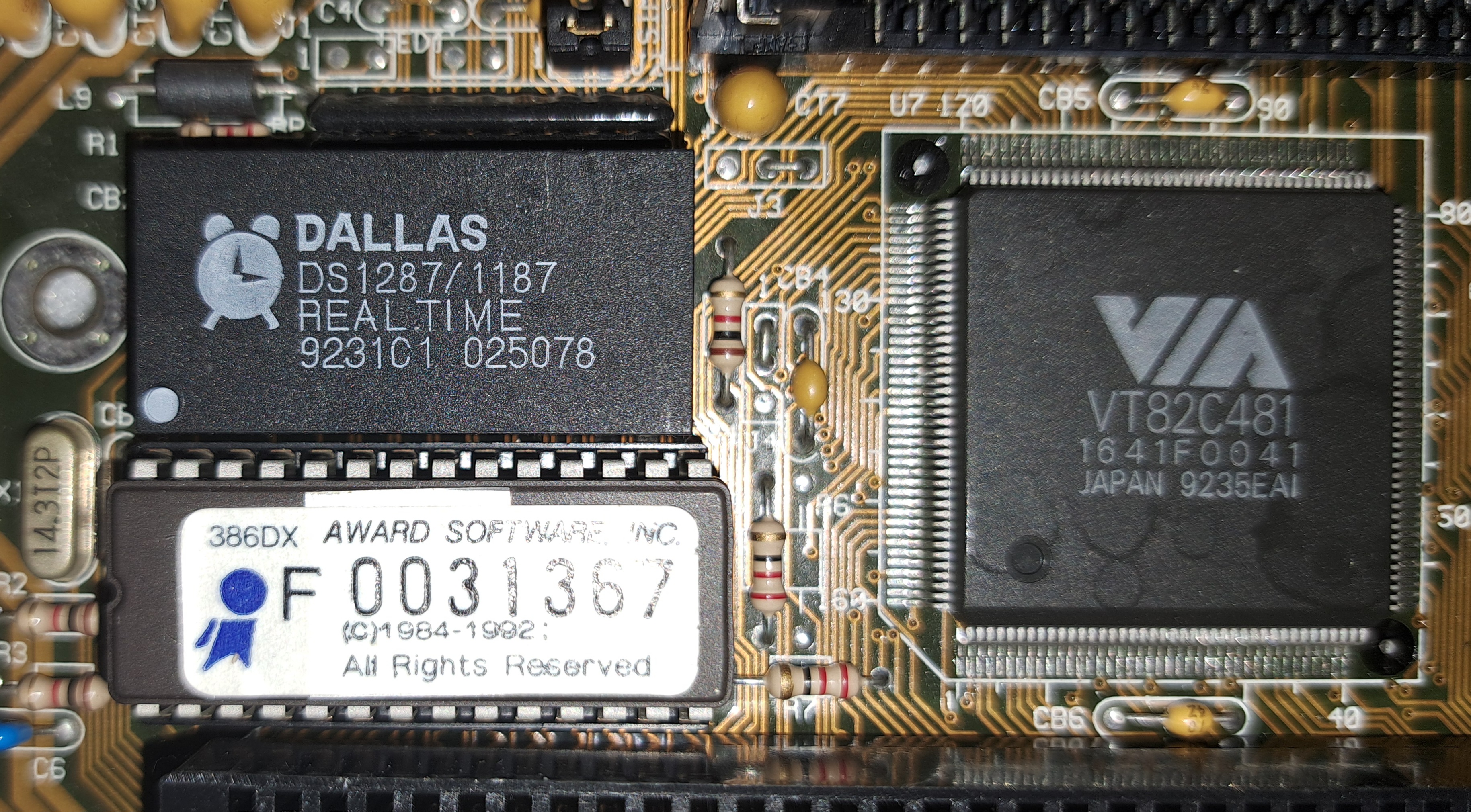
Das BIOS ist gesockelt, es ist ein TMS27C512 EPROM.
The newer version of The Retro WebLink status: Broken also works.
Die AMI-Version (The Retro WebLink status: Brokenworks best and has the most adjustment options, I will leave these on the board.
Maintenance
- Erster Funktionstest – Funktionierte
- Gereinigt – Ist sauber gewesen
- Batterie – Ist hier ein Dallas-Chip, muss geöffnet und neue Knopfzelle samt Halter aufgesetzt werden
- Leiterbahnen repariert – Nicht nötig, kein Schaden durch Batterien oder Kondensatoren
- ISA Slots und Speicher Slots mit Kontaktspray behandelt, damit gehen die Karten und Speicher leichter ein und wieder heraus.
Benchmark
| Componentescription | Type used |
|---|---|
| CPU / CoPro | See board |
| Graphics card | 16 Bit ISA ET4000 1MB |
| Storage | minimum 8 MB |
| Hard disk drive | CompactFlash |
| Szenario · Einheit | KT-0286 V3 | VIA-4386-VC-HD | FIC 386-SC-HG Rev:A |
|---|---|---|---|
| 3D Bench | |||
| für langsame PCs | 4.8 | 14 | 13.3 |
| für schnelle PCs | 14.1 | 13.9 | 13.3 |
| Chris 3D Benchmark | |||
| Punkte | 12.6 | ||
| Bilder je Sekunde | 7.5 | ||
| 640×480 · Punkte | 3.8 | ||
| 640×480 · Bilder je Sekunde | 2.3 | ||
| PC Player Benchmark | |||
| 320×200 8bpp | 3.5 | 3.6 | |
| 640×480 8bpp | 1.4 | ||
| Doom | |||
| min Detail · Realtics | 3048 | 2596 | |
| min Detail · Bilder je Sekunde | 24.5 | 28.77 | |
| max Detail · Realtics | 12678 | 11932 | |
| max Detail · Bilder je Sekunde | 5.89 | 6.26 | |
| Quake | |||
| 360×480 · Bilder | 969 | ||
| 360×480 · Sekunden | 554.5 | ||
| 360×480 · Bilder je Sekunde | 1.7 | ||
| Landmark | |||
| Landmark [CPU] | 18.27 | 64.7 | 69.41 |
| Landmark [FPU] | 8.29 | 137.6 | |
| Landmark [Video] | 3709.58 | 2987.96 | 2155.79 |
| Top Bench | |||
| Top Bench | 34 | 77 | 76 |
| Speedsys | |||
| Speedsys [CPU] | 6.46 | 9.29 | |
| MB/S L2 | 26.97 | 31.16 | |
| MB/S TP | 16.13 | 22.02 | |
| Speedsys [HDD] | 8836.4 | 7123.39 | |
| System Info | |||
| System Info [CPU] | 38.4 | 43 | |
Problems
XT-IDE slow
Ich verwende ein XT-IDE-ROM, um die 2-GB-Flashkarte komplett ansprechen zu können. Das ROM scheint aber nicht gecacht zu werden, was den IDE-Controller verlangsamt.
Lösung: AMI-BIOS aufspielen, hier ist die Cache-Funktion vorhanden.
General cross-computer issues
Computer
Doesn't start, no postcodes
- Check frequency
- Check multiplier
- Check the voltage
- (Pentium) Possibly change setting for Pentium and Pentium MMX (Dual Voltage).
Freezes / Computer crashes during Doom test
- Test memory
- Check memory. Possibly remove/exchange modules and test with a different configuration.
- Check BIOS settings (possibly set too quickly)
- Check board settings such as voltage and frequency.
Crashes after memory dive
- Test memory in device or another computer.
- Check if the board supports the memory and size
- Possibly install BIOS update
CPU
Fan bracket defective
- There are two other hooks where the heatsink could be attached with wire.
- Sticking it onto the processor would also be a possibility, or using a processor with a pre-applied cooler.
- Furthermore, there are coolers that can simply be clipped onto the CPU.
Hard drive
Not recognised
- Manually enter hard drive parameters.
- Test setup with a different hard drive.
- Test hard drive in another device.
- BIOS Update (possibly hard drive too new)
- Try the XT-Ide BIOS.#
BIOS
General Problem
- Clear BIOS settings reset.
- Update BIOS.
- If no newer BIOS is available, you can also look for successor models with the same chipset. For example, a 486 BIOS can also work on a 386.
New BIOS requires password
- Remove battery to clear settings
- Password reset jumper set
- Standard Passwort bei AMI Bios ist -> ami
General cross-computer optimisation
- Bios – Update
- BIOS patcherBPALink status: OK Award/Phoenix Version 4.23 (Ami a Version 6.00)
- ATX Power Supply Adapter (up to ATX)
- Install coprocessor (up to and including 386)
- XT-IDE ROM for Larger Hard Drives (Up to Pentium I)
- ISA Blaster for USB Mouse (as long as no PS2 or USB is present)
- DIN -> PS2 Adapter für Tastatur (solange kein PS2 oder USB vorhanden ist)
- Compact Flash as HDD replacement (up to Pentium, then rather SSD due to speed)
- GotekLink status: Unknown or FDD EmuLink status: OK as FDD replacement
- Pico GUZLink status: Unknown as a sound card replacement (until May Pentium is 8-bit)
- PicoMem Link status: OKfor memory, sound and HDD (Up to a maximum of 486, 8-bit)
CPU 80386
Facts about the processor
| Year of publication | 1985 |
| End of production | 2007 |
| Processor clock speed [MHz] | 12-40 |
| L1 Cache | – |
| Manufacturing | 1.5 µm to 0.8 µm, CMOS |
| Instruction set | x86Link status: OK to IA-32Link status: OK (16-/32-bit) |
| Bus width | 16-32 Bit |
| Variations | SX – 16 Bit lief auch auf 286er Boards DX- 32 Bit SL – Mobile lösung S |
| Co-processor | External 80387 |
| Predecessor | 80286 |
| Successor | 80486 |
Variations
| 80386SX-16 | 80386SX-20 | 80386SX-25 | 80386SX-33 | 80386DX-16 | 80386DX-20 | 80386DX-25 | 80386DX-33 | i386SL-20 | i386SL-25 | RapidCAD-25 | RapidCAD-33 | i376-16 | i376-20 | i386EX-16 | i386EX-20 | i386EX-25 | i386EXTB-20 | i386EXTB-25 | i386EXTC-25 | i386EXTC-33 | i386CXSA-25 | i386CXSA-33 | i386CXSA-40 | i386SXSA-25 | i386SXSA-33 | i386SXSA-40 | i386SXTA | i386CXSB-16 | i386CXSB-25 | |
|---|---|---|---|---|---|---|---|---|---|---|---|---|---|---|---|---|---|---|---|---|---|---|---|---|---|---|---|---|---|---|
| Codename | P3 | P3 | P3 | P3 | ||||||||||||||||||||||||||
| Base | PQFP-100, PGA-88 | PQFP-100, PGA-88 | PQFP-100, PGA-88 | PQFP-100, PGA-88 | PGA-132, PQFP-132 | PGA-132, PQFP-132 | PGA-132, PQFP-132 | PGA-132, PQFP-132 | PQFP-196, LGA-227 | PQFP-196, LGA-227 | PGA-132, PGA-68 | PGA-132, PGA-68 | PQFP-100, PGA-88 | PQFP-100, PGA-88 | PQFP-132, TQFP-144 | PQFP-132, TQFP-144 | PQFP-132, TQFP-144 | PQFP-132, TQFP-144 | PQFP-132, TQFP-144 | PQFP-132, TQFP-144 | PQFP-132, TQFP-144 | PQFP-100 | PQFP-100 | PQFP-100 | PQFP-100 | PQFP-100 | PQFP-100 | PQFP-100 | PQFP-100 | PQFP-100 |
| Tact | 16 MHz | 20 MHz | 25 MHz | 33 MHz | 16 MHz | 20 MHz | 25 MHz | 33 MHz | 20 MHz | 25 MHz | 25 MHz | 33 MHz | 16 MHz | 20 MHz | 16 MHz | 20 MHz | 25 MHz | 20 MHz | 25 MHz | 25 MHz | 33 MHz | 25 MHz | 33 MHz | 40 MHz | 25 MHz | 33 MHz | 40 MHz | 16 MHz | 25 MHz | |
| Bustakt | 16 MHz | 20 MHz | 25 MHz | 33 MHz | 16 MHz | 20 MHz | 25 MHz | 33 MHz | 20 MHz | 25 MHz | 25 MHz | 33 MHz | 16 MHz | 20 MHz | 16 MHz | 20 MHz | 25 MHz | 20 MHz | 25 MHz | 25 MHz | 33 MHz | 25 MHz | 33 MHz | 40 MHz | 25 MHz | 33 MHz | 40 MHz | 16 MHz | 25 MHz | |
| Multiplier | 1 | 1 | 1 | 1 | 1 | 1 | 1 | 1 | 1 | 1 | 1 | 1 | 1 | 1 | 1 | 1 | 1 | 1 | 1 | 1 | 1 | 1 | 1 | 1 | 1 | 1 | 1 | 1 | 1 | |
| Datenbus | 16 bit | 16 bit | 16 bit | 16 bit | 32 bit | 32 bit | 32 bit | 32 bit | 16 bit | 16 bit | 32 bit | 32 bit | 16 bit | 16 bit | 16 bit | 16 bit | 16 bit | 16 bit | 16 bit | 16 bit | 16 bit | 16 bit | 16 bit | 16 bit | 16 bit | 16 bit | 16 bit | 16 bit | 16 bit | 16 bit |
| Adressbus | 24 bit | 24 bit | 24 bit | 24 bit | 32 bit | 32 bit | 32 bit | 32 bit | 32 bit | 32 bit | 24 bit | 24 bit | 26 bit | 26 bit | 26 bit | 26 bit | 26 bit | 26 bit | 26 bit | 26 bit | 26 bit | 26 bit | 24 bit | 24 bit | 24 bit | 24 bit | 26 bit | 26 bit | ||
| Kernspannung von | 4.5 V | 4.5 V | 4.5 V | 4.5 V | 4.75 V | 4.75 V | 4.75 V | 4.75 V | 5 V | 5 V | 5 V | 5 V | 4.5 V | 4.5 V | 2.7 V | 3 V | 4.5 V | 2.7 V | 3 V | 4.5 V | 4.5 V | 4.5 V | 4.5 V | 4.75 V | 4.5 V | 4.5 V | 4.75 V | 2.7 V | 3 V | |
| Kernspannung bis | 5.5 V | 5.5 V | 5.5 V | 5.5 V | 5.25 V | 5.25 V | 5.25 V | 5.25 V | 5.5 V | 5.5 V | 3.3 V | 3.6 V | 5.5 V | 3.6 V | 3.6 V | 5.5 V | 5.5 V | 5.5 V | 5.5 V | 5.25 V | 5.5 V | 5.5 V | 5.25 V | 3.3 V | 3.6 V | |||||
| Leistung höchstens | 3.5 W | 3.5 W | ||||||||||||||||||||||||||||
| Manufacturing | 1000 nm | 1000 nm | 1000 nm | 1000 nm | 1000 nm | 1000 nm | 1000 nm | 800 nm | 800 nm | 1000 nm | 1000 nm | 800 nm | 800 nm | 800 nm | 800 nm | 800 nm | 800 nm | 800 nm | 800 nm | 800 nm | 800 nm | 800 nm | 800 nm | 800 nm | 800 nm | 800 nm | 800 nm | |||
| Transistoren | 275000 | 275000 | 275000 | 275000 | 275000 | 275000 | 275000 | 275000 | 855000 | 855000 | 800000 | 800000 | ||||||||||||||||||
| Instruction set | IA-32 | IA-32 | IA-32 | IA-32 | IA-32 | IA-32 | IA-32 | IA-32 | IA-32 | IA-32 | IA-32 | IA-32 | IA-32 | IA-32 | IA-32 | IA-32 | IA-32 | IA-32 | IA-32 | IA-32 | IA-32 | IA-32 | IA-32 | IA-32 | IA-32 | IA-32 | IA-32 | IA-32 | IA-32 | IA-32 |
| Erweiterungen | SMM | SMM | FPU | FPU | SMM | SMM | SMM | SMM | SMM | SMM | SMM | SMM | SMM | SMM | SMM | SMM |
Source: https://de.wikipedia.org/wiki/Intel_80386#VariantenLink status: OK
Software
| Operating systems | Programme | Games |
|---|---|---|
| DOS 6.22 Windows 3.x Windows for Workgroups 3.x NT 3.5 OS/2 Linux (for example, Debian 3.1) FreeBSD | CheckIt NDir Doskey | Commander Keen 1/2 Wolfenstein 3D Civilisation I / II SimCity Monkey Island Simon the Sourcerer Prince of Persia Lemmings Duke Nukem 1/2 |
Architecture

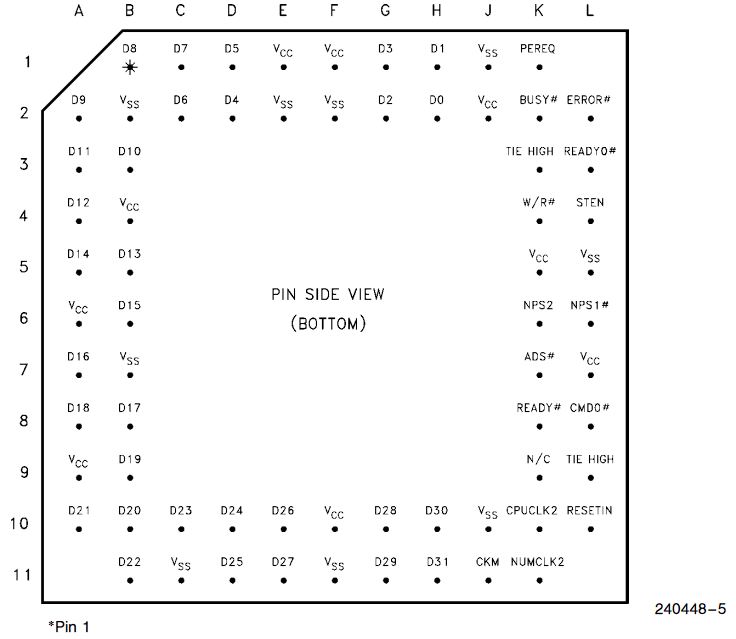
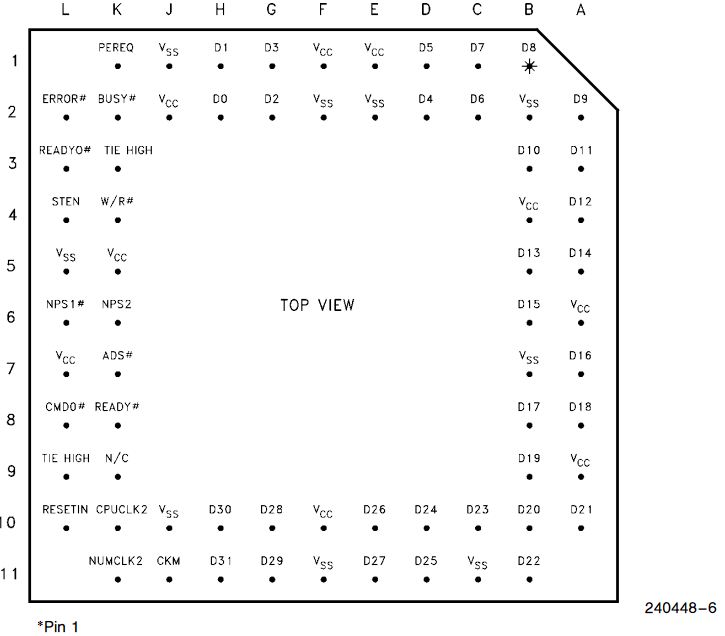
Pinout
Intel 387
Socket PGA121
Data sheets
Miscellaneous
Test report
–
Conclusion
| Question | Antwort |
|---|---|
| Does the board work | Yes / No |
| How much did it cost? | 121,50€ Ges. Preis – im Gehäuse, mit Festplatte, 5.25″, 3,5″, Grafikkarte, CD-ROM 30-60€ for the board |
| Was the price okay? | Yes |
| Is it worth it? | Ich finde ja |
| Fazit insgesamt | Positive with minor restrictions |
Das Board funktioniert und läuft stabil mit dem AMI-BIOS. Es ist etwas langsamer als andere getestete, trotz des großen Cache-Speichers von 128KB.
Licence
Stand 10.10.2026; kommerzielles Produkt, keine offene Lizenz bekannt.
- Hardware: nicht offen, kommerzielles Produkt (proprietär)
- Software/Firmware: BIOS proprietär
- Marken: Genannte Marken- und Produktnamen gehören ihren jeweiligen Inhabern.
Related Posts
- Retro Hauptplatine – GA-586ATE Rev 4.DLink status: OK
- Retro Hauptplatine – FIC 486-HC-HDLink status: OK
- Retro Hauptplatine – HIPPO COM v2.1Link status: OK
- Retro Hauptplatine – MSI 3134Link status: OK
- Retro Hauptplatine – BioSTAR GF8100 M2 TELink status: OK
Sources
- FIC 4386-VC-HD – The Retro WebLink status: Broken
- The Retro WebLink status: Broken
- ViaLink status: Broken
Log
| Date | Change | Author |
|---|---|---|
| 19.10.2026 | Fakten: Abschnitt „Mein Exemplar“ (Revision mit verbauter CPU) ergänzt. Hersteller im Titel und in Bildunterschriften auf FIC korrigiert (VIA liefert nur den Chipsatz). Formaler Standard: Alt-Texte, Datei-Linktexte, Galerien 2 Spalten, Quellen-Tabelle per List of Sources, Tippfehler, leere Absätze/Überschrift entfernt, Auszug gesetzt CPU-Angaben korrigiert: AMD Am386DX-40 fest aufgelötet, nicht tauschbar; 486-Sockel (Socket 1) unbestückt, keine Upgrade-Aussage mehr | Suffocation |
| 18.10.2026 | Mainboard- und Benchmark-Tabelle (TablePress) durch Vergleichsblöcke des Taxonomy Modeller ersetzt | Suffocation |
| 10.10.2026 | Abschnitt Lizenz ergänzt (Hardware/Software) | Suffocation |
| 08.10.2026 | Überschriften-Hierarchie korrigiert (H1→H2, Unterebenen eine Stufe tiefer) | Suffocation |
| 04.10.2026 | Rechtschreibung korrigiert: Tippfehler, Kommas, Groß-/Kleinschreibung | Suffocation |
| 03.10.2026 | Logbuch-Tabelle auf Log-Liste umgestellt | Suffocation |
| 20.03.2025 | Finalised and set live. | Suffocation |
| 19.03.2025 | Benchmarks added | Suffocation |
| 15.03.2025 | Post created | Suffocation |