Last Updated on 17. October 2026 by SuffocationLink status: OK
Nun habe ich auch einen 386DX40 auf einem MSI Mainboard. Das Mainboard hatte einen Batterieschaden und wenn ich mir das abgeknipste Beinpaar ansehe, wohl einen kurzgeschlossenen Tantal Kondensator. Der Schaden an der Dinbuchse für die Tastatur wurde mit zwei Kabelbrücken bereits behoben, das Board funktioniert einwandfrei. Was mich einlädt, mal ein paar Tests zu machen.
Views
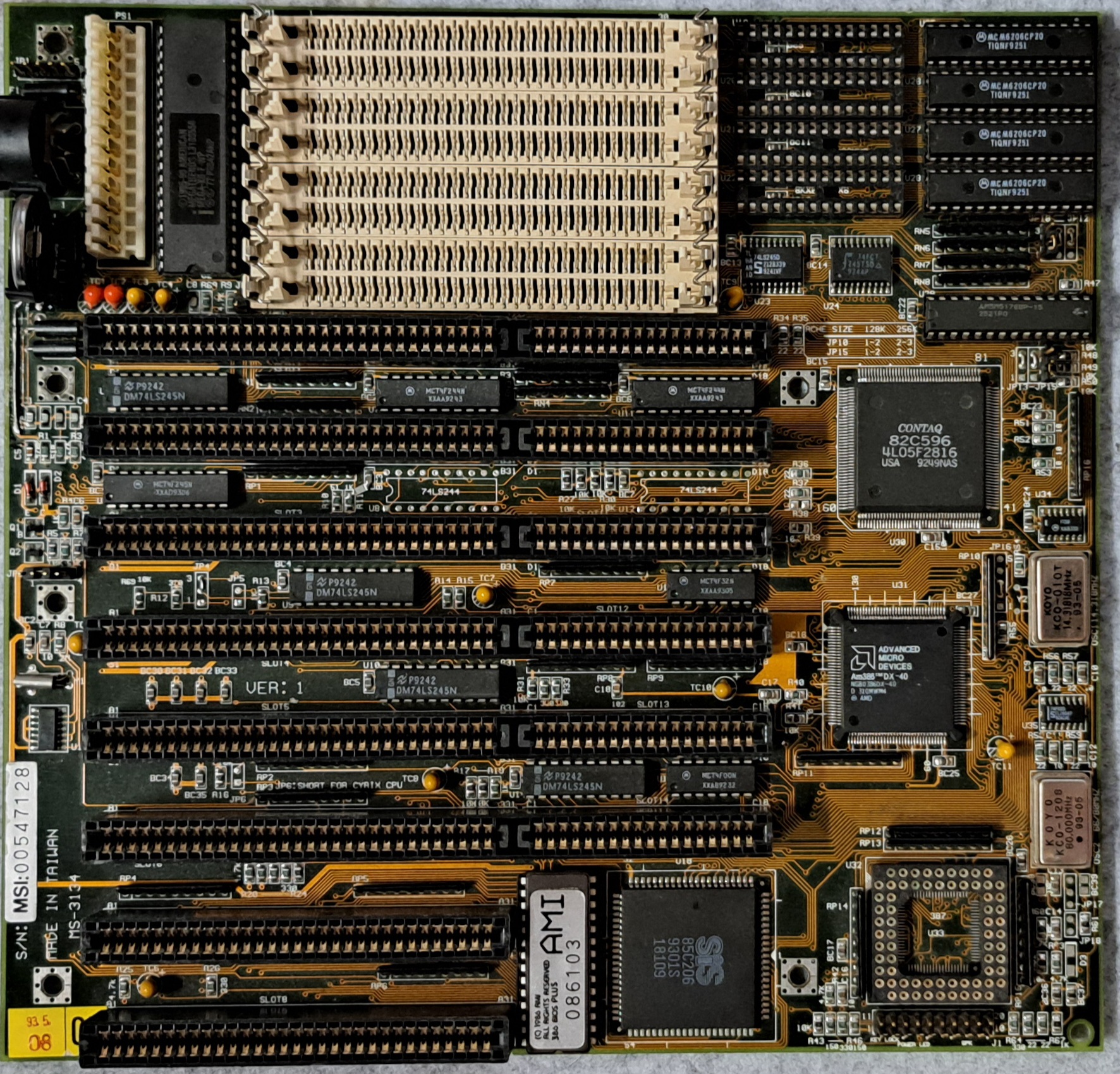
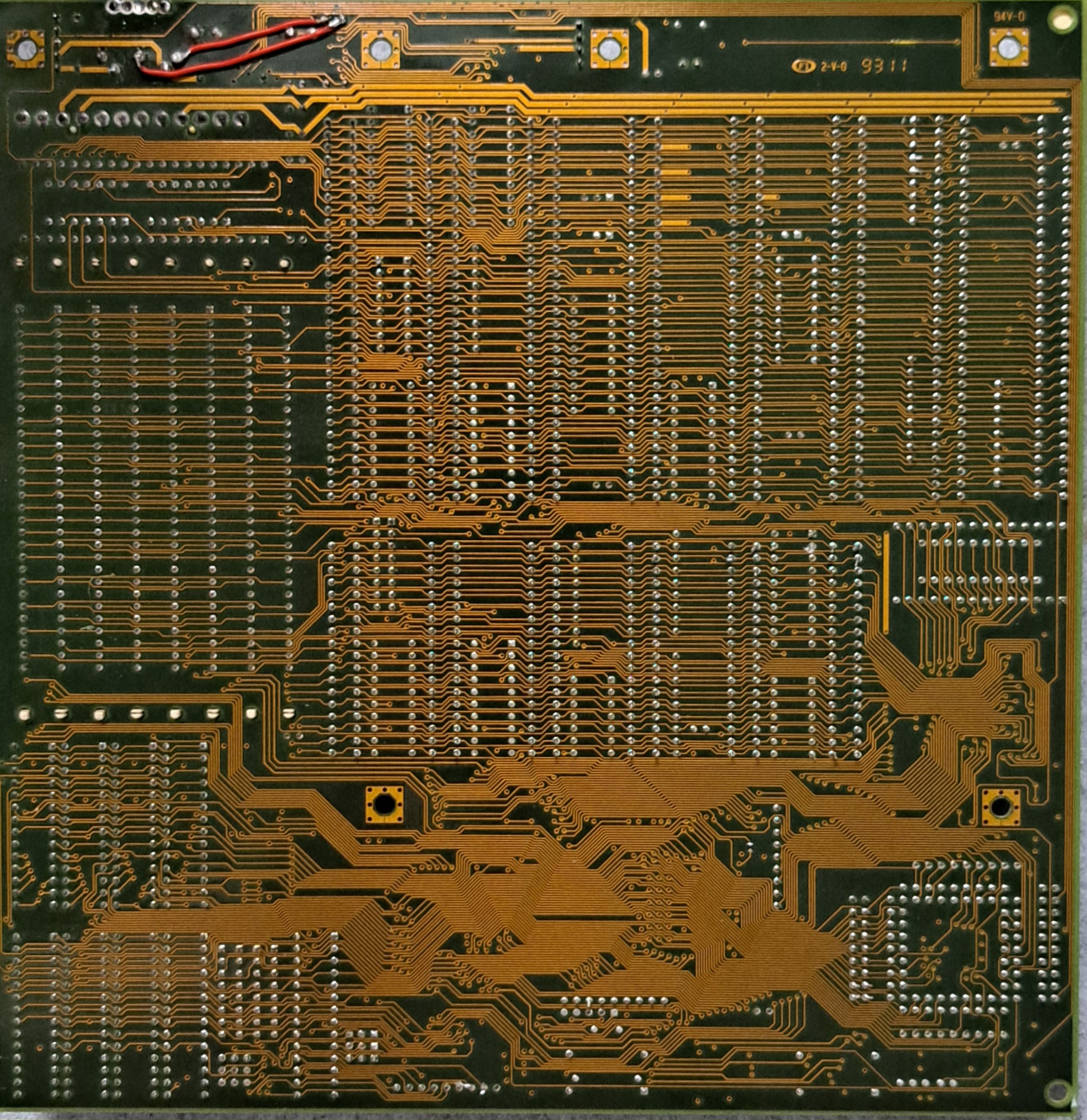
Facts
| MS-3134 | |
|---|---|
| Manufacturer | MSI |
| Chipset | Contaq · Contaq 82C596 (386 Writeback Cache) |
| Base | PQFP-132, PGA-68 |
| Unterstützte CPUs | Intel 386DX 40 MHz (aufgelötet, PQFP-132), 387DX-Koprozessor (PGA-68-Sockel) |
| Tact | 40 MHz |
| Cache | 64 KB L2 auf dem Board (nur aus seiner Tabelle; The Retro Web führt keinen Cache) |
| Speichersteckplätze | 8 SIMM 30-polig |
| RAM höchstens | 32 MB |
| Power supply | AT (P8 + P9) |
| Form factor | Baby AT |
| Lüfteranschlüsse CPU | 0 |
| Lüfteranschlüsse Gehäuse | 0 |
| Steckplätze | 6 · ISA 16 Bit, 2 · ISA 8 Bit |
| Connections | 1 · AT-Tastatur (DIN) |
| BIOS-Hersteller | AMI |
| BIOS-Baustein | EPROM 27512 (512 Kbit), gesockelt |
User manual
Keines gefunden.
BIOS
Der Bioschip ist abnehmbar und (L)EPROM. 27512
Maintenance
- Erster Funktionstest – OK
- Gereinigt – War sauber
- Batterie entfernt – war schon weg
- Leiterbahnen repariert – war schon repariert
- Batterie durch Knopfzelle ersetzt – No Varta hochkant, passt aber nicht gut
Benchmark
| CPU | 386DX40 |
| Graphics card | Tseng Labs ET4000 1MB Speicher |
| Storage | minimum 8 MB |
| Hard disk drive | CompactFlash |
| Szenario · Einheit | MSI MS-3134 |
|---|---|
| 3D Bench | |
| für langsame PCs | 15.6 |
| für schnelle PCs | 15.5 |
| PC Player Benchmark | |
| 320×200 8bpp | 3.2 |
| 640×480 8bpp | 3.1 |
| Doom | |
| min Detail · Realtics | 3053 |
| min Detail · Bilder je Sekunde | 24.46 |
| max Detail · Realtics | 11477 |
| max Detail · Bilder je Sekunde | 6.51 |
| Landmark | |
| Landmark [CPU] | 67.21 |
| Landmark [Video] | 5146.81 |
| Top Bench | |
| Top Bench | 86 |
| Speedsys | |
| Speedsys [CPU] | 8.89 |
| MB/S L2 | 26.14 |
| MB/S TP | 13.36 |
| Speedsys [HDD] | 7093.95 |
| System Info | |
| System Info [CPU] | 39.8 |
Problems
General cross-computer issues
Computer
Doesn't start, no postcodes
- Check frequency
- Check multiplier
- Check the voltage
- (Pentium) Possibly change setting for Pentium and Pentium MMX (Dual Voltage).
Freezes / Computer crashes during Doom test
- Test memory
- Check memory. Possibly remove/exchange modules and test with a different configuration.
- Check BIOS settings (possibly set too quickly)
- Check board settings such as voltage and frequency.
Crashes after memory dive
- Test memory in device or another computer.
- Check if the board supports the memory and size
- Possibly install BIOS update
CPU
Fan bracket defective
- There are two other hooks where the heatsink could be attached with wire.
- Sticking it onto the processor would also be a possibility, or using a processor with a pre-applied cooler.
- Furthermore, there are coolers that can simply be clipped onto the CPU.
Hard drive
Not recognised
- Manually enter hard drive parameters.
- Test setup with a different hard drive.
- Test hard drive in another device.
- BIOS Update (possibly hard drive too new)
- Try the XT-Ide BIOS.#
BIOS
General Problem
- Clear BIOS settings reset.
- Update BIOS.
- If no newer BIOS is available, you can also look for successor models with the same chipset. For example, a 486 BIOS can also work on a 386.
New BIOS requires password
- Remove battery to clear settings
- Password reset jumper set
- Standard Passwort bei AMI Bios ist -> ami
General cross-computer optimisation
- Bios – Update
- BIOS patcherBPALink status: OK Award/Phoenix Version 4.23 (Ami a Version 6.00)
- ATX Power Supply Adapter (up to ATX)
- Install coprocessor (up to and including 386)
- XT-IDE ROM for Larger Hard Drives (Up to Pentium I)
- ISA Blaster for USB Mouse (as long as no PS2 or USB is present)
- DIN -> PS2 Adapter für Tastatur (solange kein PS2 oder USB vorhanden ist)
- Compact Flash as HDD replacement (up to Pentium, then rather SSD due to speed)
- GotekLink status: Unknown or FDD EmuLink status: OK as FDD replacement
- Pico GUZLink status: Unknown as a sound card replacement (until May Pentium is 8-bit)
- PicoMem Link status: OKfor memory, sound and HDD (Up to a maximum of 486, 8-bit)
CPU 80386
Facts about the processor
| Year of publication | 1985 |
| End of production | 2007 |
| Processor clock speed [MHz] | 12-40 |
| L1 Cache | – |
| Manufacturing | 1.5 µm to 0.8 µm, CMOS |
| Instruction set | x86Link status: OK to IA-32Link status: OK (16-/32-bit) |
| Bus width | 16-32 Bit |
| Variations | SX – 16 Bit lief auch auf 286er Boards DX- 32 Bit SL – Mobile lösung S |
| Co-processor | External 80387 |
| Predecessor | 80286 |
| Successor | 80486 |
Variations
| 80386SX-16 | 80386SX-20 | 80386SX-25 | 80386SX-33 | 80386DX-16 | 80386DX-20 | 80386DX-25 | 80386DX-33 | i386SL-20 | i386SL-25 | RapidCAD-25 | RapidCAD-33 | i376-16 | i376-20 | i386EX-16 | i386EX-20 | i386EX-25 | i386EXTB-20 | i386EXTB-25 | i386EXTC-25 | i386EXTC-33 | i386CXSA-25 | i386CXSA-33 | i386CXSA-40 | i386SXSA-25 | i386SXSA-33 | i386SXSA-40 | i386SXTA | i386CXSB-16 | i386CXSB-25 | |
|---|---|---|---|---|---|---|---|---|---|---|---|---|---|---|---|---|---|---|---|---|---|---|---|---|---|---|---|---|---|---|
| Codename | P3 | P3 | P3 | P3 | ||||||||||||||||||||||||||
| Base | PQFP-100, PGA-88 | PQFP-100, PGA-88 | PQFP-100, PGA-88 | PQFP-100, PGA-88 | PGA-132, PQFP-132 | PGA-132, PQFP-132 | PGA-132, PQFP-132 | PGA-132, PQFP-132 | PQFP-196, LGA-227 | PQFP-196, LGA-227 | PGA-132, PGA-68 | PGA-132, PGA-68 | PQFP-100, PGA-88 | PQFP-100, PGA-88 | PQFP-132, TQFP-144 | PQFP-132, TQFP-144 | PQFP-132, TQFP-144 | PQFP-132, TQFP-144 | PQFP-132, TQFP-144 | PQFP-132, TQFP-144 | PQFP-132, TQFP-144 | PQFP-100 | PQFP-100 | PQFP-100 | PQFP-100 | PQFP-100 | PQFP-100 | PQFP-100 | PQFP-100 | PQFP-100 |
| Tact | 16 MHz | 20 MHz | 25 MHz | 33 MHz | 16 MHz | 20 MHz | 25 MHz | 33 MHz | 20 MHz | 25 MHz | 25 MHz | 33 MHz | 16 MHz | 20 MHz | 16 MHz | 20 MHz | 25 MHz | 20 MHz | 25 MHz | 25 MHz | 33 MHz | 25 MHz | 33 MHz | 40 MHz | 25 MHz | 33 MHz | 40 MHz | 16 MHz | 25 MHz | |
| Bustakt | 16 MHz | 20 MHz | 25 MHz | 33 MHz | 16 MHz | 20 MHz | 25 MHz | 33 MHz | 20 MHz | 25 MHz | 25 MHz | 33 MHz | 16 MHz | 20 MHz | 16 MHz | 20 MHz | 25 MHz | 20 MHz | 25 MHz | 25 MHz | 33 MHz | 25 MHz | 33 MHz | 40 MHz | 25 MHz | 33 MHz | 40 MHz | 16 MHz | 25 MHz | |
| Multiplier | 1 | 1 | 1 | 1 | 1 | 1 | 1 | 1 | 1 | 1 | 1 | 1 | 1 | 1 | 1 | 1 | 1 | 1 | 1 | 1 | 1 | 1 | 1 | 1 | 1 | 1 | 1 | 1 | 1 | |
| Datenbus | 16 bit | 16 bit | 16 bit | 16 bit | 32 bit | 32 bit | 32 bit | 32 bit | 16 bit | 16 bit | 32 bit | 32 bit | 16 bit | 16 bit | 16 bit | 16 bit | 16 bit | 16 bit | 16 bit | 16 bit | 16 bit | 16 bit | 16 bit | 16 bit | 16 bit | 16 bit | 16 bit | 16 bit | 16 bit | 16 bit |
| Adressbus | 24 bit | 24 bit | 24 bit | 24 bit | 32 bit | 32 bit | 32 bit | 32 bit | 32 bit | 32 bit | 24 bit | 24 bit | 26 bit | 26 bit | 26 bit | 26 bit | 26 bit | 26 bit | 26 bit | 26 bit | 26 bit | 26 bit | 24 bit | 24 bit | 24 bit | 24 bit | 26 bit | 26 bit | ||
| Kernspannung von | 4.5 V | 4.5 V | 4.5 V | 4.5 V | 4.75 V | 4.75 V | 4.75 V | 4.75 V | 5 V | 5 V | 5 V | 5 V | 4.5 V | 4.5 V | 2.7 V | 3 V | 4.5 V | 2.7 V | 3 V | 4.5 V | 4.5 V | 4.5 V | 4.5 V | 4.75 V | 4.5 V | 4.5 V | 4.75 V | 2.7 V | 3 V | |
| Kernspannung bis | 5.5 V | 5.5 V | 5.5 V | 5.5 V | 5.25 V | 5.25 V | 5.25 V | 5.25 V | 5.5 V | 5.5 V | 3.3 V | 3.6 V | 5.5 V | 3.6 V | 3.6 V | 5.5 V | 5.5 V | 5.5 V | 5.5 V | 5.25 V | 5.5 V | 5.5 V | 5.25 V | 3.3 V | 3.6 V | |||||
| Leistung höchstens | 3.5 W | 3.5 W | ||||||||||||||||||||||||||||
| Manufacturing | 1000 nm | 1000 nm | 1000 nm | 1000 nm | 1000 nm | 1000 nm | 1000 nm | 800 nm | 800 nm | 1000 nm | 1000 nm | 800 nm | 800 nm | 800 nm | 800 nm | 800 nm | 800 nm | 800 nm | 800 nm | 800 nm | 800 nm | 800 nm | 800 nm | 800 nm | 800 nm | 800 nm | 800 nm | |||
| Transistoren | 275000 | 275000 | 275000 | 275000 | 275000 | 275000 | 275000 | 275000 | 855000 | 855000 | 800000 | 800000 | ||||||||||||||||||
| Instruction set | IA-32 | IA-32 | IA-32 | IA-32 | IA-32 | IA-32 | IA-32 | IA-32 | IA-32 | IA-32 | IA-32 | IA-32 | IA-32 | IA-32 | IA-32 | IA-32 | IA-32 | IA-32 | IA-32 | IA-32 | IA-32 | IA-32 | IA-32 | IA-32 | IA-32 | IA-32 | IA-32 | IA-32 | IA-32 | IA-32 |
| Erweiterungen | SMM | SMM | FPU | FPU | SMM | SMM | SMM | SMM | SMM | SMM | SMM | SMM | SMM | SMM | SMM | SMM |
Source: https://de.wikipedia.org/wiki/Intel_80386#VariantenLink status: OK
Software
| Operating systems | Programme | Games |
|---|---|---|
| DOS 6.22 Windows 3.x Windows for Workgroups 3.x NT 3.5 OS/2 Linux (for example, Debian 3.1) FreeBSD | CheckIt NDir Doskey | Commander Keen 1/2 Wolfenstein 3D Civilisation I / II SimCity Monkey Island Simon the Sourcerer Prince of Persia Lemmings Duke Nukem 1/2 |
Architecture

Pinout
Intel 387
Socket PGA121
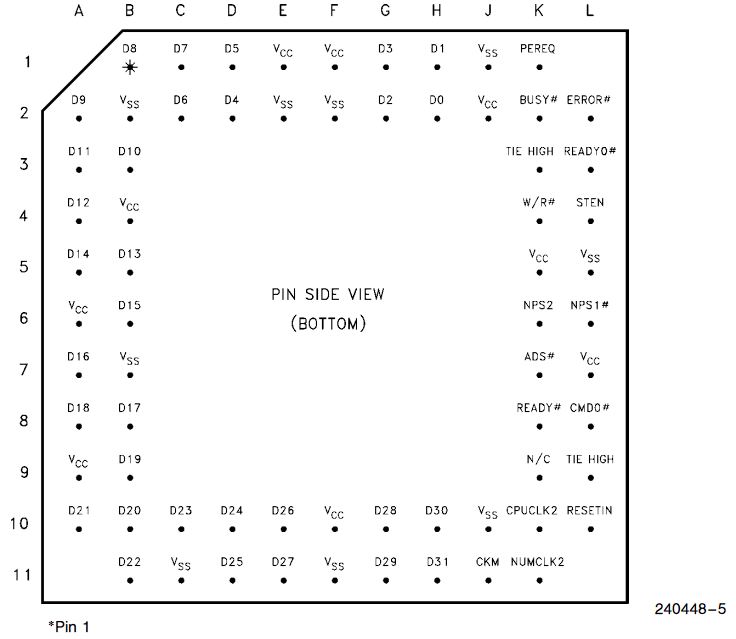
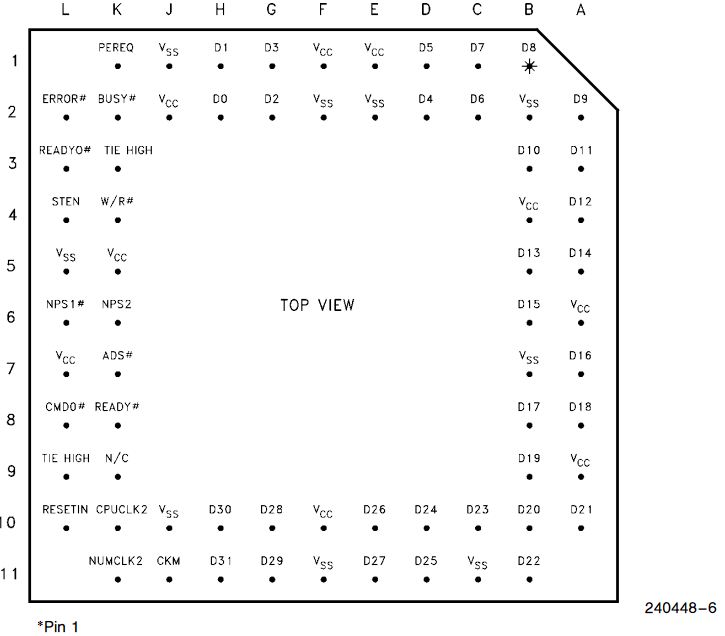
Data sheets
Miscellaneous
Test report
–
Conclusion
| Question | Antwort |
|---|---|
| Does the board work | Ja, aber wurde vom Verkäufer repariert. |
| How much did it cost? | 121,50€ Ges. Preis – im Gehäuse, mit Festplatte, 5.25″, 3,5″, Graphikkarte, CDRom 30-60€ for the board |
| Was the price okay? | mehr als OK |
| Is it worth it? | Für Software aus den 80ern ist er genau das Richtige. Wer mit Doom, Quake, Duke Nukem 3D Spaß haben will, braucht etwas Stärkeres, zum Beispiel den 486 DX2 66 oder stärker. |
| Overall conclusion | Positive |
Licence
Stand 10.10.2026; kommerzielles Produkt, keine offene Lizenz bekannt.
- Hardware: nicht offen, kommerzielles Produkt von MSI (proprietär)
- Software/Firmware: BIOS proprietär
- Marken: Genannte Marken- und Produktnamen gehören ihren jeweiligen Inhabern.
Related Posts
- Retro Hauptplatine – GA-586ATE Rev 4.DLink status: OK
- Retro Hauptplatine – FIC 486-HC-HDLink status: OK
- Retro Hauptplatine – HIPPO COM v2.1Link status: OK
- Retro Hauptplatine – FIC 4386-VC-HDLink status: OK
- Retro Hauptplatine – BioSTAR GF8100 M2 TELink status: Unknown
Sources
RetroWeb Link zum BoardLink status: Unknown
https://theretroweb.comLink status: Unknown
Log
| Date | Change | Author |
|---|---|---|
| 18.10.2026 | Mainboard- und Benchmark-Tabelle (TablePress) durch Vergleichsblöcke des Taxonomy Modeller ersetzt | Suffocation |
| 10.10.2026 | Abschnitt Lizenz ergänzt (Hardware/Software) | Suffocation |
| 08.10.2026 | Überschriften-Hierarchie korrigiert (H1→H2, Unterebenen eine Stufe tiefer) | Suffocation |
| 04.10.2026 | Rechtschreibung korrigiert: Tippfehler, Kommas, Groß-/Kleinschreibung | Suffocation |
| 03.10.2026 | Logbuch-Tabelle auf Log-Liste umgestellt | Suffocation |
| 16.03.2025 | Veröffentlicht | Suffocation |
| 15.03.2025 | Beitrag vervollständigt, Bilder hinzugefügt, Software benannt, Eigenschaften in Tabelle übertragen. | Suffocation |
| 14.03.2025 | Post created | Suffocation |