
Last Updated on 3. October 2026 by SuffocationLink status: OK
Das RTOS SDK ist die Espressif-eigene Programmierumgebung für den ESP8266.
Facts
Auch das Arduino SDK kapselt die Funktionalitäten dieses SDKs. Jetzt könnte man sich fragen, warum man für den ESP8266 spezialisierten Code schreiben sollte, indem man direkt das SDK verwendet. Die Antwort ist nicht ganz einfach, aber hier ein paar Argumente:
- Das Framework bietet erweiterte Funktionalitäten, die in der Arduino IDE nicht gekapselt sind
- Es gibt bestehende Programme für IoT, die auf dem Framework basieren
- Es war in der Vergangenheit immer aktueller als die Arduino IDE (wird nicht weiterentwickelt)
- Errors will be eliminated here first.
- The Espressif AT Framework is based on it
Requirements
- Sufficient hard drive space > 2GB
- Funktionierende Python-Umgebung
- Knowledge of the Windows Console (CMD)
Areas of application
- AT-Firmware
- Hardwarenahe Programmierung
- Nutzung der RTOS-eigenen BS-Funktionen
Installation
Windows
The current version is not working properly for me!!!
Install toolchain
WICHTIG: Verwendet keine Pfade mit Leerzeichen, das führt nur zu Problemen.
https://docs.espressif.com/projects/esp8266-rtos-sdk/en/v3.4/get-started/windows-setup.htmlLink status: OK
Zur Installation der Hilfsprogramme (Toolchain) das Gesamtpaket herunterladen unter:
https://dl.espressif.com/dl/esp32_win32_msys2_environment_and_toolchain-20181001.zipLink status: OK
I am unzipping the package to C:/Devel
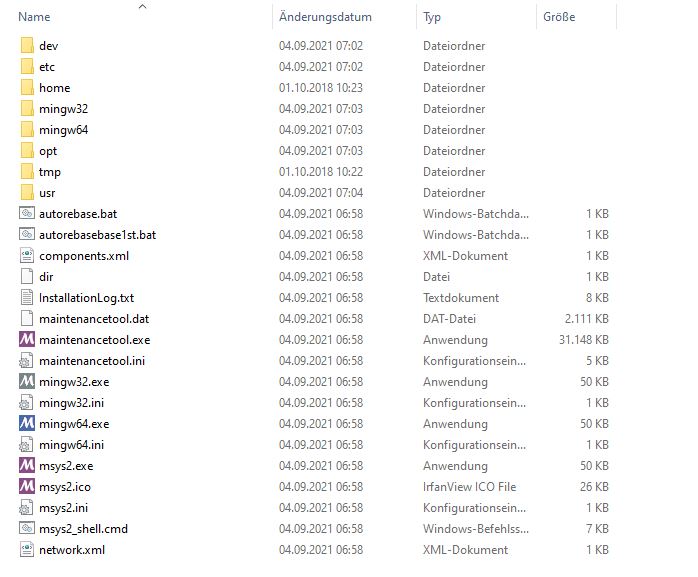
Install RTOS Framework
Nun wird noch das Programmierframework benötigt, dieses gibt es über gitLink status: OK:
git clone -b v3.4 --recursive https://github.com/espressif/ESP8266_RTOS_SDK.gitIDF-Pfad setzen. Ich mache das manuell, weil ich auch noch die IDF für den ESP32 installiert habe.
set IDF_PATH=C:\Devel\ESP8266_RTOS_SDKPython-Pakete installieren
pip install --user -r $IDF_PATH/requirements.txtDas sollte es erstmal gewesen sein und wenn später bei der Programmierung keine Fehler auftreten, hat es auch vollständig funktioniert ;). Bei mir bemängelt er aktuell noch ein paar Sourcen, die ich nicht auflösen kann. Es gibt auch noch die Möglichkeit, die Installation in der MINGW-Umgebung vorzunehmen, was mir wegen der begrenzten Console aber auf die Nerven ging. Deshalb habe ich mich entschieden, das Framework auf einem Raspberry Pi zu installieren. Dies ging ohne größere Komplikationen vonstatten, siehe das folgende Kapitel.
Linux (on PI)
Create directory esp under user PI:
cd ~/
mkdir ./esp
cd esp
This directory is where everything happens.
Benötigte Pakete installieren
sudo apt-get update
sudo apt-get upgrade
sudo apt-get install gcc git wget make libncurses-dev flex bison gperf python python-serial
For 64-bit Linux: https://dl.espressif.com/dl/xtensa-lx106-elf-gcc8_4_0-esp-2020r3-linux-amd64.tar.gzLink status: OK For 32-bit Linux: https://dl.espressif.com/dl/xtensa-lx106-elf-gcc8_4_0-esp-2020r3-linux-i686.tar.gzLink status: OK For the PI https://https://dl.espressif.com/dl/xtensa-lx106-elf-gcc8_4_0-esp-2020r3-linux-armel.tar.gzLink status: Unknown
Install toolchain
Download the toolchain using:
wget https://dl.espressif.com/dl/xtensa-lx106-elf-gcc8_4_0-esp-2020r3-linux-i686.tar.gzUnpacking toolchain:
tar -xzf ./xtensa-lx106-elf-gcc8_4_0-esp-2020r3-linux-i686.tar.gz Set path: im Editor deiner Wahl die Datei ~/.profile öffnen und die folgende Zeile ans Ende eintragen. (Nur wenn’s auch nach dem Neustart der Console wieder vorhanden sein soll)
export PATH="$PATH:$HOME/esp/xtensa-lx106-elf/bin"" Either log out and back in, or simply run the line again on the console.
RTOS Framework
Dieses kann mit git geholt werden, die Release v2.2.0.0 ist die letzte, die den ESP8266 unterstützt
git clone --recursive https://github.com/espressif/ESP8266_RTOS_SDK.gitPfad ebenfalls in die Datei ~/.profile eintragen (nur wenn’s auch nach dem Neustart der Console wieder vorhanden sein soll)
Set IDF_PATH export IDF_PATH="$HOME/esp/ESP8266_RTOS_SDK""Python-Module installieren
python -m pip install --user -r $IDF_PATH/requirements.txtIf pip is missing
sudo apt-get install python-pipPython-Programmverzeichnis noch dem Pfad hinzufügen:
export PATH="$PATH:/home/pi/.local/bin""Programming
Copy and compile the example program:
cp -r $IDF_PATH/examples/get-started/hello_world
cd hello_world
make menuconfig
make
make flash
Mit menuconfig alle Einstellungen vornehmen, hier waren es bei mir genau 0. Mit make die Binärdatei erstellen und mit flash die Datei auf den ESP schreiben. Mit dem verwendeten ESP8266-Modul hat das Flashen, was unter Windows ohne Probleme möglich ist, leider nicht funktioniert :(.
Problems
Angaben auf der Espressif-Seite stimmen nicht
Die Angaben auf der Espressif-Seite sind mit Vorsicht zu verwenden. Manche Angaben stimmen nicht mehr, andere sind für eine Windows-Umgebung nicht geeignet. Auch sind die Angaben nicht sehr versionsstabil, also immer auf die Version achten.
Miscellaneous
No.
Conclusion
Windows scheint eher nicht unterstützt zu werden, zumindest ist es der Horror, die Umgebung hier zum Laufen zu bringen. Unter Linux klappt es schnell und einfach, auch passt die Doku besser.
Related Posts
- October Check 2026 – Neue Mikrocontroller und BoardsLink status: OK
- Ulanzi TC001 Smart Pixel ClockLink status: OK
- ESP WEB Serial LibraryLink status: OK
- ESP32-C3 Seeed Studio XIAOLink status: OK
- ESP32-C3 Super Mini BoardLink status: OK
- Preview – LuatOs ESP32-C3 BoardLink status: OK
- ESP32 Bluetooth GamepadLink status: OK
- ESP01 – DHT11 Temperatur und Feuchte Sensor PlatinenLink status: OK
- ESP01 Relay BoardsLink status: OK
- ESP8266/32 WiFi Manager.Link status: OK
Sources
https://dl.espressif.com/dl/xtensa-lx106-elf-gcc8_4_0-esp-2020r3-linux-amd64.tar.gzLink status: OK
https://dl.espressif.com/dl/xtensa-lx106-elf-gcc8_4_0-esp-2020r3-linux-i686.tar.gz Link status: OK
https://https://dl.espressif.com/dl/xtensa-lx106-elf-gcc8_4_0-esp-2020r3-linux-armel.tar.gzLink status: Unknown
https://docs.espressif.com/projects/esp8266-rtos-sdk/en/latest/get-started/get-started-devkitc.htmlLink status: Unknown
https://git-scm.com/downloadsLink status: OK
https://docs.espressif.com/projects/esp8266-rtos-sdk/en/v3.4/get-started/windows-setup.htmlLink status: OK
| Date | Change | Author |
|---|---|---|
| 03.10.2026 | Rechtschreibung korrigiert: Tippfehler, Kommas, Groß-/Kleinschreibung, Bindestriche, Formulierungen Log-Liste eingefügt | Suffocation |
| 04.09.2021 | Post created | Suffocation |